

Unsplash
Unsplash is a free image library offering thousands of high-quality photos across dozens of categories, available for download and use on any project.
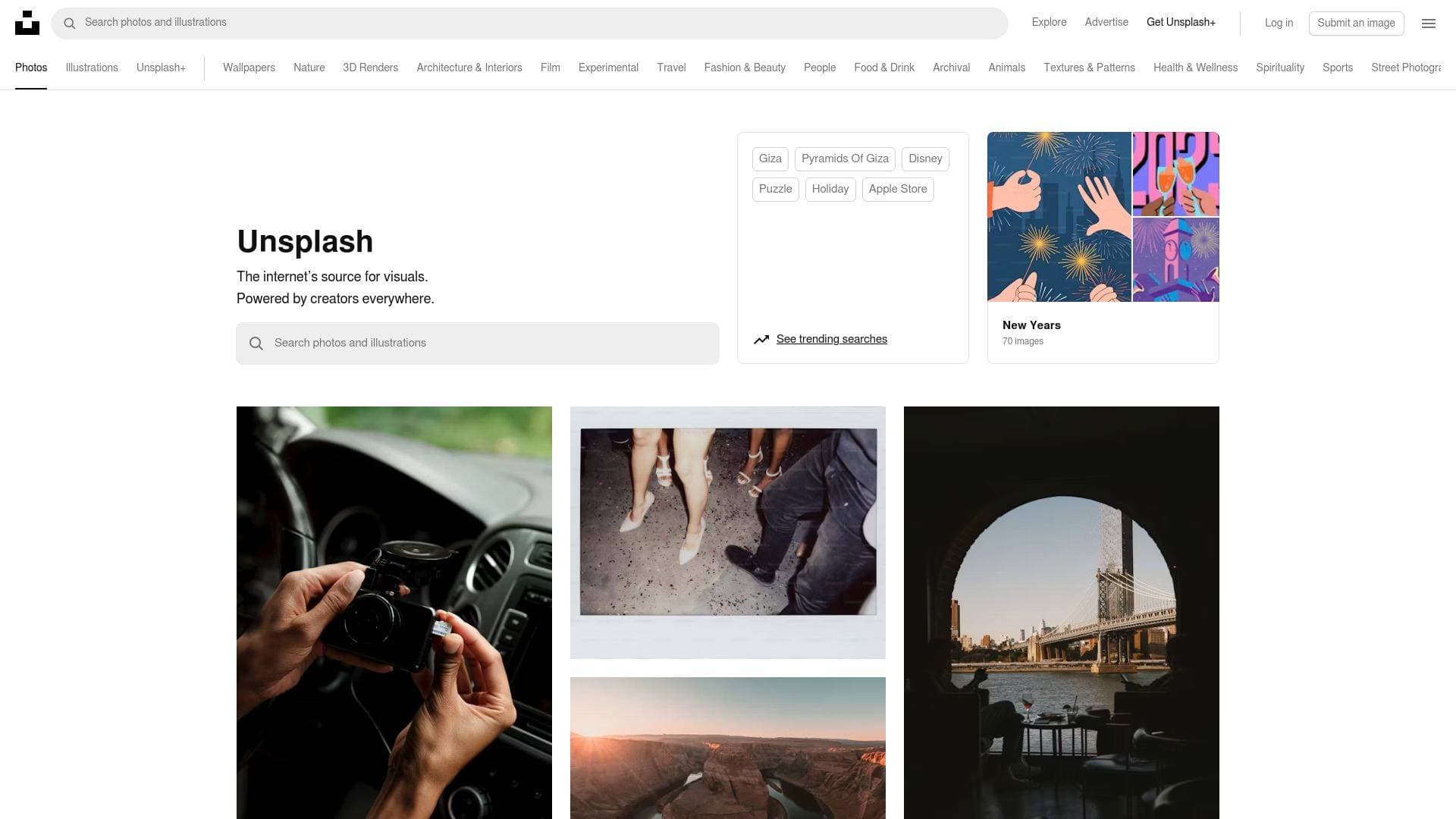
What is Unsplash? A Content Creator's Guide
Finding high-quality visuals without breaking the bank is one of the most persistent challenges in any content creation workflow. Unsplash solves this directly by positioning itself as "the internet's source for visuals," powered by photographers and creators from around the world. It offers a massive, continuously updated library of beautiful, free images that can be downloaded and used for any project. For bloggers needing header images, YouTubers building thumbnails, newsletter writers looking for eye-catching visuals, or social media managers sourcing content daily, Unsplash functions as an always-available visual asset library. The platform spans an enormous range of subject categories, from nature and travel to architecture, street photography, people, textures, 3D renders, and film. Photos are contributed by real photographers, many of whom are available for hire, giving creators access to both free imagery and a direct line to professional talent. Beyond the free tier, an Unsplash+ subscription unlocks premium photos and built-in editing tools including cropping, resizing, and background removal. For content creators who need polished visuals fast, Unsplash is a practical, cost-effective resource that covers everything from casual blog posts to professionally produced video thumbnails.
Unsplash Features That Matter for Content Creators
-
Free Image Downloads: Every photo on the standard Unsplash library is available to download and use for free under the Unsplash License. Content creators can grab images for blog posts, YouTube thumbnails, social media posts, newsletters, and more without paying licensing fees or worrying about royalty restrictions.
-
Unsplash+ Premium Tier: For creators who need exclusive, higher-end imagery, Unsplash+ provides access to a premium photo collection. Unsplash+ images are locked behind a subscription and are marked clearly on the platform, making it easy to identify which assets require an upgrade.
-
Built-in Editing Tools (Unsplash+): Unsplash+ subscribers get access to on-platform editing capabilities including crop, resize, and background removal. This is a meaningful time-saver for creators who want to prep images for specific formats, such as square thumbnails for YouTube or vertical crops for Instagram Stories, without leaving the platform.
-
Visual Search: Unsplash includes a visual search tool, allowing creators to find images not just by keyword but by visual similarity. This helps when you have a specific aesthetic in mind but struggle to describe it in words, making the content creation workflow faster and more intuitive.
-
Curated Categories and Collections: The platform organizes content into distinct categories including Nature, Travel, Architecture & Interior, Street Photography, People, Textures & Patterns, Wallpapers, 3D Renders, Film, and Experimental. Creators working in specific niches can browse directly within their relevant category rather than sifting through unrelated results.
-
Trending Searches: Unsplash surfaces trending search topics, which is genuinely useful for content creators trying to stay timely. Seasonal topics, current events, and popular themes appear as suggested searches, helping creators align their visual content with what audiences are actively searching for.
-
Photographer Profiles and Hire Options: Many photographers on Unsplash are marked as "Available for Hire." For creators who need custom photography for a brand campaign, sponsored content, or a high-production YouTube video, this feature provides a direct path to professional photographers whose style they've already seen and liked.
-
Keyword Tags on Individual Photos: Each photo on Unsplash comes with a rich set of keyword tags. Clicking any tag surfaces related images, making it easy to explore visual themes and find cohesive sets of images for a content series or brand aesthetic.
-
Related Images on Photo Pages: Individual photo pages display a curated grid of related images. For content creators building a consistent visual identity across a blog or social channel, this feature makes it easy to find multiple photos that share a similar mood, color palette, or subject matter.
-
iStock Integration for Extended Search: When Unsplash's free library doesn't cover a specific need, the platform surfaces sponsored premium images from iStock directly within search results, with a noted discount code (UNSPLASH20 for 20% off). This gives creators a seamless path to paid stock photography when the free options fall short, all within the same search experience.
Which Content Creators Should Use Unsplash?
Unsplash is built for creators who need reliable, high-quality visuals on a regular basis without the overhead of a paid stock photo subscription. Whether producing content daily or weekly, the platform's depth and variety make it a practical fit for a wide range of creator types and use cases.
Primary creator types:
- Bloggers and writers who need header images, in-article visuals, and featured photos for every post
- Newsletter creators sourcing eye-catching images to break up text and increase visual engagement
- YouTubers building thumbnails, channel art, or background visuals for b-roll and overlays
- Social media managers who need a constant stream of on-brand images for Instagram, Facebook, LinkedIn, and Pinterest posts
- Podcasters creating episode artwork, website visuals, or promotional graphics
- TikTok and Reels creators who use still images in slideshows, text-over-photo formats, or as background visuals
Experience level: Unsplash is beginner-friendly with no learning curve. Searching, browsing, and downloading requires no account for the free tier, making it immediately accessible to new creators.
Team size: Works equally well for solo creators managing their own content calendar and small teams where a social media manager or content strategist handles visual sourcing.
Specific use cases for content creators:
- Sourcing a travel photo for a blog post about destination guides without paying for stock imagery
- Finding a lifestyle image for a newsletter header that matches a specific seasonal theme
- Downloading a nature or architecture photo to use as a YouTube video thumbnail background
- Browsing the "People" category for authentic-looking lifestyle shots for Instagram content
- Using the background removal tool (Unsplash+) to isolate a subject for a custom graphic
- Finding a consistent set of related images for a multi-part blog series using the related photos feature
- Discovering trending search topics to align visual content with current audience interests
- Identifying and contacting a photographer directly for custom brand photography through the "Available for Hire" feature
Unsplash FAQ for Content Creators
Is Unsplash free to use? The core Unsplash library is free to download and use for any project under the Unsplash License. A paid tier called Unsplash+ exists for access to premium photos and editing tools including crop, resize, and background removal.
What categories of images does Unsplash offer? Unsplash covers a wide range of categories including Nature, Travel, Architecture & Interior, Street Photography, People, Textures & Patterns, Wallpapers, 3D Renders, Film, and Experimental. Individual search results also include thousands of niche topics like specific cities, foods, and activities.
Can I find images of specific topics like food or travel destinations? Yes. Unsplash supports detailed keyword searches and surfaces related search suggestions. For example, searching "greek food" returns over 1,600 photos, and searching "Nairobi" returns over 2,200 photos, with related tags for more specific exploration.
What editing tools are available on Unsplash? Unsplash+ subscribers can access built-in tools to crop, resize, and remove backgrounds from images directly on the platform, without needing external editing software.
Can I hire photographers I find on Unsplash? Yes. Many photographers on Unsplash display an "Available for Hire" badge on their profiles. Creators can visit a photographer's profile directly from any photo to explore their work and reach out for commissioned projects.
What is Unsplash+ and how does it differ from the free tier? Unsplash+ is a premium subscription that unlocks access to exclusive photos not available in the free library, as well as the built-in editing tools. Free-tier photos are available to all users without an account, while Unsplash+ content is locked and requires a subscription to download.
Does Unsplash integrate with other platforms? The platform integrates with iStock for extended search results, surfacing premium paid images alongside free Unsplash photos when searching for specific topics. A discount code (UNSPLASH20) is offered for iStock purchases made through Unsplash.
The Verdict: Is Unsplash Worth It for Content Creators?
For content creators who regularly need high-quality visuals, Unsplash is one of the most practical free resources available. The free library alone covers an enormous range of subjects and styles, making it genuinely useful for bloggers, newsletter writers, social media managers, and YouTubers who need images frequently and can't justify a paid stock subscription for every project. The addition of trending searches, visual search, and related image discovery makes it more than just a download library. It functions as a lightweight visual research tool that helps creators stay on-trend and maintain a consistent aesthetic.
The Unsplash+ tier adds meaningful value for creators who need premium exclusivity or want to skip external editing software for basic image prep tasks like cropping and background removal. The "Available for Hire" feature is a genuine differentiator for creators who want to build long-term relationships with photographers whose work they already admire.
The main limitation is that the free library, while vast, may not always cover highly specific or niche visual needs, which is where the iStock integration becomes relevant. Overall, Unsplash is a strong recommendation for any content creator looking to reduce visual sourcing time and cost without sacrificing image quality.
Details
One link. Every channel, rate, and piece of work brands need to evaluate you. Built for how creators actually get hired.
Claim your profile
Live creator, content, and marketing roles from real companies, with the pay, market, and context the raw job page never gives you.
Browse jobs

 Post Bridge