

Jupitrr
Jupitrr AI is an all-in-one video creation platform that helps content creators plan, record, edit, and publish videos daily without needing editing skills.
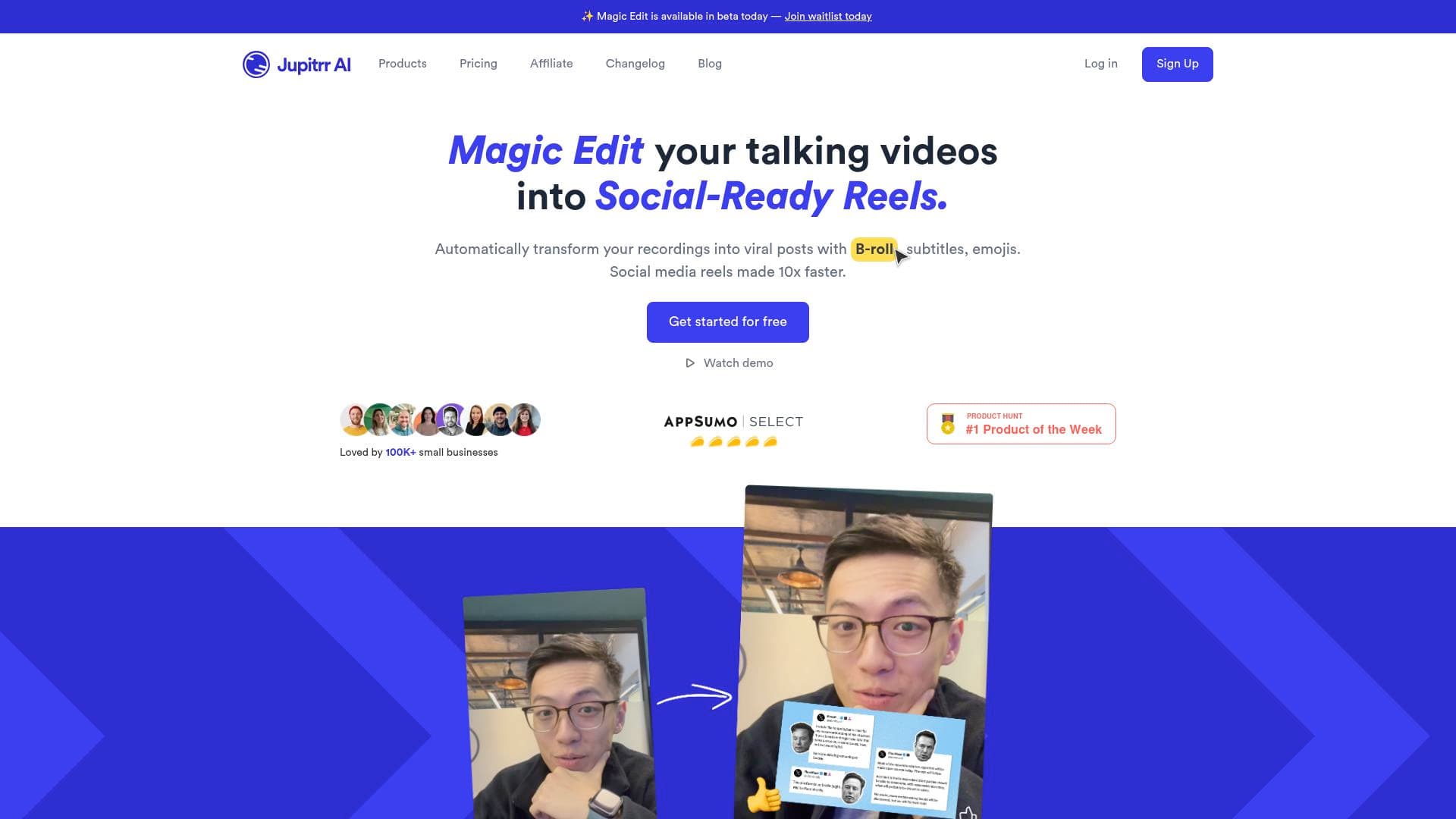
Brief Overview of Jupitrr AI for Content Creators
Jupitrr AI is a complete video creation and publishing platform built around a single goal: helping content creators go from idea to published video every single day. The core problem it solves is the fragmented video production workflow — most creators juggle separate tools for research, scripting, recording, editing, and scheduling, which burns hours before a single frame is exported. Jupitrr collapses all of that into one connected system called VideoOS, covering keyword research, content calendars, AI scriptwriting, a teleprompter, an AI video editor, and social media publishing in one place. Founded in 2020, the platform is trusted by over 200,000 users and is built specifically for creators who want professional-looking talking-head videos without needing technical editing skills. The AI video editor handles the heavy lifting — adding captions, animated hooks, stock B-roll, emojis, transitions, brand logos, and background music automatically after a single upload. For creators who want to fine-tune results, Levio, Jupitrr's built-in AI assistant, accepts plain-English chat commands to adjust captions, swap B-rolls, change styles, or refine the message. It supports publishing to YouTube, Instagram, TikTok, and LinkedIn, with full landscape, square, and portrait format support available on paid plans.
Jupitrr AI Key Features for Content Creators
-
VideoOS — Unified Video Workflow: VideoOS is the central hub that connects every stage of the video content creation workflow. Creators can discover keywords, find trending videos, plan a content calendar, write scripts, record, edit, and publish without ever leaving the platform — eliminating the need to switch between five or more separate apps.
-
Viral Video Search & Keyword Research: Jupitrr includes a built-in keyword and trending video discovery tool so creators can identify what topics are gaining traction before committing to a script. The Free plan includes 30 viral video searches per month, while Pro unlocks 100, and Team and Scale plans offer unlimited searches.
-
AI Scriptwriter: Once a topic is identified, the AI scriptwriter generates performing scripts directly inside the platform. This is available with unlimited usage on Pro, Team, and Scale plans, helping creators maintain a consistent posting schedule without spending hours writing from scratch.
-
Content Calendar: A built-in content calendar lets creators plan their video publishing schedule long-term. Rather than relying on a separate project management tool, creators can map out their entire content pipeline inside Jupitrr and schedule posts to multiple social media platforms directly.
-
Teleprompter App with AutoCut: The teleprompter feature displays scripts during recording so creators can deliver their lines confidently without memorizing content. After recording, the AutoCut feature automatically trims, stitches, and prepares the footage for editing — cutting out the manual work of cleaning up raw recordings.
-
AI Video Editor: Upload a talking-head or phone video and Jupitrr's AI editor automatically adds captions, animated hooks, stock B-roll footage, emojis, transitions, brand logos, and background music in one click. The editor supports video dimensions of 9:16 and 16:9 (vertical and horizontal), handles files up to 3GB on paid plans, and exports at studio quality. The Free plan is limited to 2-minute videos and 50MB file sizes with social media quality compression.
-
Levio AI Editing Agent: Levio is Jupitrr's conversational AI assistant built directly into the editor. Creators can type plain-English instructions — like "swap the B-roll in the second section" or "change the caption style" — and Levio makes the adjustments without requiring manual timeline editing.
-
Audio to Video Conversion: Creators can transform audio recordings into fully produced videos, making it straightforward to repurpose podcast episodes, voice memos, or audio interviews into social-ready visual content.
-
Captions in 23+ Languages: Jupitrr generates subtitles automatically and supports over 23 languages, which significantly expands a creator's potential reach across international audiences. Transcription is powered by Deepgram for improved accuracy.
-
Social Media Scheduling & Analytics: Paid plans include the ability to schedule and publish directly to social platforms, with video analytics available to track performance. The Team plan adds multi-social media scheduling and a Custom Brand Kit, while Scale adds multiple workspaces and priority support.
-
iStock B-Roll Library: Pro, Team, and Scale subscribers get access to unlimited iStock B-roll footage directly inside the video editor, replacing the need for a separate stock footage subscription. The Free plan uses Pexels footage.
Jupitrr AI Target Users & Use Cases for Content Creators
Jupitrr AI is designed for creators who want to post video content consistently but don't have the time or technical skills to manage a complex editing workflow. It's particularly well-suited for solo creators and small teams who need to produce high volumes of polished content without hiring an agency or editor. The platform scales from individual creators on the Free or Pro plan all the way to teams of 10+ on the Scale plan.
-
Primary creator types: Social content creators, coaches and consultants building thought-leadership content, online educators and course creators repurposing tutorial footage, podcasters converting audio to video, and YouTubers producing regular talking-head content.
-
Experience level: Explicitly designed for creators without editing skills — editing is done via transcript or plain-English chat rather than traditional timelines.
-
Team size: Solo creators (1 seat on Free and Pro), small content teams (5 seats on Team), and larger organizations (10+ seats on Scale).
-
Specific use cases for content creators:
- A solo YouTuber using the AI scriptwriter and teleprompter to record and publish polished talking-head videos daily
- A podcaster uploading audio files and converting them into captioned, B-roll-enhanced videos for Instagram Reels and TikTok
- A course creator repurposing tutorial recordings into short-form clips with automated captions in multiple languages
- A content creator using the viral video search tool to identify trending topics before planning their next week's content calendar
- A social media creator scheduling finished videos to YouTube, Instagram, TikTok, and LinkedIn directly from the platform
- A creator using Levio to fine-tune AI-generated edits through simple chat commands instead of manual timeline adjustments
- A small content team collaborating on video projects using the Team plan's Collaborate Mode and Custom Brand Kit
- An educator or coach building audience from zero by posting consistently with the help of the full VideoOS workflow
How to Get Started with Jupitrr AI
- Sign up for free: Create an account using Google or email — no credit card required to access the Free plan, which includes 3 video uploads, 30 viral video searches, and 3 video briefs.
- Research and plan: Use the Viral Video Search and keyword tools to find trending topics, then build out your content calendar inside the platform.
- Write your script: Use the AI Scriptwriter to generate a script, then load it into the Teleprompter App for recording.
- Record and edit: Record using the teleprompter, let AutoCut clean up the footage, then upload to the AI Video Editor for one-click polishing with captions, B-roll, hooks, and music.
- Publish: Schedule and publish directly to YouTube, Instagram, TikTok, or LinkedIn from within the platform.
Frequently Asked Questions About Jupitrr AI
What is Jupitrr AI? Jupitrr AI is an all-in-one video creation platform that covers research, scripting, recording, editing, and publishing for content creators. It's built for creators without technical editing backgrounds who want to produce professional-looking videos consistently.
What plans are available and what do they cost? Jupitrr offers four plans: Free ($0), Pro ($49/month billed annually), Team ($149/month billed annually), and Scale (starting at $379/month billed annually). A 3-day money-back guarantee with no questions asked is included on paid plans.
What video formats and dimensions does Jupitrr support? The Free plan supports only 9:16 (vertical) format. Pro, Team, and Scale plans support both 9:16 and 16:9 (landscape), covering short-form vertical content and standard horizontal video for YouTube and LinkedIn.
What is Levio? Levio is Jupitrr's built-in AI editing agent that lets creators fine-tune their videos using plain-English chat commands. Creators can ask Levio to adjust captions, swap B-rolls, change styles, or refine the video message without touching a traditional editing timeline.
What B-roll sources are available? Free plan users get access to Pexels stock footage. Pro, Team, and Scale subscribers get unlimited iStock B-roll footage directly inside the video editor.
How many languages does Jupitrr support for subtitles? Jupitrr generates subtitles in 23+ languages, powered by Deepgram transcription for improved accuracy.
Can creators publish directly to social media from Jupitrr? Yes. Social media scheduling and publishing is available on Pro and above, with multi-social media scheduling included in the Team and Scale plans. Supported platforms include YouTube, Instagram, TikTok, and LinkedIn.
Is there an affiliate program? Yes, Jupitrr offers an affiliate program for creators who want to promote the platform and earn from referrals.
Bottom Line: Should Content Creators Choose Jupitrr AI?
Jupitrr AI makes the most sense for content creators who are serious about posting video consistently but are held back by the complexity and time cost of a multi-tool workflow. The all-in-one VideoOS approach — from trend research and scripting through recording, AI editing, and social scheduling — is a genuine time-saver for solo creators and small teams alike. The no-editing-skills-required approach, powered by the one-click AI editor and Levio's chat-based fine-tuning, makes it accessible to coaches, educators, podcasters, and social creators who don't want to learn traditional video editing software.
The Free plan is genuinely useful for testing the platform, though its limits (3 uploads, 2-minute max duration, 50MB file size, no video exports) mean serious creators will need to upgrade. The Pro plan at $49/month unlocks the full editing workflow including iStock B-roll, studio-quality exports, social scheduling, and support for videos up to 20 minutes and 3GB. Teams benefit from collaboration features, a Custom Brand Kit, and multi-platform scheduling on the Team plan.
The main limitation to be aware of is that the platform is optimized specifically for talking-head and audio-based video formats — it's not a general-purpose video editor for cinematic or heavily produced content. For creators who regularly record themselves speaking to camera, run podcasts, or want to build a consistent video presence without hiring an editor, Jupitrr AI delivers a focused, well-integrated production workflow that's hard to replicate with separate tools.
Details
One link. Every channel, rate, and piece of work brands need to evaluate you. Built for how creators actually get hired.
Claim your profile
Live creator, content, and marketing roles from real companies, with the pay, market, and context the raw job page never gives you.
Browse jobs

 Post Bridge