

Type Studio
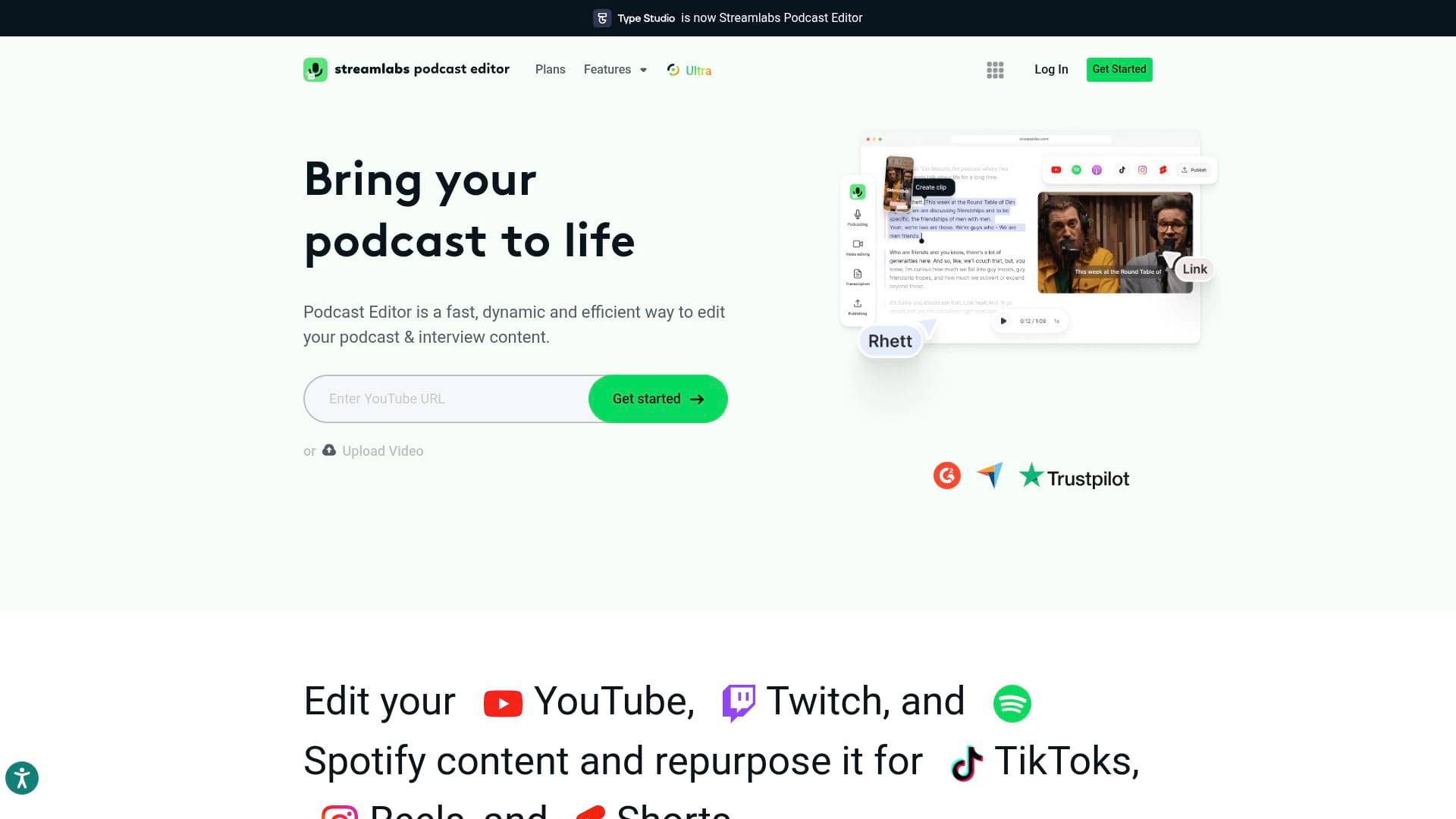
Streamlabs Podcast Editor is a text-based video editing tool that lets podcasters, streamers, and creators edit video content by editing transcribed text instead of traditional timelines.
What is Streamlabs Podcast Editor? A Content Creator's Guide
Streamlabs Podcast Editor is a text-based video editing tool built specifically for podcasters, streamers, and video creators who want a faster, more intuitive content creation workflow. Rather than scrubbing through a traditional video timeline, creators edit their footage simply by editing the AI-generated transcription of their video — delete a word from the text, and that section disappears from the video. Originally launched as Type Studio, the tool is now fully integrated into the Streamlabs ecosystem, making it a natural fit for creators already using Streamlabs for live streaming and recording. It supports editing content from YouTube, Twitch, and Spotify, and helps repurpose that long-form content into TikToks, Instagram Reels, and YouTube Shorts. No prior editing experience is required, which makes it genuinely accessible to creators at every stage. The platform is designed as an all-in-one workstation for podcasters and Just Chatting streamers who want to get content out to their audience without wrestling with complex software.
Streamlabs Podcast Editor Features That Matter for Content Creators
-
Text-Based Video Editing: The core innovation here is that creators edit video by editing transcribed text. AI transcribes the entire video, and any word or phrase deleted from the transcript is automatically removed from the video. This approach eliminates the need to learn complex timeline-based editing tools entirely.
-
AI Transcription: Podcast Editor uses AI to fully transcribe uploaded video content. Creators can then remove filler words, awkward pauses, and unwanted sections just by editing the text document — a massive time-saver for long-form podcast and interview recordings.
-
AI Highlight Clip Extraction: The tool can automatically identify and extract highlight clips from longer recordings. For creators who produce hours of content and need punchy social clips, this feature cuts down the manual review process significantly.
-
Automatic Subtitle Generation: Subtitles are added to videos with a single click — no SRT file wrangling required. Research cited by the platform shows that adding subtitles to videos can boost view time by 12%, and since most people watch videos without sound, this feature directly supports audience engagement and reach.
-
Subtitle Customization: After auto-generation, creators can manually correct any words the transcription got wrong and make custom adjustments. This gives creators full control over the final caption output without starting from scratch.
-
Video Translation: Podcast Editor supports translation into 30+ languages (available with the Pro tier). This opens up content to international audiences without requiring a separate localization workflow.
-
Content Repurposing for Social Platforms: Long-form content from YouTube, Twitch, and Spotify can be converted into short-form clips optimized for TikTok, Instagram Reels, and YouTube Shorts. The platform handles resizing and formatting so creators don't have to manually adjust aspect ratios for each platform.
-
Branding and Visual Customization: Creators can add their logo, images, emojis, shapes, and other visual elements to their videos. A library of stock images is available, and creators can also upload their own assets to maintain consistent branding across episodes.
-
Video Templates: Pre-built video templates are available to speed up the production process and maintain a consistent visual style across content without building layouts from scratch each time.
-
Video-to-Article Conversion: Podcast Editor includes a feature that converts video content into written articles. For creators who also run blogs or newsletters, this means a single recording can fuel multiple content formats simultaneously.
-
Seamless Integration with Talk Studio: Podcast Editor connects directly with Streamlabs Talk Studio, the browser-based recording tool. Creators can record with guests in Talk Studio and then edit those recordings directly in Podcast Editor, creating a complete record-to-publish pipeline without switching between unrelated tools.
Which Content Creators Should Use Streamlabs Podcast Editor?
Streamlabs Podcast Editor is built for creators who produce spoken-word video content and want to spend less time in post-production. It's particularly well-suited to creators who feel intimidated by traditional video editing software or who simply want a faster path from raw recording to published content. Both solo creators and small teams will find value here.
- Primary creator types: Podcasters, interview-format YouTubers, Just Chatting Twitch streamers, Spotify video podcasters, vloggers, and any creator producing long-form spoken content
- Experience level: Explicitly designed for creators with no editing experience, though experienced editors will also benefit from the speed of text-based editing
- Team size: Works for solo creators and small teams alike
- Specific use cases:
- A podcaster who records weekly interviews and needs to trim filler words and dead air quickly
- A Twitch Just Chatting streamer who wants to repurpose stream VODs into short TikTok clips
- A YouTube creator who needs auto-generated subtitles to improve accessibility and SEO
- A creator expanding to international audiences who needs video translation into 30+ languages
- A blogger or newsletter writer who wants to convert podcast episodes into written articles
- A creator building a consistent brand who needs to add logos and custom visuals to every episode
- A podcaster recording with remote guests via Talk Studio who wants a single workflow from recording to editing
- A short-form content creator who needs long YouTube or Spotify episodes reformatted for Instagram Reels and YouTube Shorts
Getting Started with Streamlabs Podcast Editor
- Sign up for free: Podcast Editor is available on a free plan with no account required to upload a video and start editing. The free tier supports up to 1 hour of upload with a watermark on export.
- Upload or record your video: Upload an existing video file directly, or record fresh content using Streamlabs Talk Studio and bring it into Podcast Editor.
- Let AI transcribe your content: The AI automatically transcribes the full video, generating an editable text document that mirrors the spoken content.
- Edit by editing text: Delete words, phrases, or entire sections from the transcript to cut those moments from the video. Remove filler words and pauses with ease.
- Add subtitles, branding, and visuals: Use the one-click subtitle generator, add your logo or images from the asset library, and customize the visual style of your clips.
- Export and share: Resize and optimize clips for TikTok, Reels, Shorts, or other platforms, then export and distribute across your social channels.
Streamlabs Podcast Editor FAQ for Content Creators
Is Streamlabs Podcast Editor free to use? Yes, there is a free plan available. The free tier supports up to 1 hour of video upload but includes a watermark on exported content. Upgrading to Streamlabs Ultra (Pro tier) removes the watermark, increases upload capacity to 40 hours, and provides 250GB of storage.
How much does the Pro version cost? Streamlabs Ultra, which includes Podcast Editor Pro along with the full suite of Streamlabs tools, is priced at $27/month or $189/year (saving $135 compared to monthly billing). The Ultra plan is described as a $53 value bundled into one affordable price.
What platforms can I repurpose content for? Podcast Editor supports repurposing content originally from YouTube, Twitch, and Spotify into formats optimized for TikTok, Instagram Reels, and YouTube Shorts.
Does it support video translation? Yes. The Pro version includes translation into 30+ languages, making it useful for creators targeting international or multilingual audiences.
Do I need to download any software? No. Podcast Editor runs in the browser, and subtitles can be added automatically without downloading any additional software.
Can I add my own branding to videos? Yes. Creators can upload their logo, custom images, and other visual elements. A stock image library with emojis and shapes is also available for visual customization.
How does the subtitle boost engagement? Research cited by the platform indicates that adding subtitles to videos can boost view time by 12%. Subtitles also improve SEO discoverability and make content accessible to viewers who watch without sound.
The Verdict: Is Streamlabs Podcast Editor Worth It for Content Creators?
Streamlabs Podcast Editor is a genuinely useful video editing tool for creators who produce podcast-style or interview-format content and want to cut post-production time dramatically. The text-based editing approach is the standout feature — it removes the technical barrier of traditional timeline editing entirely, making it accessible to beginners while still being fast enough for experienced creators. The automatic subtitle generation, AI highlight extraction, and multi-platform repurposing tools make it a strong all-in-one option for creators who need to distribute content across YouTube, TikTok, Instagram, and Spotify.
The free plan is a reasonable starting point, but the watermark and 1-hour upload cap will push serious creators toward the Pro tier. The best value comes through Streamlabs Ultra, which bundles Podcast Editor Pro with the full Streamlabs tool suite for $27/month. Creators already in the Streamlabs ecosystem — using Desktop, Talk Studio, or Cross Clip — will find the most value here, since everything connects into a single creator workflow. For podcasters, Just Chatting streamers, and any creator drowning in long-form video that needs to become short-form social content, Streamlabs Podcast Editor is a practical, low-friction solution.
Details
One link. Every channel, rate, and piece of work brands need to evaluate you. Built for how creators actually get hired.
Claim your profile
Live creator, content, and marketing roles from real companies, with the pay, market, and context the raw job page never gives you.
Browse jobs Post Bridge
