

TubeBuddy
TubeBuddy is a YouTube SEO and channel growth platform offering keyword research, thumbnail tools, bulk processing, and analytics to help creators grow faster.
Brief Overview of TubeBuddy for Content Creators
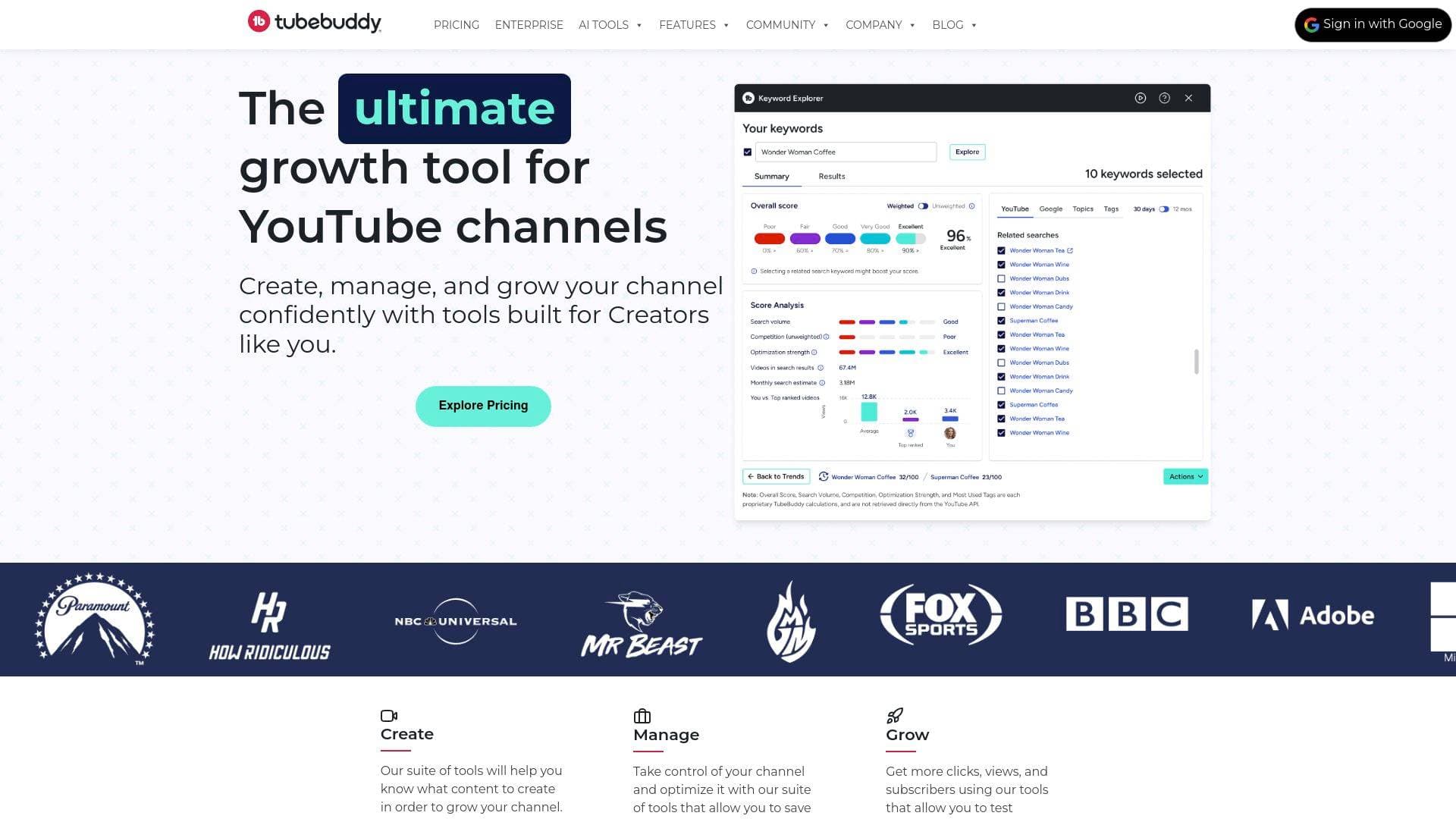
TubeBuddy is a YouTube SEO and channel growth tool built specifically by YouTube creators, for YouTube creators. It tackles one of the biggest challenges YouTubers face: getting discovered in a crowded platform while managing the time-consuming backend work that comes with running a channel. Rather than leaving creators to guess what works, TubeBuddy provides data-driven insights across every stage of the content creation workflow — from ideation and keyword research all the way through to post-publish analytics and community management. The platform operates as a browser extension that integrates directly into YouTube Studio, making it accessible without switching between separate apps or dashboards. Trusted by over 10 million creators, it has attracted users ranging from brand-new channels to major media organizations like BBC, NBC Universal, and Paramount. Whether a creator is uploading their first video or managing a catalog of hundreds, TubeBuddy offers tools scaled to match that level of growth. The core value proposition is straightforward: spend less time on repetitive channel management tasks and more time actually making videos.
TubeBuddy Key Features for Content Creators
-
Keyword Explorer and SEO Studio: TubeBuddy's keyword research tools help creators discover what their audience is actively searching for before they hit record. The Keyword Explorer, Search Explorer, and Search Insights tools work together to surface high-opportunity topics, while the SEO Studio helps optimize titles, descriptions, and tags to maximize YouTube algorithm visibility. Tag Rankings and Search Positions let creators track how their videos are performing in search over time.
-
Thumbnail Analyzer and Thumbnail Generator: Thumbnails are one of the most critical click-through factors on YouTube, and TubeBuddy addresses this with dedicated tools for creating and analyzing them. The Thumbnail Generator lets creators build professional-looking thumbnails using frames directly from their video, while the Thumbnail Analyzer provides data on which thumbnail designs are most likely to win clicks. This keeps the entire thumbnail workflow in one place.
-
A/B Testing for Titles and Thumbnails: Available on the Legend and Enterprise plans, Video A/B Testing lets creators test different titles and thumbnails against each other to see which version drives better performance. This removes the guesswork from optimization and gives creators real data on what their specific audience responds to.
-
Bulk Processing Tools: As a channel's video catalog grows, updating metadata across dozens or hundreds of videos becomes a massive time sink. TubeBuddy's bulk tools — including Bulk Find, Replace & Append, Bulk End Screen Editor, Bulk Cards Editor, and Bulk Thumbnail Overlays — let creators make sweeping changes across their entire catalog in minutes rather than hours.
-
Bulk Delete Comments: Spam and negative comments can derail community engagement and damage a channel's atmosphere. The Bulk Delete Comments tool lets creators remove large batches of unwanted comments directly from YouTube Studio in just a few clicks, with the option to remove all comments from a specific user or selectively delete individual ones.
-
Suggested Shorts (AI-Powered): TubeBuddy's AI analyzes existing long-form videos to identify the most engaging moments, then suggests which clips would work best as YouTube Shorts. This helps creators repurpose content without having to manually scrub through footage, and it's available across all plans.
-
Click Magnet: This advanced analytics feature, available on Legend and Enterprise plans, shows creators exactly which videos are generating the highest click-through rates and what's driving those results. Understanding CTR patterns helps creators replicate what's working and avoid what isn't.
-
Retention Analyzer: The Retention Analyzer gives creators a clear picture of where viewers are dropping off in their videos. Identifying these patterns helps creators improve their content structure, pacing, and hooks over time — directly impacting watch time and algorithmic performance.
-
Content Strategy Tools: TubeBuddy includes a suite of strategy-focused features including Best Time to Publish, Video Topic Planner, Topical Analysis, Niche Leaderboard, Channelytics, and Competitor Upload Alerts. Together, these tools help creators understand their niche landscape, plan content calendars, and stay ahead of what's trending in their space.
-
Productivity and Workflow Tools: Features like Default Upload Profiles, Canned Responses, Scheduled Publish, Scheduled Video Update, Quick-Edit Toolbar, Chapter Editor, and Channel Backup reduce the repetitive administrative work that eats into a creator's production time. Canned Responses alone can save significant time for creators who reply to high comment volumes regularly.
TubeBuddy Target Users & Use Cases for Content Creators
TubeBuddy is designed to serve YouTube creators at every point in their journey, from the very first upload to running a fully monetized channel with a team. The tool scales with the creator, offering entry-level SEO and optimization features for beginners and progressively more advanced analytics, bulk tools, and AI-powered features for established channels. Solo creators and multi-person channel teams alike can benefit, with the Enterprise plan specifically designed for brands and creators managing three or more channels with multiple channel managers.
- Primary creator types: YouTubers at any subscriber level, from sub-5k channels just getting started to channels with 250k+ subscribers looking to scale
- Experience level: Beginners benefit from SEO basics and thumbnail tools; intermediate and advanced creators leverage A/B testing, deep analytics, and bulk processing
- Team size: Solo creators using productivity tools to save time, as well as teams with multiple channel managers using Enterprise features for collaboration
- Specific use cases:
- A new YouTuber using Keyword Explorer to find low-competition topics before filming their first videos
- A mid-size creator running A/B tests on thumbnails to improve click-through rates across their most-watched videos
- An established creator using Bulk Find, Replace & Append to update outdated links or branding across hundreds of old videos
- A creator using Suggested Shorts to repurpose long-form content into YouTube Shorts without extra filming
- A channel manager using Bulk Delete Comments to quickly clean up spam after a video goes viral
- A creator using Retention Analyzer to identify where viewers are tuning out and restructuring future videos accordingly
- A growing channel using Best Time to Publish data to schedule uploads for maximum early engagement
- A brand or media company managing multiple YouTube channels using the Enterprise plan with dedicated support and automated channel reviews
How to Get Started with TubeBuddy
- Sign up for TubeBuddy by choosing a plan (Pro at $12/month, Legend at $26.39/month, or Enterprise with custom pricing) or starting with the free tier to explore basic features.
- Install the browser extension — TubeBuddy runs as a browser extension that integrates directly into YouTube Studio once installed.
- Authorize channel access by connecting TubeBuddy to your YouTube channel through the guided authorization process during sign-up.
- Start with SEO and keyword tools to research your next video topic using Keyword Explorer and Search Insights before filming.
- Explore the analytics dashboard to review your channel's current performance, identify content gaps, and set up tracking for search rankings and retention data.
Frequently Asked Questions About TubeBuddy
What exactly does TubeBuddy do for a YouTube channel? TubeBuddy is a YouTube workflow optimization platform that covers SEO, keyword research, thumbnail creation and analysis, bulk editing, analytics, and community management. It integrates directly into YouTube Studio via a browser extension, so creators don't need to leave their normal workflow to access its tools.
Is TubeBuddy suitable for brand-new creators? Absolutely. TubeBuddy is built to support creators at every stage, and new YouTubers specifically benefit from the SEO tools, keyword research features, and thumbnail optimization tools that help early-stage channels grow faster. The data supports this — TubeBuddy has published research showing that new creators who use the platform see measurably faster growth.
How does TubeBuddy install on a YouTube channel? Creators sign up for TubeBuddy, install the browser extension, and then authorize TubeBuddy to access their YouTube channel. Once authorized, TubeBuddy tools appear directly inside YouTube Studio. The process is guided during sign-up.
What plans does TubeBuddy offer and what do they cost? TubeBuddy offers three main tiers: Pro at $12/month, Legend at $26.39/month, and Enterprise at custom pricing. Annual billing saves 20% compared to monthly. Pro covers basic video, thumbnail, and SEO tools. Legend adds content strategy tools, advanced analytics, full SEO access, bulk processing, A/B testing, and more. Enterprise is designed for brands and teams managing three or more channels and includes 1:1 training, dedicated expert support, automated channel reviews, and advanced AI analytics.
Can TubeBuddy help with comment moderation? Yes. The Bulk Delete Comments tool lets creators remove large batches of spam or negative comments directly from YouTube Studio. Creators can delete all comments from a specific user or selectively remove individual comments. Note that deleted comments cannot be recovered, so reviewing selections before confirming is important.
Does TubeBuddy work for channels with large existing video catalogs? Established creators with large catalogs get significant value from TubeBuddy's bulk processing tools. Features like Bulk Find, Replace & Append, Bulk End Screen Editor, Bulk Cards Editor, and Bulk Thumbnail Overlays allow creators to update metadata and visual elements across their entire catalog without manually editing each video.
Is there a contract or commitment required? TubeBuddy operates with no contracts and allows cancellation at any time.
Bottom Line: Should Content Creators Choose TubeBuddy?
TubeBuddy is a strong choice for any creator who is serious about growing on YouTube and wants a data-backed approach to doing it. The platform's depth is its biggest advantage — it covers the full creator workflow from pre-production keyword research through post-publish analytics and community management, all within YouTube Studio itself. New creators will find the SEO and thumbnail tools genuinely useful for building momentum early, while established channels will get the most value from A/B testing, bulk processing, and advanced analytics features on the Legend plan. The Pro plan at $12/month is a reasonable entry point for creators who want smarter keyword and optimization tools without the full feature set. For creators managing multiple channels or working with a team, the Enterprise plan adds dedicated support and AI analytics that justify the custom pricing. The one clear limitation is platform scope — TubeBuddy is built exclusively for YouTube, so creators focused on TikTok, Instagram, or other platforms won't find cross-platform tools here. For YouTube-focused creators at any level, though, TubeBuddy delivers a comprehensive growth toolkit backed by a user base of over 10 million creators.
Details
One link. Every channel, rate, and piece of work brands need to evaluate you. Built for how creators actually get hired.
Claim your profile
Live creator, content, and marketing roles from real companies, with the pay, market, and context the raw job page never gives you.
Browse jobs

 Post Bridge