

Strut
Strut is a collaborative writing workspace that combines notes, docs, and projects with AI-powered tools to help content creators write, organize, and finish their work.
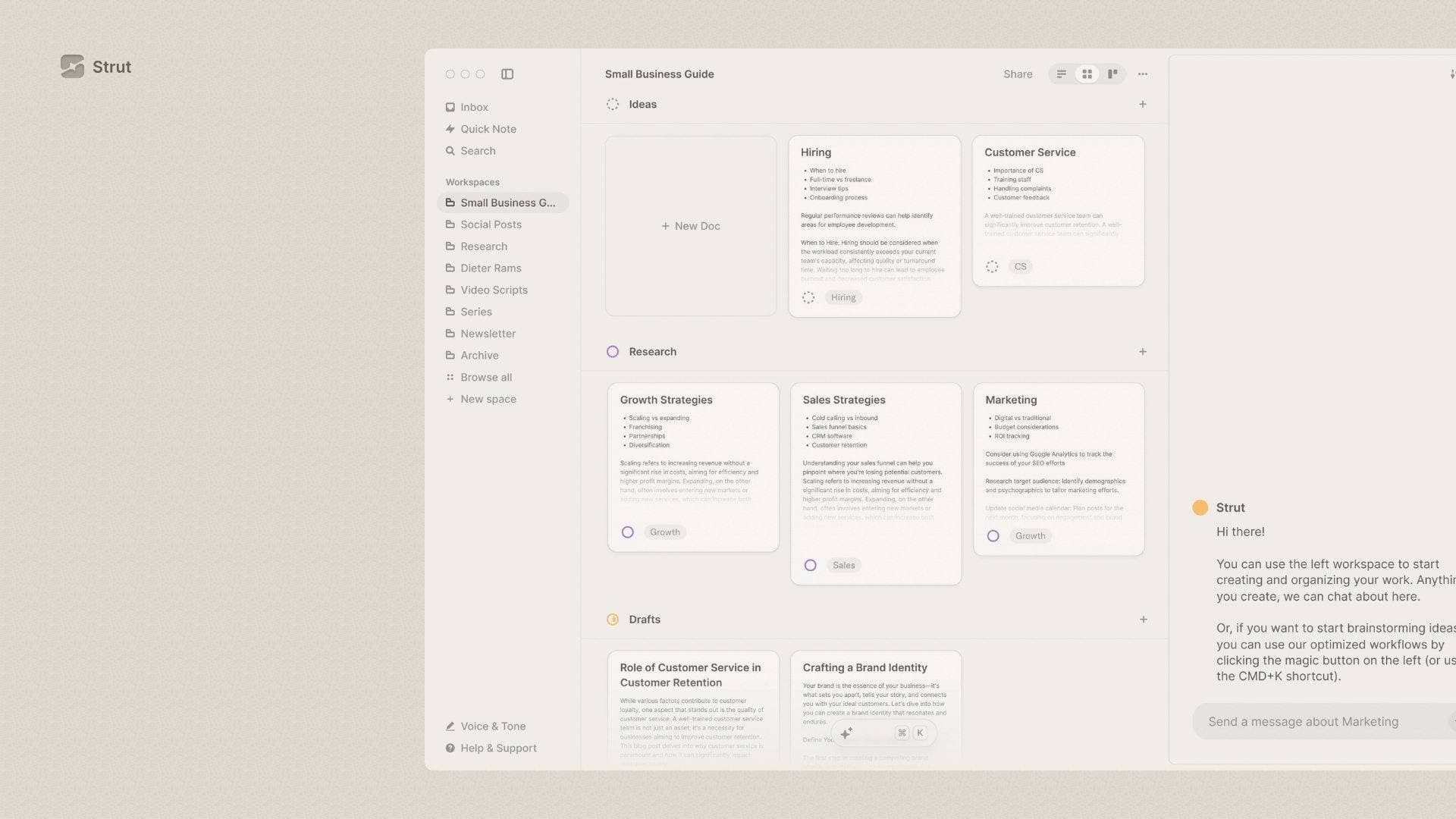
Brief Overview of Strut for Content Creators
Strut is a complete writing workspace that brings notes, docs, and writing projects together into one focused, AI-supported environment. For content creators who constantly juggle ideas across scattered apps, sticky notes, and disconnected documents, it solves the core problem of fragmentation by centralizing the entire content creation workflow. Rather than automating writing away, Strut positions its AI as a collaborator designed to support the creative process, not replace it. The platform supports both solo creators and collaborative teams through real-time co-writing features. Available on web and as a desktop app for Mac and Windows, it stays accessible wherever creators work. What sets Strut apart is its combination of project management, deep focus writing modes, and an AI layer powered by GPT-4o, all inside a minimal but fully functional editor. Creators working on anything from short-form social content to long-form articles or even novels can customize workspaces to match their specific workflow.
Strut Key Features for Content Creators
-
Project Workspaces: Strut organizes writing projects into dedicated workspaces that can be viewed as lists, grids, or kanban boards. Creators can customize each workspace into stages that match their personal writing process, whether that's drafting, editing, or publishing.
-
Writing Inbox: A dedicated inbox captures raw notes and ideas before they're ready to become full projects. Everything captured is automatically organized in a daily timeline, so creators never lose a fleeting idea again.
-
Deep Focus Mode: Strut includes a typewriter-inspired focus mode that strips away distractions and creates a clean writing environment. Switching between project organization and deep writing happens instantly, keeping momentum intact.
-
AI Document and Project Chat: Creators can chat directly with AI about the specific document or project they're working on. It functions like having a writing collaborator available around the clock for brainstorming, feedback, or research support.
-
AI Workflows: Pre-built AI workflows handle common content creation tasks like brainstorming ideas, generating outlines, and creating drafts. There's no need to learn complex prompting techniques since these workflows are built directly into the platform.
-
Brand Voice (Beta): This feature lets creators teach the AI to write in their specific voice and tone. Creators can write their own voice guide or have Strut generate one automatically by analyzing an existing website or blog post, making AI-generated content feel genuinely personal.
-
Inline AI Editing: Beyond drafting, Strut's AI handles grammar corrections and style enhancements directly within the document. This polishes writing at the sentence level without requiring creators to leave their workspace.
-
Document Mentions: Creators can @mention other documents inside the AI chat to pull multiple pieces of content into a single conversation. This is particularly useful when working on content series or projects with interconnected pieces.
-
Real-Time Collaboration: Strut supports collaborative writing by allowing others to join and edit documents simultaneously. This makes it practical for creator teams, co-writers, or editors working together on shared content.
-
Drag and Drop Organization: Documents can be moved between workspaces and the inbox simply by dragging and dropping. Combined with keyboard shortcuts for navigation, the workflow stays fast and uninterrupted.
Strut Target Users & Use Cases for Content Creators
Strut is built for writers at heart, making it a natural fit for content creators whose primary output is text-based. Whether working solo or as part of a small creative team, the combination of project management and writing tools covers the full content lifecycle from idea to finished piece.
- Primary creator types: Bloggers, newsletter writers, YouTubers scripting video content, podcasters drafting show notes and episode outlines, and long-form content creators working on books or serialized writing projects.
- Experience level: The pre-built AI workflows and minimal interface make it approachable for newer creators, while the customizable workspaces and brand voice tools offer depth for experienced writers who need more control.
- Team size: Works for solo creators who want an all-in-one writing hub, as well as small creator teams that collaborate on content in real time.
- Specific use cases:
- A newsletter writer capturing daily ideas in the inbox and turning them into polished editions using AI editing tools
- A YouTuber organizing video scripts across multiple projects using kanban boards and tracking each script from idea to final draft
- A blogger using Brand Voice to ensure AI-assisted content matches their established writing style
- A podcaster brainstorming episode topics and generating outlines with built-in AI workflows
- A content team co-writing articles in real time using collaborative workspaces
- A fiction writer or serialized content creator customizing workspace stages for characters, locations, drafts, and final chapters
- A creator using deep focus mode to power through writing sessions without distraction
- A solo creator using the desktop app to keep Strut always accessible for quick idea capture throughout the day
How to Get Started with Strut
- Sign up and download: Access Strut through the web app or download the desktop app for Mac or Windows to keep it always available on your device.
- Set up your first workspace: Create a project workspace and choose between list, grid, or kanban board views depending on how you prefer to organize your content pipeline.
- Capture ideas in the inbox: Start dropping raw notes and ideas into the writing inbox without worrying about organization. Strut automatically arranges them in a daily timeline.
- Configure your Brand Voice: Write a voice and tone guide or let Strut analyze an existing blog post or website to generate one, so AI suggestions match your personal style from the start.
- Start writing with AI support: Open a document, activate deep focus mode, and use AI workflows or document chat to brainstorm, outline, and draft your content.
Frequently Asked Questions About Strut
Does Strut use creator data to train its AI? Strut does not use any user data to train its AI models. The platform takes the position that creator data belongs solely to the creator.
What AI model powers Strut? Strut runs on GPT-4o, OpenAI's latest model, which powers the document chat, AI workflows, inline editing, and brand voice features.
Is Strut available on desktop? Yes, Strut offers a dedicated desktop app for both Mac and Windows. The desktop app keeps Strut always accessible without needing a browser tab open.
Can multiple creators collaborate inside Strut? Real-time collaboration is supported, allowing multiple people to write and edit documents together simultaneously. This applies across all plans that include the collaboration feature.
What formats does Strut support for exporting content? Strut supports exporting content in Markdown format, making it easy to move finished writing into other publishing platforms or content management systems.
What is the Writing Inbox? The Writing Inbox is an open capture space where creators can drop ideas and notes before they're ready to become formal projects. Content in the inbox is automatically organized by a daily timeline.
Bottom Line: Should Content Creators Choose Strut?
Strut is a strong fit for text-focused content creators who want a single workspace that handles everything from raw idea capture to polished final drafts. Bloggers, newsletter writers, and script writers in particular will benefit from the combination of project organization, deep focus writing, and an AI collaborator that can be trained to match their voice. The Brand Voice feature stands out as especially valuable for creators who have spent years developing a distinct writing style and don't want AI assistance to dilute it. Real-time collaboration makes it viable for small creator teams as well. One consideration is that pricing was transitioning from free to paid plans as of mid-2024, so creators should check current plan details before committing. For any creator whose workflow lives and dies by the written word, Strut offers a focused, well-designed environment worth exploring.
Details
One link. Every channel, rate, and piece of work brands need to evaluate you. Built for how creators actually get hired.
Claim your profile
Live creator, content, and marketing roles from real companies, with the pay, market, and context the raw job page never gives you.
Browse jobs

 Post Bridge