

Social Intents
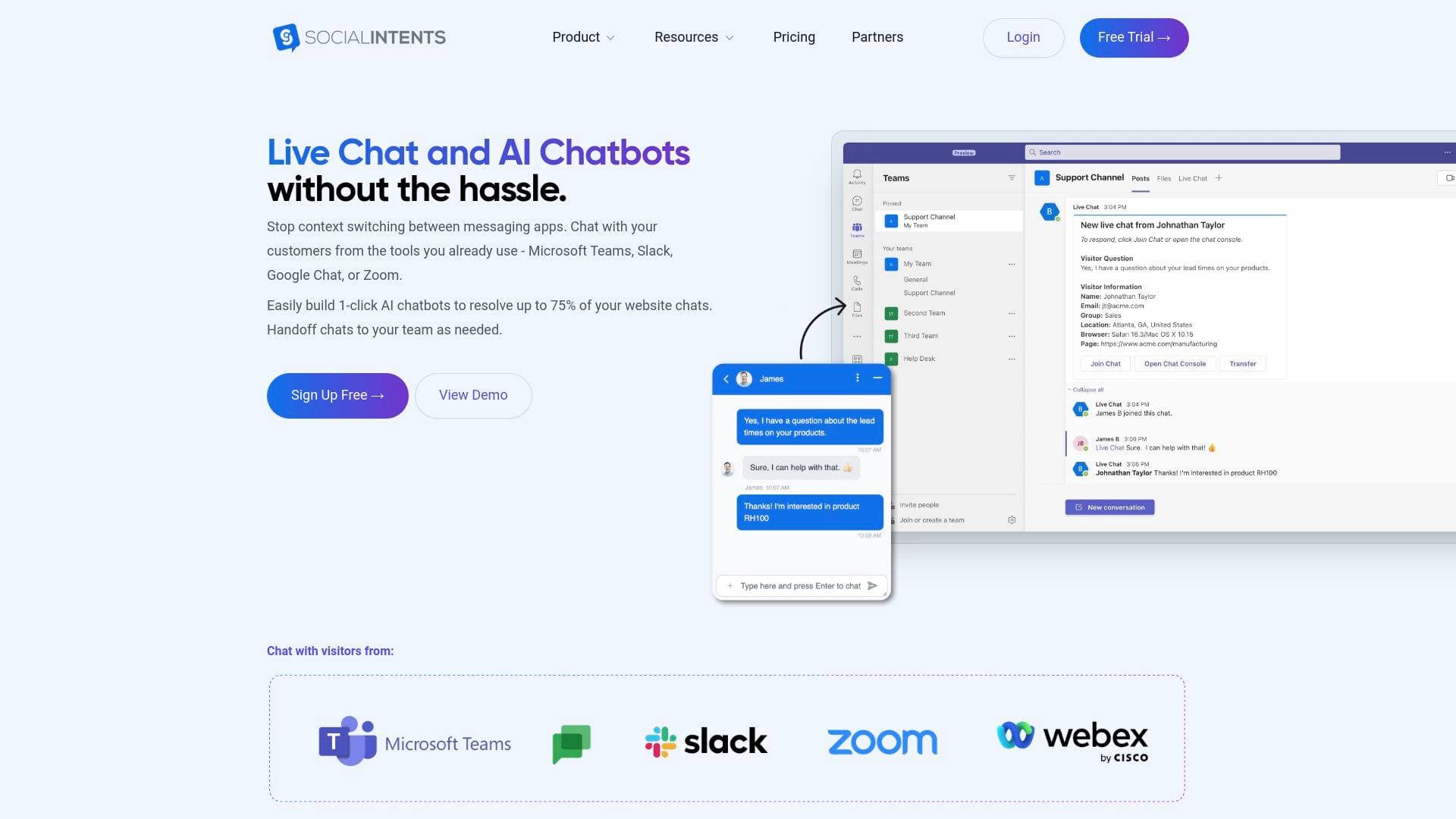
Social Intents is a live chat and AI chatbot platform that lets content creators and businesses handle customer conversations directly from Microsoft Teams, Slack, or Google Chat.
Brief Overview of Social Intents for Content Creators
Social Intents is a live chat and AI chatbot platform built for teams that want to handle audience and customer conversations without switching between a dozen different tools. The core idea is straightforward: instead of learning new support software, creators and their teams respond to messages directly from Microsoft Teams, Slack, or Google Chat. For content creators managing a growing audience, a merch store, a membership community, or brand partnership inquiries, this kind of centralized communication tool can cut down on the chaos of juggling multiple inboxes. The AI chatbot component handles up to 75% of incoming questions automatically, powered by ChatGPT, Claude, or Gemini, trained on your own content. Social Intents supports conversations across website live chat, WhatsApp, Facebook Messenger, and SMS, all funneled into one unified inbox. With over 50,000 teams worldwide and a 4.8/5 rating on both G2 and Capterra, it has a strong track record. The platform is designed to be operational in under five minutes, with no coding required and no new software to learn for the team responding to messages.
Social Intents Key Features for Content Creators
-
AI Chatbot Powered by ChatGPT, Claude, or Gemini: Creators can build an AI chatbot trained on their website content, PDFs, FAQs, and help docs in minutes. The AI automatically answers common questions 24/7, which is especially useful for creators who get repetitive questions about pricing, products, or content schedules. Supported models include GPT-5.2, GPT-5.2-mini, Claude, Claude Haiku, Gemini 3, and Gemini Flash, and creators can switch between them at any time using their own API key.
-
Microsoft Teams, Slack, and Google Chat Integration: Every incoming chat, whether from a website widget, WhatsApp, or SMS, routes directly into the messaging platform the team already uses. For creators who run small teams or work with editors, managers, or community moderators, this means no new tools to train anyone on. Teams can @mention teammates, use threads, and route conversations to different departments or channels.
-
WhatsApp Business Support: Social Intents connects to WhatsApp through the official API, giving creators a channel to reach audiences on the world's most widely used messaging app. The platform supports a shared team inbox so multiple team members can respond to the same WhatsApp number without conflicts. A Coexistence Mode even allows the creator to keep using their personal WhatsApp Business app on their phone while the team handles conversations through Social Intents.
-
AI Actions for Automated Workflows: Beyond answering questions, the AI chatbot can trigger real business actions mid-conversation. These include booking meetings via Calendly or Cal.com, pushing leads to Salesforce or HubSpot, looking up order statuses, and creating support tickets. For creators selling products or courses, this means the chatbot can handle order inquiries and lead capture without any human intervention.
-
Smart Human Handoff with Full Context: When a conversation exceeds what the AI can handle, it escalates to a human agent automatically. The agent receives the full conversation history, so the audience member never has to repeat themselves. Escalation can be triggered by specific phrases typed by the visitor, by quick reply buttons, or proactively by the chatbot itself when it detects frustration or complexity.
-
Multi-Channel Unified Inbox: Social Intents consolidates website live chat, WhatsApp, Facebook Messenger, and SMS into one dashboard. Creators managing multiple audience touchpoints can monitor all conversations, track response times, and review AI resolution rates from a single interface. Real-time visitor monitoring is included on the Business plan.
-
80+ Language Support: The platform auto-detects and responds in the visitor's language, making it practical for creators with international audiences. Gemini is noted as particularly strong for multilingual use cases, though all three AI models support this capability.
-
Lead Capture Forms and CRM Integration: Pre-chat forms collect email addresses, phone numbers, and preferences before a conversation starts. This data syncs automatically to connected CRMs including Salesforce, HubSpot, and Dynamics 365. For creators building email lists or managing brand deal pipelines, this turns every chat into a potential lead capture opportunity.
-
Proactive Chat and Targeting Rules: The platform can automatically reach out to website visitors based on behavior rules, such as time spent on a page or specific URLs visited. Different chatbots can be shown on different pages, which lets creators deploy a merch-focused bot on their store page and a community-focused bot on their membership page.
-
White-Label Agency Plans: For creators who also manage content or digital services for clients, Social Intents offers agency plans supporting up to 100+ client accounts per plan with custom branding and unlimited agents per client. This is a practical option for creator-entrepreneurs running social media management or community management services.
-
Reports and Analytics: The dashboard tracks response times, resolution rates, AI performance metrics, and customer satisfaction. Data can be exported to external systems, and Zapier integration allows creators to send chat transcripts and leads to virtually any third-party tool.
Social Intents Target Users & Use Cases for Creators
Social Intents fits content creators who have moved beyond just making content and are now managing an audience, a product line, or a service business. It is particularly well-suited for creators who already use Microsoft Teams, Slack, or Google Chat as their daily communication tool, since the entire value proposition is built around not needing to learn anything new.
Primary creator types:
- YouTubers and streamers with merchandise stores who need to handle order inquiries and fan questions at scale
- Course creators and educators who want to automate FAQ responses about enrollment, pricing, and curriculum
- Newsletter writers and bloggers managing sponsorship inquiries and reader support through a website chat widget
- Podcasters who run community memberships and need a shared inbox for listener questions
- Social media managers handling client communication across multiple channels from one place
- Creator-entrepreneurs running agencies who need white-label chat tools for their own clients
Experience level: The no-code setup and five-minute onboarding make it accessible to solo creators, while the API integrations, JavaScript SDK, and custom AI Actions give technically inclined creators room to build more sophisticated workflows.
Team size: Works equally well for solo creators using the Starter plan (3 agents, 200 chats/month at $39/month) and growing teams on the Business plan (unlimited agents, 10,000 chats/month at $199/month).
Specific use cases for content creators:
- A creator with a Shopify store uses the AI chatbot to handle order status questions automatically, only escalating to a human when there is an actual problem
- A course creator trains the chatbot on their curriculum FAQ PDF and lets it answer enrollment questions 24/7 while they focus on content production
- A YouTube creator's team responds to brand partnership inquiries through Slack without ever logging into a separate support tool
- A newsletter writer uses the WhatsApp integration to let subscribers message in questions that get answered by an AI trained on their archive
- A podcaster's community manager handles listener support from Google Chat, with the AI covering after-hours messages automatically
- A creator-agency owner manages 12 client accounts from one white-label dashboard, routing each client's chats to dedicated Slack channels
- A creator selling digital products uses lead capture forms to collect emails before chats start, syncing them directly to their HubSpot account
- A streamer uses proactive chat on their merch page to automatically invite visitors to chat after 30 seconds, increasing conversion opportunities
How to Get Started with Social Intents
- Create a free account: Sign up for the 14-day free trial with no credit card required. Full access to all features is included during the trial period.
- Connect your team's messaging tool: Use the one-click integration to link Microsoft Teams, Slack, Google Chat, or Zoom. No configuration beyond authentication is needed.
- Add the chat widget to your website: Copy a single line of code and paste it into your site, or use the WordPress or Shopify plugins for a no-code installation.
- Train the AI chatbot: Enter your website URL and Social Intents crawls and indexes your content automatically. Optionally upload PDFs or add FAQ pairs manually. Add your OpenAI, Anthropic, or Google API key to activate the AI.
- Configure escalation and go live: Set up escalation trigger phrases so the AI knows when to hand off to a human, customize the confirmation message, and start receiving conversations in your existing team chat tool.
Frequently Asked Questions About Social Intents
What AI models does Social Intents support? Social Intents supports ChatGPT (GPT-5.2 and GPT-5.2-mini), Claude (Claude and Haiku), and Gemini (Gemini 3 and Flash). Creators bring their own API key from OpenAI, Anthropic, or Google, and can switch between models at any time. Most teams spend between $5 and $20 per month on API costs depending on chat volume.
Does the platform require coding skills? No coding is required for the core setup. Adding the chat widget to a website requires copying one line of code, and WordPress and Shopify plugins are available for fully no-code installation. A JavaScript SDK is available for creators who want to pass custom visitor data to agents.
How does the AI chatbot learn about my content or business? Creators can train the AI by providing a website URL (the platform crawls and indexes the pages automatically), uploading PDF or Word documents, or manually adding Q&A pairs. The chatbot uses this knowledge base to answer questions in the creator's brand voice.
What happens when the AI cannot answer a question? The conversation escalates to a human agent through the connected messaging platform. The agent receives the full conversation history so the visitor does not need to repeat themselves. Escalation can be triggered by visitor phrases, quick reply buttons, or proactively by the chatbot itself.
Is there a free trial? Yes, Social Intents offers a 14-day free trial with full access to all features including AI chatbots, AI Actions, and team integrations. No credit card is required, and there are no contracts or commitments.
Can multiple team members respond to the same WhatsApp number? Yes. Social Intents provides a shared team inbox for WhatsApp, allowing multiple agents to view and respond to conversations without conflicts. The Coexistence Mode also lets the account owner continue using the WhatsApp Business app on their phone while the team handles conversations through Social Intents.
How many escalation trigger phrases can be configured? There is no hard limit on escalation phrases. Most setups use between 10 and 20 phrases covering direct requests, frustration signals, sales intent, and urgency. Each widget has its own independent escalation configuration, so different chatbots on different pages can have different trigger phrases.
Bottom Line: Should Content Creators Choose Social Intents?
Social Intents is a strong fit for content creators who have outgrown managing audience and customer conversations manually and already rely on Microsoft Teams, Slack, or Google Chat for team communication. The biggest practical advantage is that there is genuinely nothing new to learn for anyone on the team responding to messages. The AI chatbot handling 75% of questions automatically is a meaningful time-saver for creators who receive repetitive questions about products, content, or services.
The platform is particularly well-suited for creators running e-commerce operations, online courses, or community memberships where customer support volume is high and the questions tend to be predictable. The WhatsApp integration, multi-language support, and lead capture features add real value for creators with international audiences or active list-building strategies.
The main consideration is pricing relative to scale. The Starter plan at $39/month caps at 200 chats, which may be limiting for high-traffic creators. The Pro plan at $99/month with 5,000 chats and full AI model access is likely the practical entry point for most active creator businesses. Creators also need to budget for their own AI API costs, though the $5 to $20/month estimate for typical usage is modest.
For creators who want a live chat and AI support tool that plugs directly into the workflow they already have, Social Intents delivers a well-designed, deeply integrated solution backed by strong user ratings and a broad feature set.
Details
One link. Every channel, rate, and piece of work brands need to evaluate you. Built for how creators actually get hired.
Claim your profile
Live creator, content, and marketing roles from real companies, with the pay, market, and context the raw job page never gives you.
Browse jobs

 Post Bridge