

Clipscribe
ClipScribe is a video creation tool that helps content creators produce dynamic subtitled social media videos with automatic captions, headlines, countdowns, and audio waveforms for multiple platforms.
What is ClipScribe? A Content Creator's Guide
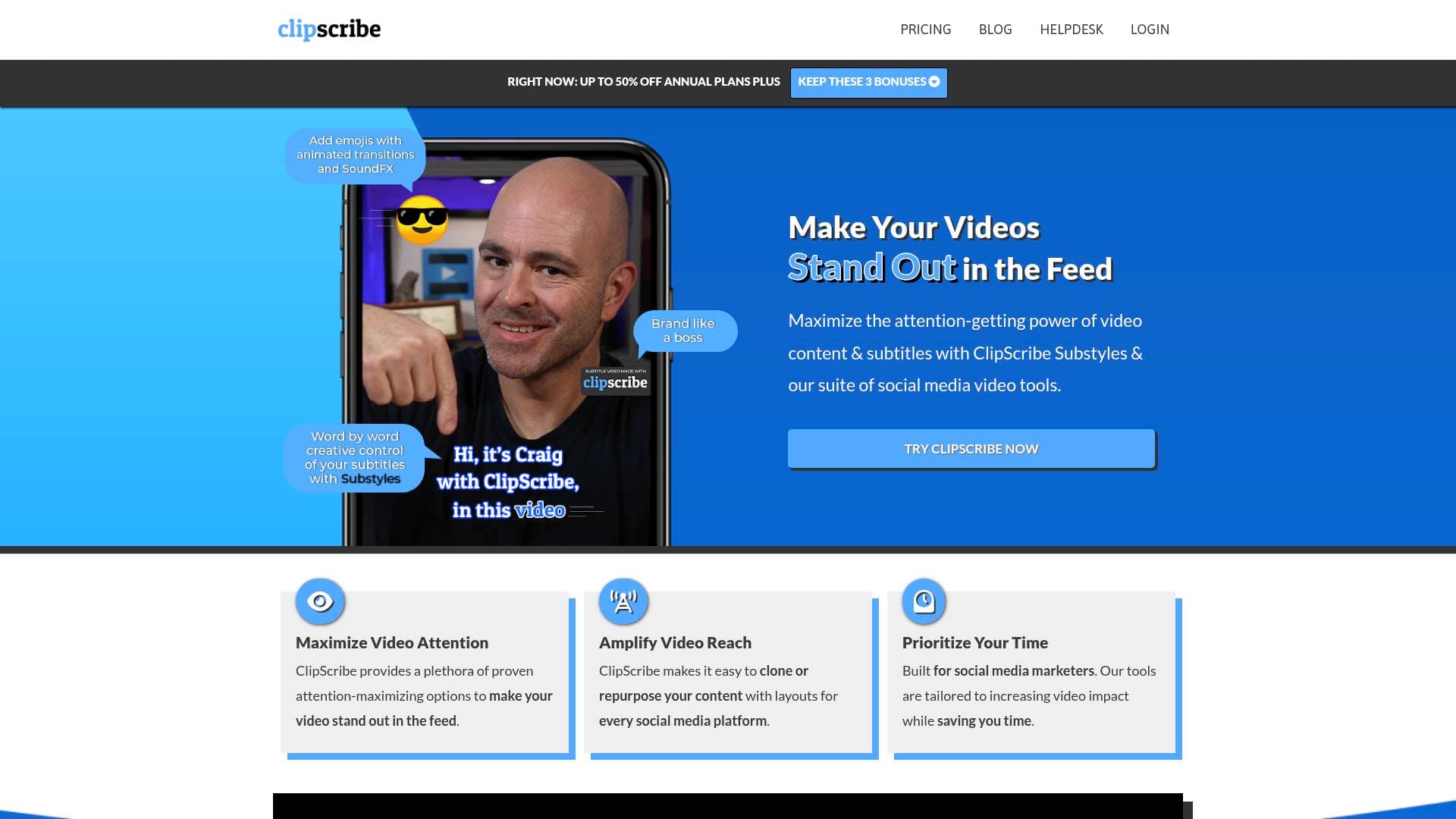
ClipScribe is a video editing tool built specifically for content creators who need to produce attention-grabbing, subtitled social media videos across multiple platforms. The core problem it tackles is one every creator knows well: videos that get scrolled past because they fail to capture attention in the first few seconds. By focusing on dynamic, automatic subtitles and visual engagement elements, ClipScribe helps creators turn standard video content into scroll-stopping clips optimized for social media feeds. The platform supports multiple platforms, meaning creators can format and distribute content without rebuilding their videos from scratch for each channel. Key visual features include automatic dynamic subtitles, headlines, countdown timers, and audio waveforms, all designed to amplify both video attention and reach. For creators who rely on video production workflows to grow their audience, ClipScribe positions itself as a dedicated solution for making video content more visually compelling and accessible.
ClipScribe Features That Matter for Content Creators
-
Automatic Dynamic Subtitles: ClipScribe automatically generates subtitles for videos, but goes beyond static captions by making them dynamic. This is critical for social media, where a large portion of viewers watch videos without sound, and eye-catching subtitles can dramatically increase watch time and engagement.
-
Headlines: Creators can add headline text overlays to their videos, giving them the ability to frame their content with bold, attention-commanding messaging right from the start. Headlines help hook viewers immediately, which is especially valuable on fast-moving platforms like TikTok and Instagram Reels.
-
Countdown Timers: The inclusion of countdown elements gives creators a way to build anticipation and urgency within their video content. Whether used for product launches, live stream announcements, or challenge reveals, countdowns add a layer of interactivity and visual interest that static videos lack.
-
Audio Waveforms: ClipScribe includes audio waveform visualizations, a feature particularly useful for podcasters and interview-style content creators who repurpose audio-heavy content into social video clips. Waveforms make audio-driven videos feel more dynamic and visually engaging even when there is minimal on-screen action.
-
Multi-Platform Support: The tool is built to create videos formatted for multiple social media platforms, reducing the time creators spend manually resizing and reformatting content. This multi-platform video creation capability is a significant time-saver for creators maintaining a presence across YouTube, TikTok, Instagram, and beyond.
-
Attention-Commanding Visual Elements: Beyond subtitles, ClipScribe combines several visual enhancement tools to maximize viewer attention. The combination of dynamic text, waveforms, and countdowns works together to keep viewers engaged throughout the video rather than dropping off early.
-
Registration and Account System: ClipScribe offers a registration system, indicating it is a web-based platform that creators can access from a browser without needing to install desktop software. This makes it accessible for creators working across different devices or operating systems.
Which Content Creators Should Use ClipScribe?
ClipScribe is built for creators whose success depends on video performance on social media platforms. Whether repurposing long-form content into short clips or producing original social-first videos, the tool's feature set is tailored to the specific demands of feed-based video consumption. Creators who publish frequently and need a fast, repeatable video production workflow will find the most value here.
- Primary creator types: YouTubers repurposing long-form videos into short clips, TikTokers and Instagram Reels creators who need subtitled vertical videos, podcasters turning audio episodes into visual social content, and social media managers handling video output for creator brands.
- Experience level: The tool appears designed for accessibility, making it suitable for creators who are not professional video editors but still want polished, professional-looking results.
- Team size: Solo creators and small creator teams who need to produce a high volume of social videos without a dedicated post-production team.
- Specific use cases:
- A podcaster clipping a key interview moment and adding dynamic subtitles and a waveform for Instagram
- A YouTuber creating teaser clips with headline overlays to drive traffic back to full videos
- A TikToker adding automatic captions to comply with accessibility best practices while boosting engagement
- A creator building hype for an upcoming launch using countdown timer overlays in promotional videos
- A content creator batch-producing subtitled clips for multiple platforms from a single source video
- A newsletter writer adding video snippets with bold headlines to embed in email campaigns or social posts
- A streamer creating highlight reels with dynamic text elements for post-stream social distribution
ClipScribe FAQ for Content Creators
What types of visual elements can be added to videos in ClipScribe? ClipScribe supports automatic dynamic subtitles, headline text overlays, countdown timers, and audio waveforms. These elements are designed to work together to increase viewer attention and engagement across social media platforms.
Does ClipScribe support multiple social media platforms? Yes, ClipScribe is built to create videos for multiple platforms, allowing creators to produce content formatted for different social channels without starting from scratch each time.
Is ClipScribe a web-based tool? ClipScribe operates as a web-based platform with a registration and login system, meaning creators can access it through a browser without needing to install dedicated desktop software.
Who benefits most from using ClipScribe? Content creators who regularly produce social media video content, particularly those repurposing existing video or audio into short-form clips, will benefit most. Podcasters, YouTubers, and social-first video creators are the primary audience.
What makes ClipScribe's subtitles different from standard captions? ClipScribe specifically emphasizes dynamic subtitles rather than static captions, meaning the subtitle presentation is designed to be visually engaging and attention-commanding rather than simply functional text at the bottom of the screen.
The Verdict: Is ClipScribe Worth It for Content Creators?
ClipScribe is a focused video creation tool that solves a specific and common problem: making social media videos visually compelling enough to stop the scroll. For creators who regularly repurpose content across platforms, the combination of automatic dynamic subtitles, headline overlays, countdown timers, and audio waveforms covers the core visual elements that drive engagement on modern social feeds. Podcasters converting audio content to video, YouTubers building clip-based social strategies, and TikTokers prioritizing accessibility through captions will all find practical value in what ClipScribe offers. The web-based nature of the platform lowers the barrier to entry, making it accessible without a steep technical learning curve. Based on the features available, ClipScribe is best suited for solo creators and small teams who need a dedicated, repeatable workflow for producing polished, subtitle-forward social videos at scale.
Details
One link. Every channel, rate, and piece of work brands need to evaluate you. Built for how creators actually get hired.
Claim your profile
Live creator, content, and marketing roles from real companies, with the pay, market, and context the raw job page never gives you.
Browse jobs

 Post Bridge