
How to Record a Podcast on Your Phone: The Simple Voice Memo Workflow
Learn the voice memo podcast workflow that creates the most popular solo episodes. Record 3-7 minute episodes on your phone and upload directly - no editing required.
Details
You do not need a studio to start a podcast. If you have a smartphone in your pocket, you already own everything you need to record a podcast on your phone today. This step-by-step guide covers the simplest possible workflow, recording straight into your phone as a voice memo, plus the apps, microphone options, and editing tools you can add whenever you want higher audio quality.
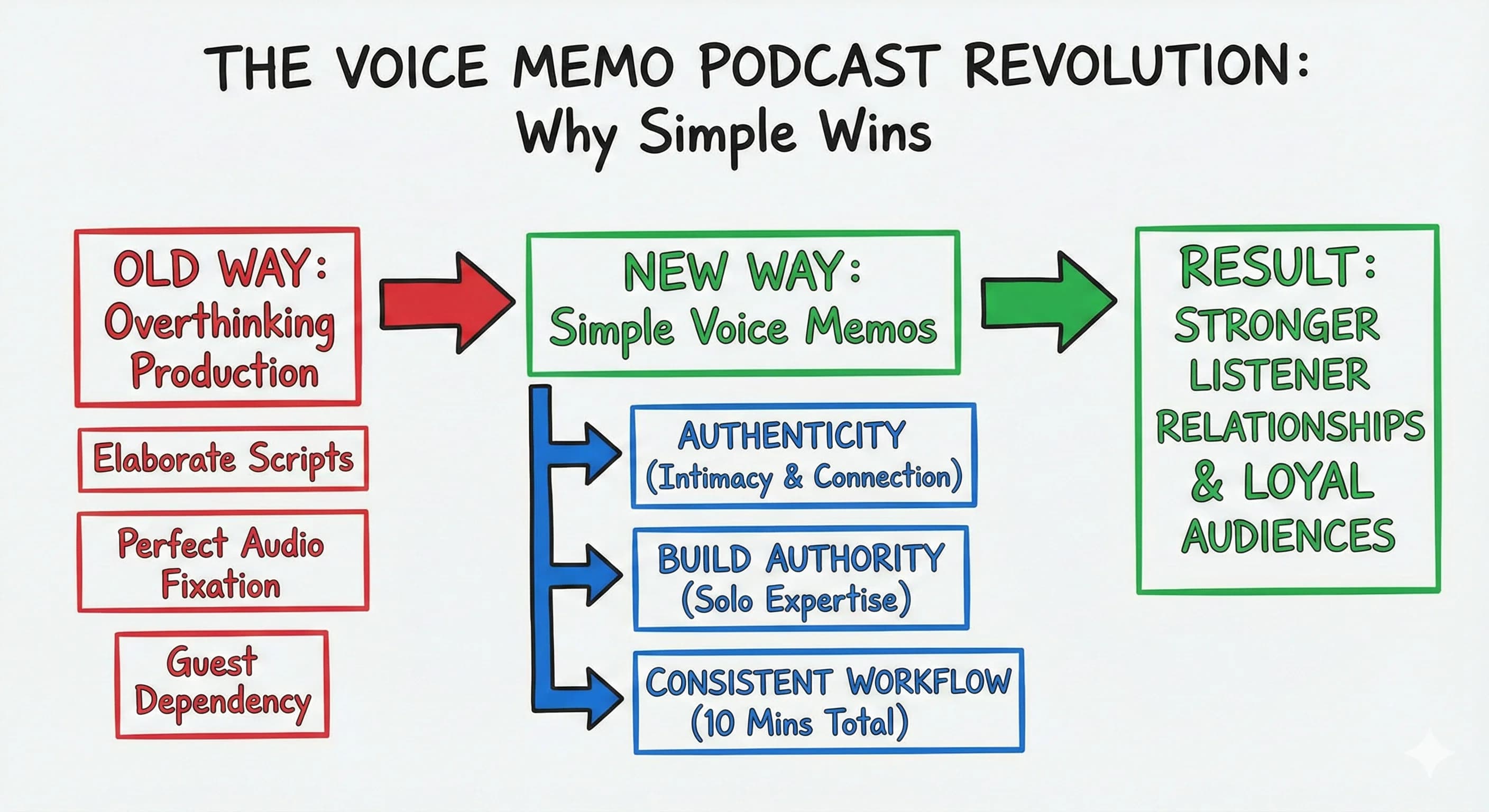
The Voice Memo Podcast Revolution: Why Simple Wins
You're overthinking your podcast production. While most podcasters spend hours crafting elaborate scripts and perfecting audio quality, creators like Leah Bryant are proving that intimate, authentic content builds stronger listener relationships than polished productions. The voice memo approach isn't just about saving time, it's about creating the kind of genuine connection that turns casual listeners into loyal audiences.
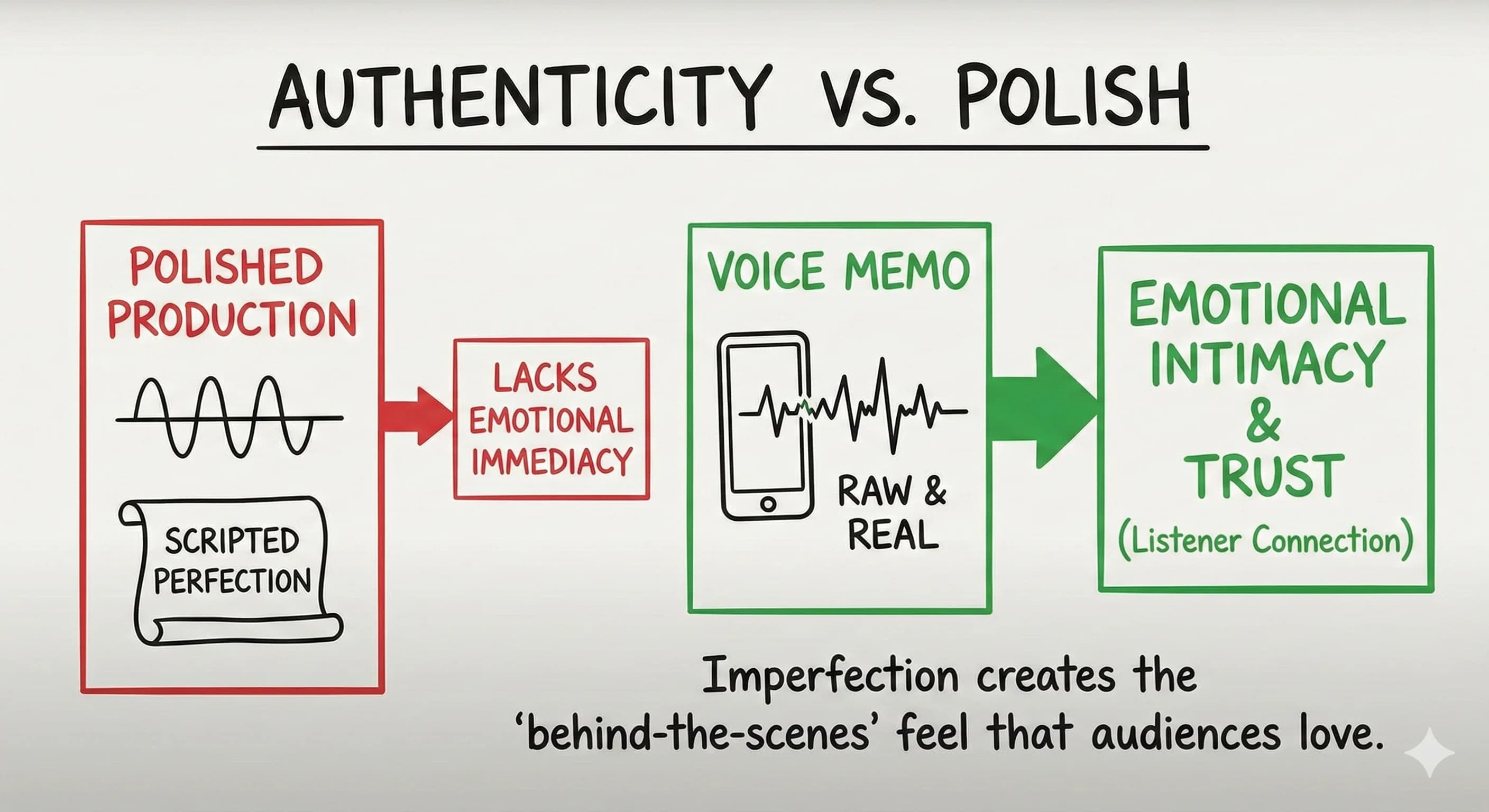
Research shows that phone-recorded, memo-style content creates emotional intimacy and immediacy that highly produced episodes often lack. When listeners hear what feels like a personal voice note, they engage more deeply with both the content and the creator.
Why Voice Memo Solo Episodes Actually Work Better
The solo monologue format represents a fundamental shift from traditional production methods. Instead of relying on guests, elaborate scripts, or extensive post-production, this streamlined workflow prioritizes authentic, personal content that builds genuine authority.
Podcast strategist Leah Bryant argues that solo episodes are a "fast-track way to build an intimate relationship with your listeners" and showcase your expertise. She specifically recommends keeping solo episodes short and focused, typically around 15 minutes or less. Your 3-7 minute voice memo approach takes this expert advice even further.
This addresses the crucial question many podcasters ask: "Can you use voice memos for a podcast?" The answer is absolutely yes, and it's becoming the secret weapon of successful solo podcasters who want to maximize impact while minimizing time investment.
The Strategic Power of Unpolished Content
Here's what most podcasters don't realize: audiences often prefer authentic, phone-like audio when it strengthens the creator's point of view. Academic research on voice memo-centered audio narratives found that producers deliberately retained phone-recorded texture and even "mucked up the sound" further in post-production to emphasize the diary feel.
This isn't about being lazy with production: it's about understanding that the emotional intimacy of voice memo recordings is core to listener engagement. When you record directly into your phone's voice memos app, you're not cutting corners; you're creating a format that listeners associate with personal, behind-the-scenes access.
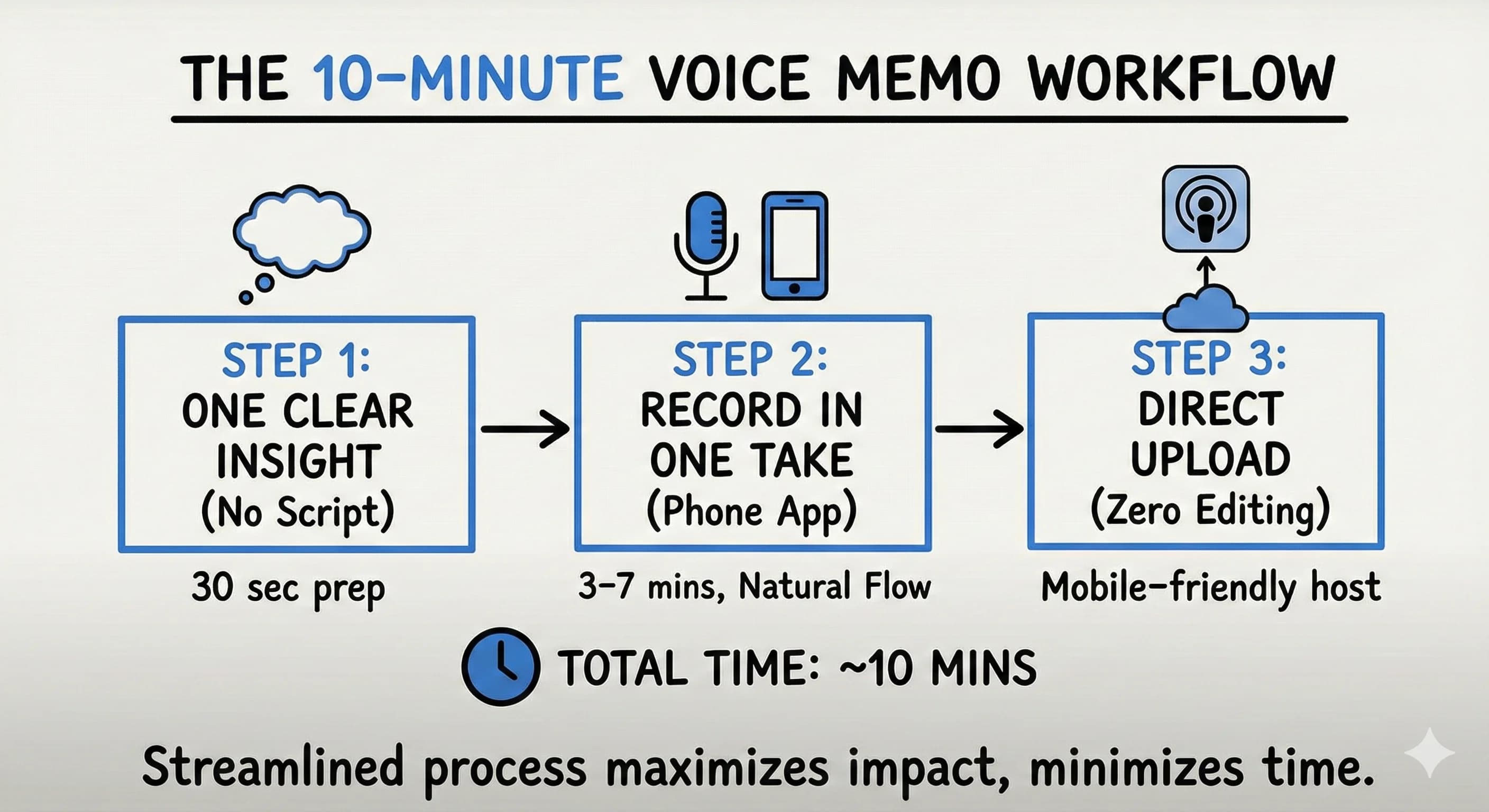
Your 10-Minute Voice Memo Workflow
Step 1: One Clear Insight, No Script Required
Forget elaborate outlines. Production guides emphasize planning your episode's main talking point and key takeaway even for simple shows. Before hitting record, spend 30 seconds identifying one specific perspective you want to share. That's your entire prep work.
This approach often produces better content than over-scripted episodes because you're speaking naturally about something you genuinely believe.
Step 2: Record in One Take
Open your phone's voice memos app and record 3-7 minutes in one take. Don't worry about perfect delivery: the natural flow of conversation is exactly what makes these episodes compelling.
Your phone's built-in microphone delivers sufficient sound quality for this format. The slight imperfection actually enhances the intimate, personal feel that makes voice memo episodes so effective.
Step 3: Direct Upload, Zero Editing
Skip traditional post-production entirely. Upload your voice memo directly to your podcast host through their mobile app or browser interface. Most major hosting platforms like Libsyn, Buzzsprout, and Podbean support direct mobile uploads.
This streamlined workflow eliminates hours of editing while preserving the authentic voice memo aesthetic that listeners respond to.
Why This Approach Builds Authority Faster
Traditional podcast advice focuses on technical perfection, but host-centered, reflection-heavy segments consistently perform as the most engaging content. Case studies of successful narrative podcasts show that when hosts add personal anecdotes and reflections, this contributes significantly to story impact and listener connection.
Your voice memo episodes establish your unique perspective without guest dependency. The minimal time investment allows for consistent publishing schedules, and these episodes become perfect content for repurposing across newsletters and social media.
Solo episodes improve listener relationships and position the host as the expert, compared to only doing interviews. You're not just interviewing interesting people, you're becoming the interesting person your audience tunes in to hear from.
Maximizing Your Voice Memo Impact
When writing show notes for these episodes, focus on the single core insight rather than lengthy descriptions. Keep episodes ad-free initially, as the low production cost allows for experimentation without revenue pressure.
Frame your episodes explicitly as "voice notes" or a "public audio journal" to lean into the intimate, personal feel that phone-recorded audio naturally creates. This positioning reinforces the parasocial relationship that makes podcasts so powerful.
Consider doing 3-5 related voice memos on one theme to create a sense of progression without additional production overhead. For example, a "Week of Pricing Myths" series gives listeners something to anticipate while maintaining your simple workflow.
Apps to Record a Podcast on Your Phone
The voice memo route is the simplest, but it isn't your only option. Here are the recording apps worth knowing, from easiest to most capable:
- iPhone Voice Memos or Android Voice Recorder: The zero-setup default. Open the app, hit record, done. On both iOS and Android this is the fastest way to record a podcast using just your phone.
- GarageBand (iOS): Free on iPhone, GarageBand lets you record and edit a podcast with multi-track control if you want a little more polish than a raw voice memo.
- Riverside: The Riverside.fm mobile app records studio-quality audio (and video) directly into your phone, and it's a great option when you interview a guest remotely. It's the leading remote recording platform for creators who want professional podcast quality from a smartphone.
Any of these will let you start recording in seconds. Pick the one that matches how polished you want to sound.
How to Get Good Audio Quality on Your Phone
Your phone's built-in microphone is genuinely good enough to start. To make it noticeably better, control the room, not the gear:
- Record in a small, quiet space with soft furnishings. Reducing background noise does more for audio quality than any expensive mic.
- Hold the phone a hand's width from your mouth, or set it on a small tripod so it stays steady.
- Add an external microphone when you're ready. A clip-on lavalier or a USB-C mic that plugs directly into your phone (you may need a USB-C or Lightning adapter) will significantly improve clarity.
- Wear headphones or earbuds so you can hear problems while you record, not after.
None of this is required for a voice memo episode. It's simply the path to higher-quality audio whenever you want it.
Editing and Publishing Your Episode
You can skip editing entirely, and for voice memo episodes that's the point. But if you want to trim mistakes or clean up audio levels, free tools make it easy: GarageBand on iPhone, Audacity on desktop, or Adobe Audition for more advanced control. A light edit to cut dead air is usually all a phone-recorded episode needs.
When the file is ready, upload it to a podcast host with mobile-friendly direct uploads (Buzzsprout, Podbean, and Libsyn all support this). From there your host publishes your podcast to Spotify, Apple Podcasts, and the other directories automatically. If you want SEO benefits, run the audio through a transcript tool to generate a transcript and show notes without extra manual work.
Getting Started: Your First Voice Memo Episode
Identify one strong opinion or insight you hold about your niche. It could be something you disagree with in your industry, a lesson you learned recently, or advice you find yourself giving repeatedly.
Open your voice memos app, hit record, and speak directly to one person in your audience for 3-7 minutes. Imagine you're leaving a detailed voice message for someone who asked you a specific question.
Upload immediately to your podcast hosting platform. Don't second-guess yourself or listen back multiple times: the spontaneity is part of what makes this format work.
Making Voice Memo Episodes Your Competitive Advantage
 This workflow proves that effective podcasting doesn't require expensive equipment or complex production. Sometimes the most powerful content comes from simply sharing your authentic voice, quite literally.
While other podcasters spend hours perfecting audio and scripting elaborate episodes, you can build genuine authority and audience connection in just 10 minutes per episode. The consistency this enables often matters more than production quality.
Start today with one voice memo episode. Your audience is waiting to hear your unfiltered perspective, and you might be surprised which episodes become your most popular content.
Read more about Becoming a Content Creator
📚 Complete Guides
- How to Become a Content Creator: Complete Beginner's Guide
- Content Creator Platform Guide: Choose the Right Platform to Start Your Creator Journey
⚡ Tactics & Strategies
- 50% Retention Rate Optimization for YouTube Algorithm Success
- Age Bracket as Superpower Strategy for Older UGC Creators
- AI Workflow Integration for Content Reduction
- Audience Consistency Strategy to Avoid Algorithm Penalties
- Audience Poll on Instagram to Source Q&A Content in Advance of Recording
📄 Related Articles
- The AI Content Creation Workflow: Turn 37 Seconds Into 1,200 Words
- The AI Content Workflow That Cuts Production Time by 70%
- Influencer Campaign Report: How Smart Reporting Systems Build Stronger Brand Relationships
- How to Get Traffic From Pinterest: Pins That Compound for Years
- Street Interviews: The LinkedIn Strategy That Went Viral
- Walking Tour Content Strategy: How to Create Authentic Local Content
- Business Vlog Ideas: How to Find Your Niche While Satisfying Your Creative Passion
- Welcome Email: Examples and a Sequence That Converts
Read more about Systems, Workflows & Operations for Content Creators
Free: The Solo Podcast Voice Memo Kit
Get the interactive tool, downloadable PDF, and Notion template - all free.
No spam. Unsubscribe anytime.

Alex Kirillov
Details
One link. Every channel, rate, and piece of work brands need to evaluate you. Built for how creators actually get hired.
Claim your profile
Live creator, content, and marketing roles from real companies, with the pay, market, and context the raw job page never gives you.
Browse jobs