
Reverse Prompt Engineering: Turn Great ChatGPT Answers Into Reusable Prompts
Stop tweaking AI output from scratch every session. Ask ChatGPT this one meta-question after your best results and build a reusable prompt library that gets better over time.
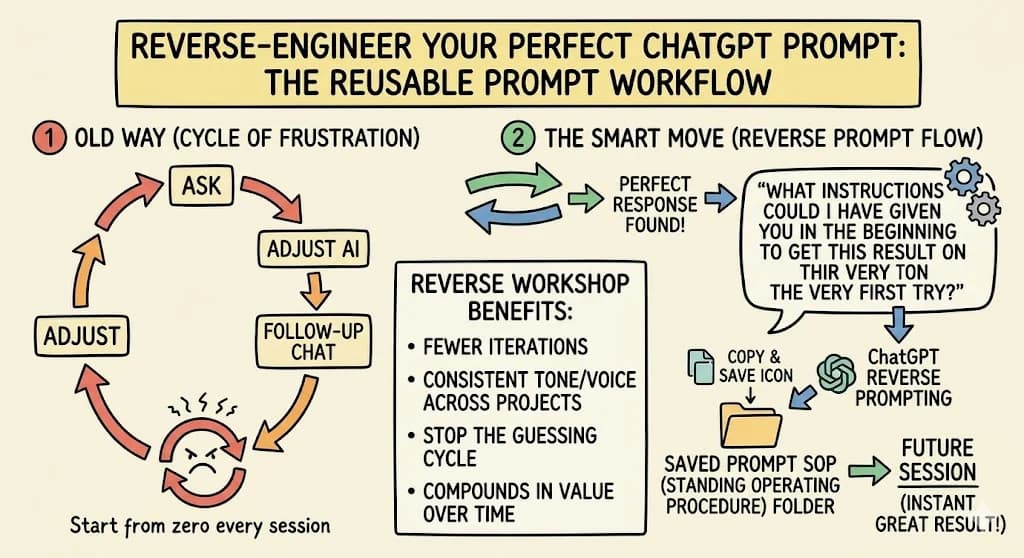
Want better ChatGPT answers without spending an hour on back-and-forth? Most content creators spend hours tweaking AI responses, sending follow-up messages, and hoping the next reply finally hits the mark. You adjust, push back, and eventually land on something great. Then the next session starts from zero all over again.
Ever wondered why ChatGPT sometimes gives you a brilliant answer and other times just fluff? The difference almost always comes down to the quality of your starting prompt. There is a simple meta-question you can ask that changes this completely. It transforms every editing session into a prompt-building workshop and makes every future session faster.
What Is Reverse Prompt Engineering?
Reverse prompt engineering is the practice of working backward from an AI output to reconstruct the prompt that could have produced it. Where normal prompt engineering starts with a prompt and hopes for a good output, reverse prompt engineering starts with the output you want and asks the large language model to deconstruct it into the effective prompt behind it.
That's the key difference. Forward prompt engineering is a guess; reverse prompt engineering is a recovery. In more technical circles the same idea appears as "prompt recovery" or "language model inversion", where researchers try to reconstruct the original prompt from generated text. For content creators, you don't need the academic version. You just let the AI do the reconstructing for you, turning any great ChatGPT answer into a reusable prompt.
The Secret to Better Prompts Starts at the End
Here is the shift in mindset: instead of starting with a great prompt, you can end with one. After you work through a back-and-forth conversation until the response feels exactly right, you ask ChatGPT one final question:
"What instructions could I have given you in the beginning to get this result on the very first try?"
 What comes back is a fully constructed, ready-to-use prompt tailored to your exact content needs. Prompt engineers have documented this approach under names like reverse meta-prompting and reverse prompt engineering, and creators across YouTube, blogging, and social media are using it to stop the guessing cycle for good.
One prompt engineer walking through this method on YouTube describes it as a solid way to have the chatbot look back and take advantage of the context of the whole thread to design a better starting prompt. The process is straightforward: iterate until the response matches your vision, then ask the AI model to reverse-engineer the conversation into a single reusable prompt. When tested in a brand-new chat, that reverse-engineered first prompt produces high-quality output on the first attempt, without any of the back-and-forth.
This technique works across every major platform, whether you are writing YouTube scripts, Instagram captions, newsletters, or blog posts. OpenAI's design treats ChatGPT as a conversational tool that responds to context, which is exactly why this reverse approach works so well.
Why This Approach Helps You Get Better Answers Over Time
This method turns a one-time win into a long-term asset. Every time you reach a result you love, you now have a system to capture why it worked.
A blogger who documents using this technique for writing posts and marketing copy describes asking the chatbot to summarize the instructions that would have produced a polished result from the start. What comes back is a structured prompt that captures the role (for example, "Act as a copywriter for beginners"), the context, the task, the format, and constraints like tone, word count, and style. That prompt then becomes a reusable template, adjusted only for topic and specifics the next time around.
This also answers one of the most common questions creators ask: what do I need to say to get the output to be longer and more detailed? The answer is to let the AI itself tell you what it needed to succeed. If you could give ChatGPT a detailed technical brief describing the ideal set of instructions for any task you regularly perform, you would never have to guess again.
Working with an AI like ChatGPT this way also helps you understand the context it needs to perform well. The more clearly you frame your query, the better the large language model can match your expectations.
Reverse Prompt Engineering Step by Step
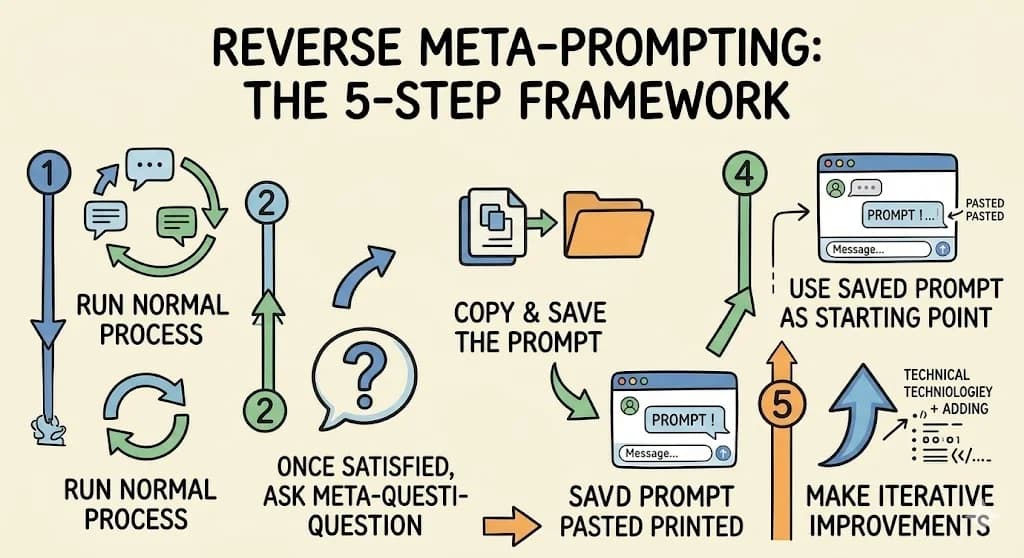
- Run your normal process. Ask, adjust, and iterate the reply until the response matches your vision.
- Once satisfied, type the meta-question: "What instructions could I have given you in the beginning to get this result on the very first try?"
- Copy and save the prompt ChatGPT provides.
- Use that saved prompt as your starting point the next time you need similar content.
- Make iterative improvements each time you use a saved prompt, noting what small tweaks unlock even better results.
You can also sharpen the meta-question to get a more structured response. Asking ChatGPT to act as a prompt engineer, go through the entire conversation, and capture the nuances of your feedback tends to produce a Markdown prompt that is easier to read, save, and reuse. Some creators go a step further and ask for the prompt to be organized into sections covering role, context, task, format, and constraints.
If you want to dive deep into a specific content type, such as a 500-word product summary or a step-by-step tutorial, you can ask it to please provide a version of the reverse-engineered prompt that is as precise as possible for that exact format. Phrases like "act as an expert" or "respond only with" are common refinement signals that tend to sharpen the final result.
How to Keep ChatGPT Consistent Across Projects
 One of the biggest challenges content creators face is consistency. You nail a tone or format once, then struggle to replicate it in the next session. By saving reverse-engineered prompts, you give the model the exact instructions it needs every single time.
Think of these saved prompts as templates. When you need a product review, a how-to post, or a social media caption in a specific voice, you already have the word-for-word instructions that produced your best work. This is how you use custom instructions and saved formats to build a seamlessly repeatable workflow.
Creators who document this approach consistently highlight the same outcome: fewer iterations, more reliable first-try responses, and a growing library of prompt formulas that compound in value over time. One creator using the reverse-engineer method pastes the resulting prompt into a master folder and describes it as turning ad-hoc conversations into a prompt goldmine.
You can also apply this beyond your own conversations. If you come across a piece of content in your niche that performs exactly the way you want yours to, you can paste it in and ask it to reverse-engineer the prompt that could give you something with the same structure, tone, and emotional impact. That gives you a starting formula even for content you did not create yourself.
Addressing Common Flaws and Frustrations
It is worth noting that many users encounter the same roadblocks at first. ChatGPT's tendency to sound confident even when uncertain catches creators off guard, and long sessions can sometimes cause the model to lose the thread of earlier instructions. Transparency about these limits is important before you build a workflow around any AI tool.
ChatGPT can fabricate plausible-sounding facts, so you should always evaluate the factual accuracy of anything you publish. This is a known flaw of any large language model that draws on a fixed training dataset rather than live information.
If you want the AI to provide more accurate responses, be clear and concise about your expectations and ask it to flag any claims it is uncertain about. Ask follow-up questions when an answer feels thin. You can also use phrases like "say 'I'm not sure' if you cannot confirm this" as part of your prompt so that ChatGPT will say "I don't know" rather than guess. This kind of strict guidelines around uncertainty is especially useful for detailed technical topics.
What do you do if ChatGPT refuses to answer or you still won't get the tone you need no matter how you phrase it? Simply reframe your request. A prompt like "write a version that is more formal" or using the instruction "write" followed by your specific requirements is often enough to shift the direction. You'll need to experiment with framing, but each experiment feeds back into your prompt library as a useful refinement.
For users wondering whether ChatGPT Plus is worth $20 a month when the free version is available, the short answer is that the free version covers the reverse meta-prompting technique described here just as well as the paid tier. ChatGPT Plus unlocks faster response speeds and access to newer models, which matters if you are running high-volume automation workflows, but for most creators the free version is a strong starting point.
How can you adjust the creativity level of ChatGPT's responses? You can prompt it to be more playful, more formal, or more analytical, and then capture that tonal instruction in your reverse-engineered prompt so it carries forward automatically. Both open source and closed source AI models respond well to this kind of tonal framing. Compared to other generative AI tools, ChatGPT remains one of the most widely documented platforms for prompt-level customization, in large part because of how openly the community shares what works. OpenAI's published guidelines, including their own prompting guide, reflect a commitment to helping users get the most from the system.
Language models in general respond best when you treat them like a skilled collaborator rather than a search engine. You would not type a fragment into a briefing document for a human editor. The same principle applies here: the more clearly you communicate, the better the model can serve you. This mindset is also worth exploring as a thought experiment: imagine briefing a new team member every session versus handing them a standing operating procedure. The saved prompt is that procedure.
For anyone moving towards AI-assisted content creation at scale, an inquiry into how much time you spend re-explaining context each session is a useful reminder of where your workflow is leaking productivity.
The Right Way to Build and Store Your Prompt Library
Saving prompts in a simple document is enough to start. A Google Doc or Notion page organized by content type works well. Tag each prompt by use case, platform, and tone so you can find the right one quickly.
Over time, your library becomes your biggest productivity asset. Each prompt you add reflects a real creative win, something you already know works for your specific voice and audience. You are not collecting generic ChatGPT prompts from the internet. You are building a system based entirely on your own best responses.
The educational side of this is worth noting too. Repeatedly seeing high-quality prompt examples for your own use cases trains your instincts. Over time, you will naturally write better starting prompts because you have seen enough of them to understand what details actually move the needle: audience specifics, format constraints, tone cues, and role framing.
Start Building Your Prompt Library Today
The smartest way to use ChatGPT as a content creator is not just to get a good result today. It is to capture that result so you can replicate and improve it tomorrow.
Ask the meta-question after your next great session. Save what comes back. Then watch your content workflow get faster and more consistent with every session you run.
You have probably already had dozens of great sessions you never saved. That stops now.
Read more about Becoming a Content Creator
📚 Complete Guides
- How to Become a Content Creator: Complete Beginner's Guide
- Content Creator Platform Guide: Choose the Right Platform to Start Your Creator Journey
⚡ Tactics & Strategies
- 50% Retention Rate Optimization for YouTube Algorithm Success
- Age Bracket as Superpower Strategy for Older UGC Creators
- AI Workflow Integration for Content Reduction
- Audience Consistency Strategy to Avoid Algorithm Penalties
- Audience Poll on Instagram to Source Q&A Content in Advance of Recording
📄 Related Articles
- The 4-Pillar Guide to Instagram Reels Strategy That Gets Results
- The Four Sentence Story: A Writing Exercise for Better Content
- Competitive Content Analysis: The 5-Competitor Method
- How to Find Your Target Audience (Start With One Person)
- Swipe File: How to Build One With Gmail Labels
- The LinkedIn Hook: Templates and Types to Stop the Scroll
- The P2P Revolution: How Peer to Peer Community Building Is Transforming Influencer Marketing Strategies
- Personal Brand Values: How to Define Them and Filter Every Post
Read more about Systems, Workflows & Operations for Content Creators

Alex Kirillov
One link. Every channel, rate, and piece of work brands need to evaluate you. Built for how creators actually get hired.
Claim your profile
Live creator, content, and marketing roles from real companies, with the pay, market, and context the raw job page never gives you.
Browse jobs
