

Voiceflow
Voiceflow is a no-code AI agent builder that lets creators design, test, deploy, and monitor chat and voice agents across web, phone, and mobile channels.
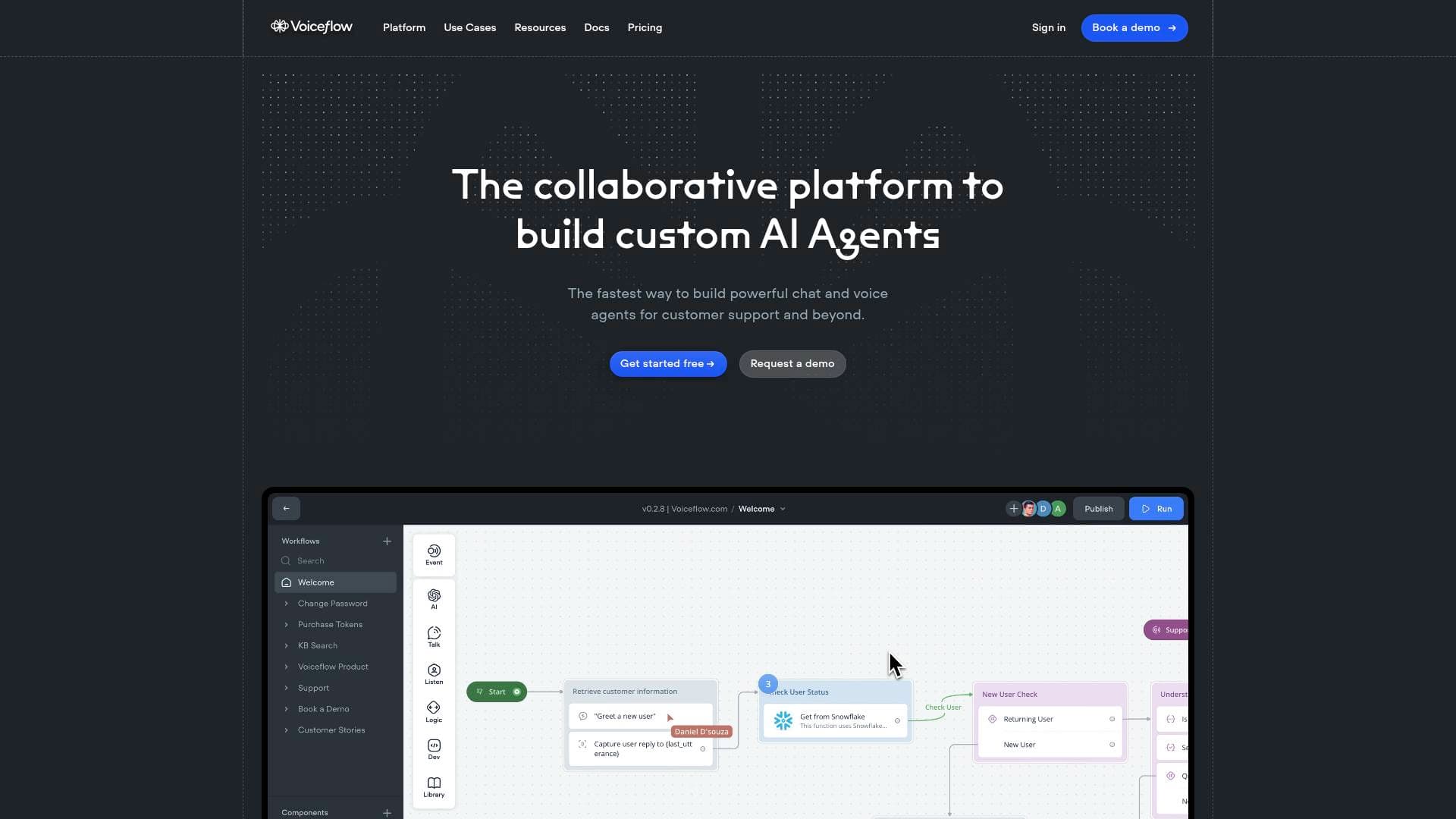
What is Voiceflow? A Content Creator's Guide
Voiceflow is a no-code AI agent builder designed to help anyone create, launch, and scale conversational AI agents for chat and voice without writing a single line of code. For content creators managing growing audiences, the platform solves a very real problem: handling the flood of repetitive questions, booking requests, and community inquiries that eat into creative time. Rather than spending hours answering the same DMs or emails, creators can deploy an AI agent that handles those conversations automatically, 24/7. The platform supports web chat widgets, phone-based voice agents, and mobile deployments through a flexible API, making it genuinely omnichannel. Powered by the Agentic Context Engine, Voiceflow turns complex multi-turn conversations into structured, enriched interactions. With over 250,000 users and a 4.8/5 rating on G2, it has proven itself across a wide range of use cases. The free-forever plan makes it accessible to solo creators just starting out, while the production-grade infrastructure scales to meet the demands of larger creator operations.
Voiceflow Features That Matter for Content Creators
-
No-Code Workflow Builder: Voiceflow's visual canvas lets creators design entire conversation flows using drag-and-drop logic, without any programming knowledge required. Nodes for API calls, conditional logic, and custom actions give full control over how an agent behaves at every step of a conversation. For creators who want to build something sophisticated but aren't developers, this is the core value proposition.
-
Knowledge Base Integration: Creators can upload PDFs, text files, and URLs directly into Voiceflow's Knowledge Base, training the AI agent on their own content. This means an agent can accurately answer questions about a creator's brand, products, course offerings, or community guidelines using their actual documentation. The agent draws on this institutional knowledge rather than generating generic responses.
-
Multi-LLM Support: Voiceflow avoids model lock-in by supporting multiple large language models, including GPT, Claude, Gemini, Meta Llama, and Grok. Creators can choose the model that best fits their use case or budget, and switch without rebuilding their entire agent from scratch. This flexibility is particularly useful as AI models continue to evolve rapidly.
-
Omnichannel Deployment: Agents built in Voiceflow can be deployed across web (embedded chat and voice widgets), phone (for automated call handling), and mobile (via API). A creator running a membership site, a podcast, and a YouTube channel can serve their audience across all those touchpoints from a single agent build.
-
Instant Assistant with LLM + NLU Hybrid: The Instant Assistant feature combines natural language understanding (NLU) for capturing user intent with LLM-generated responses grounded in a creator's knowledge base. This means an agent can understand what a fan is asking and respond with accurate, on-brand information rather than hallucinated content. Functional assistants can be deployed in minutes rather than months.
-
100+ Pre-Built Integrations: Voiceflow connects to tools like Zendesk, Salesforce, Shopify, HubSpot, Google Sheets, Airtable, Make, and Gmail out of the box. For creators running e-commerce stores, online courses, or newsletter businesses, this means the AI agent can pull live data and trigger actions across the entire creator tech stack without custom development.
-
Observability Suite: An LLM-powered evaluation dashboard tracks agent performance at scale, showing pass rates, conversation logs, credit usage, and custom metrics. Creators can see exactly how their agent is performing and make data-driven decisions about which conversation flows to improve. The dashboard shown tracks metrics like a 90.3% average pass rate across 6,600+ logs.
-
Production Environments: Voiceflow supports separate development, staging, and production environments, all hosted on the platform. This means creators can test changes to their agent without disrupting the live version their audience is already using. Updates can be pushed through a proper pipeline rather than making risky live edits.
-
Agent Content Manager (CMS): The Agent CMS centralizes all agent content, including LLM prompts, knowledge sources, variables, NLU intents, and developer-built functions, into a single organized system. Creators managing multiple agents or working with a small team can keep everything consistent and reusable without duplicating work across projects.
-
Developer Toolkit and API Library: For creators who do have technical skills or work with developers, Voiceflow exposes a full API library for dynamically querying and deploying agent content. Custom JavaScript functions can be written directly inside the platform, and the agent can make API calls mid-conversation to fetch live data or trigger external workflows.
Which Content Creators Should Use Voiceflow?
Voiceflow is best suited for content creators who have reached a scale where audience interactions have become difficult to manage manually. Whether that means hundreds of daily DMs, a growing FAQ backlog, or a course community that needs 24/7 support, the platform offers a practical way to automate those touchpoints without sacrificing quality. It works for both non-technical creators using the visual builder and technically-inclined creators who want to write custom code and API integrations.
Primary creator types:
- YouTubers and podcasters who want to deploy a chatbot on their website that answers questions about their content, merchandise, or sponsorship inquiries
- Course creators and educators who need an AI agent to handle student FAQs, onboarding flows, and assignment guidance around the clock
- Newsletter writers looking to automate subscriber onboarding, FAQ responses, and lead capture on their landing pages
- Streamers who want a web-based agent to handle community questions, merch inquiries, or membership tier explanations
- Bloggers and affiliate marketers running Shopify stores who need automated product recommendation and FAQ agents
- Creators with membership communities who want to reduce support ticket volume by deploying a knowledge-base-powered agent
- Solo creators managing brand deals who want an agent to handle initial sponsor inquiry responses and qualification
- Creators building their own digital products who need a voice or chat agent to handle post-purchase support and onboarding
Experience level: The no-code visual builder makes Voiceflow accessible to beginners, while the code editor, API library, and custom functions accommodate advanced users. The free-forever plan removes the financial barrier for creators just getting started.
Team size: Works for solo creators and small creator teams alike. The collaboration features and Agent CMS are particularly useful when multiple people need to manage or update agent content.
Getting Started with Voiceflow
- Sign up for the free plan at Voiceflow's creator portal, which provides access to the core agent-building features with no time limit.
- Connect your knowledge base by uploading PDFs, text files, or URLs that contain your brand information, FAQs, product details, or content library.
- Build or customize a workflow using the visual canvas, adding logic nodes, API calls, and LLM response steps to shape how your agent handles different conversation paths.
- Test your agent using the built-in prototyping tool to preview how it responds to real audience questions before going live.
- Deploy to your chosen channel by copying the web chat code snippet into your website's body tag, or configuring a phone or mobile deployment through the API for broader reach.
Voiceflow FAQ for Content Creators
Is Voiceflow free to use? Voiceflow offers a free-forever plan that includes the core features powering Instant Assistants. Creators can build, test, and deploy an AI agent without paying anything upfront, making it a low-risk way to experiment with conversational AI for audience engagement.
Can Voiceflow agents handle voice as well as chat? Yes. Voiceflow supports both chat and voice modalities. Web widgets can be switched between chat and voice mode, and the platform supports phone-based voice agents for automated call handling. Creators can build a single agent and deploy it across both text and voice interfaces.
What AI models does Voiceflow support? Voiceflow supports multiple LLMs including GPT models, Claude (including Claude Instant), Gemini, Meta Llama, and Grok. Creators can choose the model that fits their needs and avoid being locked into a single provider as the AI landscape evolves.
Can I connect Voiceflow to my existing tools? Voiceflow offers 100+ pre-built integrations covering tools commonly used by creators, including Shopify, HubSpot, Google Sheets, Airtable, Zendesk, Make, and Gmail. Custom API connections can also be built directly within the platform for tools not covered by native integrations.
How long does it take to build and launch an agent? With the Instant Assistant feature and a pre-loaded knowledge base, a functional agent can be deployed in minutes. More complex agents with conditional logic, API integrations, and custom workflows take longer but can still be built and launched within days rather than the months traditionally required for conversational AI development.
Is Voiceflow compliant with data privacy regulations? Voiceflow holds SOC-2 Type II certification, ISO/IEC 27001:2022 certification, and is both GDPR and HIPAA compliant. For creators handling subscriber data, health-related content, or audience information from regulated regions, these certifications provide meaningful assurance about how data is handled.
The Verdict: Is Voiceflow Worth It for Content Creators?
For content creators who are drowning in repetitive audience interactions, Voiceflow offers a genuinely practical solution. The no-code builder lowers the barrier to entry significantly, the free-forever plan removes financial risk, and the multi-LLM support means creators aren't betting on a single AI provider. The knowledge base feature is particularly compelling for creators with established content libraries, FAQs, or product catalogs, since it grounds the agent's responses in real, accurate information rather than generic AI output.
The platform shines brightest for creators who have already built an audience and need to scale their support and engagement without hiring additional help. Course creators, newsletter writers, and community managers will find the most immediate value. Creators who are just starting out and don't yet have significant audience interaction volume may find the tool more powerful than they currently need, but the free plan makes it worth exploring early.
The main consideration is that more sophisticated deployments, such as multi-channel agents with complex API integrations, will require some technical investment or collaboration with a developer. That said, the visual builder and 100+ pre-built integrations cover a wide range of creator use cases without touching code. Overall, Voiceflow is a strong choice for any creator serious about automating audience communication and building scalable AI-powered experiences around their brand.
Details
One link. Every channel, rate, and piece of work brands need to evaluate you. Built for how creators actually get hired.
Claim your profile
Live creator, content, and marketing roles from real companies, with the pay, market, and context the raw job page never gives you.
Browse jobs

 Post Bridge