

Tinywow
TinyWow is a free online toolkit offering 250+ AI writing, PDF, image, video, and file tools to help content creators work faster without subscriptions or sign-ups.
What is TinyWow? A Content Creator's Guide
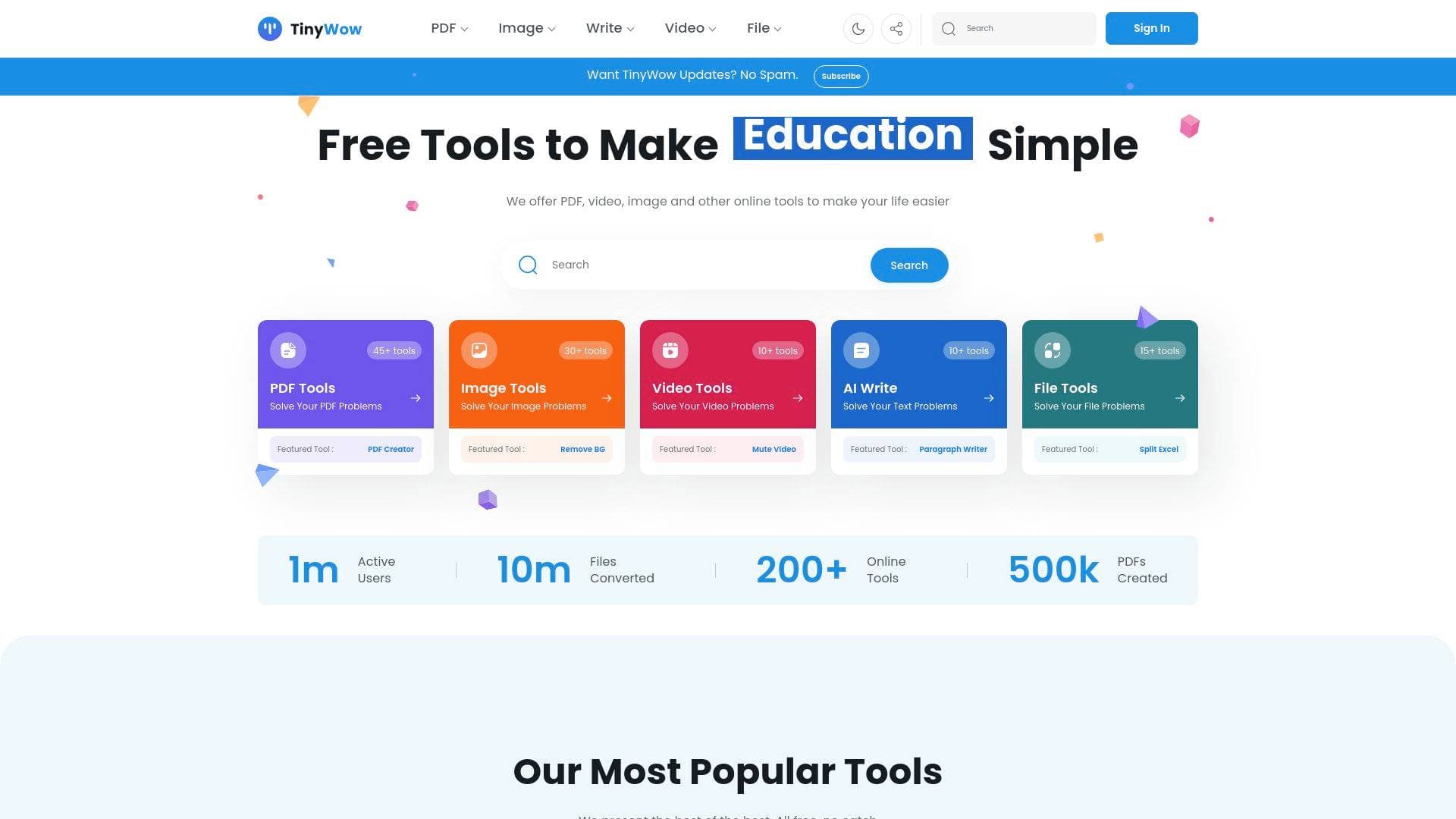
TinyWow is a free online content creation toolkit that bundles over 250 tools across five major categories: AI writing, PDF management, image editing, video processing, and file conversion. For solo creators juggling multiple platforms and formats, it directly solves the problem of needing a dozen separate paid tools just to handle everyday production tasks. The platform operates entirely in the browser with no software installation required, and most tools are accessible without signing up. Whether a YouTuber needs to transcribe a video, a blogger needs an AI article writer, or an Instagram creator needs a quick background remover, TinyWow covers the entire content creation workflow in one place. With over 1 million active users and 10 million files converted, it has clearly found an audience among creators who want capable tools without the price tag. The free tier is genuinely functional, while a Premium plan unlocks ad-free access, no CAPTCHAs, and priority processing.
TinyWow Features That Matter for Content Creators
-
AI Writing Suite (10+ tools): TinyWow includes an Article Writer, Paragraph Writer, Essay Writer, Sentence Rewriter, Content Improver, Grammar Fixer, Content Summarizer, Blog Outline Generator, Blog Post Ideas generator, and a dedicated YouTube Script Writer. For bloggers and video creators, this is a full AI-powered writing workflow in one place. The AI Humanizer tool is particularly useful for making AI-generated drafts sound more natural before publishing.
-
Instagram Caption Generator and LinkedIn Post Generator: These platform-specific writing tools let social media creators generate captions and posts directly from their content ideas. Rather than adapting generic copy, creators get output tailored to the tone and format of each specific platform, saving significant time during the content scheduling process.
-
AI Image Generator: Creators can generate original images from text prompts using the built-in AI image generator. This is especially useful for bloggers and newsletter writers who need custom visuals without a design budget or a separate subscription to an AI image platform.
-
Background Remover and Photo Cleanup: The AI-powered background remover instantly strips backgrounds from photos, while the Photo Cleanup tool uses AI to remove unwanted objects, items, or people from images. Thumbnail designers and social media creators will find both tools essential for producing clean, professional-looking visuals quickly.
-
Video Transcription Tools: TinyWow includes a YouTube to Text converter, a YouTube Transcript Generator, a Video to Text tool, and an Audio to Text transcriber. Podcasters can turn episode audio into written transcripts, and YouTubers can pull transcripts for repurposing content into blog posts or social captions without any third-party service.
-
Video Downloading and Format Tools: Creators can download videos directly from TikTok, Instagram, Twitter, and Facebook. Additional video tools include MP4 to MP3 conversion, video trimming, video compression, MOV to MP4 and MKV to MP4 conversion, and a Video to GIF converter. These tools cover the core video production workflow needs for multi-platform creators.
-
Image Upscaler and Compression: The image upscaler increases the resolution of low-quality photos, while the compression tool reduces file sizes without requiring desktop software. Creators working with thumbnails, blog headers, or social graphics can optimize images for fast-loading pages or platform upload limits in seconds.
-
PDF Tools (45+ tools): The PDF suite includes a free PDF editor, PDF to Word converter, Merge PDF, Split PDF, Compress PDF, PDF Translator, eSign, and more. Creators who handle brand deal contracts, media kits, or sponsored content agreements can edit, sign, and convert PDFs without paying for dedicated PDF software.
-
Profile Photo Maker: This tool creates round, styled profile photos for social media directly from any uploaded image. It is a small but practical tool for creators who want a polished, platform-ready profile picture without opening a full design application.
-
Meme Maker and Chart Creator: The Meme Maker lets creators generate memes quickly for social content, while the Chart Creator produces downloadable chart images. Data-driven creators, newsletter writers, and educators can visualize stats and turn them into shareable graphics without needing a separate design tool.
Which Content Creators Should Use TinyWow?
TinyWow is built for creators who need a wide range of tools but do not want to pay for multiple specialized subscriptions. It works especially well for solo creators managing their own production pipeline across writing, visuals, and video. Both beginners and experienced creators benefit, since the tools are browser-based and require no technical setup.
Primary creator types:
- YouTubers who need video transcription, YouTube script writing, video compression, and thumbnail image editing
- TikTokers and Instagram creators who want to download reference content, generate captions, and clean up photos for posts
- Bloggers and newsletter writers who use the AI article writer, blog outline generator, blog post ideas tool, and content improver to speed up their writing workflow
- Podcasters who need audio-to-text transcription to repurpose episodes into written content
- Social media managers handling multiple platforms who need Instagram captions, LinkedIn posts, and Facebook headline generators in one toolkit
Specific use cases for content creators:
- Writing a YouTube script using the dedicated YouTube Script Writer tool
- Transcribing a podcast episode to text for show notes or blog repurposing
- Removing the background from a product photo for a sponsored Instagram post
- Generating a blog outline and then expanding it with the Paragraph Writer
- Converting a recorded video from MOV to MP4 for platform upload compatibility
- Compressing a large video file before uploading to reduce storage or upload time
- Creating a collage or combining images for a YouTube thumbnail or blog header
- Editing and eSigning a brand deal PDF without leaving the browser
Experience level: Beginner-friendly. No installation, no account required for most tools, and each tool has a clear step-by-step interface.
Team size: Works well for solo creators, though small creator teams can use it just as effectively since it is entirely web-based.
Getting Started with TinyWow
-
Visit TinyWow and browse by category: Tools are organized into five sections: PDF, Image, Write, Video, and File. Pick the category that matches your immediate task, such as "Write" for content generation or "Video" for format conversion.
-
Use a tool without signing up: Most tools are accessible immediately. Simply upload a file or enter your text, configure any settings (such as image dimensions or writing topic), and run the tool.
-
Download your output: Files are processed and made available for download. Uploaded and generated files are automatically deleted one hour after upload, so creators do not need to worry about data lingering on the platform.
-
Optionally create a free account: Signing up unlocks access to saved files and the full tool library. The free tier includes a limited number of generations per tool per session.
-
Consider Premium for heavy use: The Premium plan removes ads, skips CAPTCHAs, removes generation and upload limits, and provides priority processing. It is available at $20 per month or $15 per month on the yearly plan, with a 7-day free trial available.
TinyWow FAQ for Content Creators
Is TinyWow actually free to use? Yes, TinyWow is free for core usage. Most tools are accessible without an account, and the free tier covers a limited number of generations per session. Premium plans start at $15 per month (billed yearly) and remove all limits, ads, and CAPTCHAs.
How many tools does TinyWow include? TinyWow offers access to 250+ tools across PDF, image, video, AI writing, and file conversion categories. The platform spans 45+ PDF tools, 30+ image tools, 10+ video tools, 10+ AI writing tools, and 15+ file tools.
Does TinyWow store my uploaded files? Uploaded and generated files are deleted one hour after upload, according to the platform's own disclosure on the resize tool page.
Can I use TinyWow to write YouTube scripts? Yes. There is a dedicated YouTube Script Writer tool in the AI Write section that generates scripts from your input, making it a practical starting point for video content creation.
What video platforms does TinyWow support for downloading? TinyWow supports video downloading from TikTok, Instagram, Twitter, and Facebook directly through its video tools section.
Does TinyWow work on mobile? Files can be uploaded from PC or mobile, as indicated on the image resize tool page, making it usable on smartphones and tablets without a dedicated app.
What is included in the Premium plan? Premium includes access to all 250+ tools with no generation or upload limits, an ad-free and CAPTCHA-free experience, and priority processing for faster results. It costs $20 per month or $15 per month on the yearly plan.
The Verdict: Is TinyWow Worth It for Content Creators?
For content creators who regularly bounce between writing drafts, editing images, converting video files, and managing PDFs, TinyWow is a genuinely useful all-in-one online toolkit. The free tier is broad enough to handle occasional tasks across every category, and the sheer variety of 250+ tools means creators rarely need to leave the platform for a separate service. Standout tools for the creator economy include the YouTube Script Writer, audio-to-text transcription, AI image generator, background remover, and the full AI writing suite with platform-specific generators for Instagram and LinkedIn.
The main limitation is the free tier's generation caps per session, which can interrupt workflow for creators who use the AI writing or image tools heavily. The Premium plan at $15 per month (yearly) addresses this, though creators who only need occasional access will find the free version more than adequate.
Best for: Bloggers, YouTubers, podcasters, and social media creators who want a wide toolkit without managing multiple subscriptions. TinyWow delivers strong value at zero cost for casual use and reasonable pricing for power users who need unlimited access.
Details
One link. Every channel, rate, and piece of work brands need to evaluate you. Built for how creators actually get hired.
Claim your profile
Live creator, content, and marketing roles from real companies, with the pay, market, and context the raw job page never gives you.
Browse jobs

 Post Bridge