

Revid AI
Revid AI is an all-in-one AI video creation platform that helps content creators turn ideas, text, and links into viral short videos for TikTok, Instagram, and YouTube with no editing skills required.
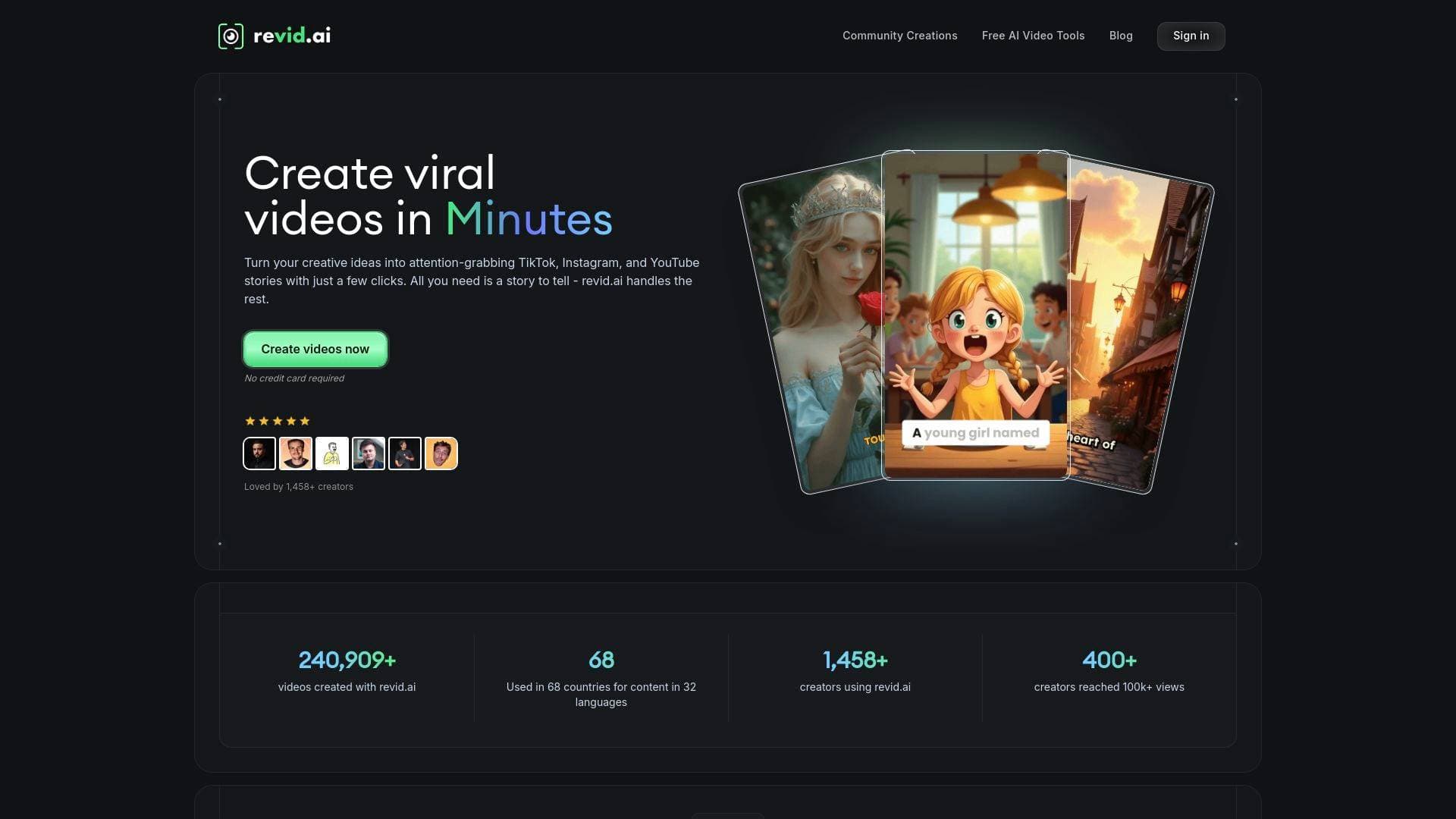
Brief Overview of Revid AI for Content Creators
Revid AI is a comprehensive AI video creation platform built specifically to help content creators turn raw ideas into publish-ready short videos without any editing experience. The core problem it solves is the time and technical skill gap that prevents most creators from producing consistent, high-quality video content at scale. Rather than spending hours in complex editing software, creators simply input a story idea, a script, or even a URL, and Revid AI handles everything from script writing to visual generation, voiceover, captions, and music. The platform supports TikTok, Instagram Reels, and YouTube Shorts natively, covering the three most important short-form video platforms for audience growth. What sets this video production tool apart is its AI training on millions of viral videos, allowing it to generate scripts and hooks that are specifically engineered for engagement. Over 14,258 creators have already used the platform, collectively producing more than 240,909 videos, with 400+ creators reaching 100,000+ views. The tool operates in 32 languages across 68 countries, making it one of the more globally accessible video creation workflows available today.
Revid AI Key Features for Content Creators
-
AI Script Generator: Revid AI automatically writes video scripts based on a creator's topic or idea, using patterns learned from millions of viral videos. Creators can also write their own script or paste a link to any content, which the AI will automatically parse and format into a video-ready script. This removes one of the biggest bottlenecks in the content creation workflow.
-
50+ Unique Voices: The platform offers more than 50 male and female AI voices for voiceover narration, giving creators the flexibility to match tone and personality to their content style. Creators can also upload their own pre-recorded audio or record directly through their device for a personal touch.
-
Video Styles and Templates: Whether a creator needs a TikTok-style vertical video, a YouTube clip, or an AI-generated talking avatar, Revid AI provides multiple format options through a simple selection menu. No manual configuration is required.
-
30+ Visual Generation Presets: The AI Movie Maker tool includes an extensive library of visual style presets including Ghibli Studio, Pixar, Anime, Realism, Ultra Realism, Flat Animation, Pixel Art, Sci-Fi, Manga, Fantasy, Lego, Claymation, and many more. Creators can match the visual aesthetic of their video to their brand or content niche without any design skills.
-
Multiple Media Type Options: Creators can choose between AI-generated video clips, moving AI images with motion effects, high-quality stock footage, their own uploaded media, or static gameplay-style backgrounds. This flexibility allows for a wide range of content styles from a single platform.
-
AI Music Video Generator: Identified as the most-used tool on the platform, this feature lets musicians and creators upload an audio file or paste a Spotify link to generate a fully synced music video with audio-reactive animations. It exports in formats optimized for YouTube Shorts and Instagram Reels.
-
PDF to Brainrot Video Converter: Creators can upload any PDF and the AI extracts key information, generates a voiceover, and pairs it with trending split-screen backgrounds like Subway Surfers or Minecraft Parkour gameplay. This tool is particularly useful for educational creators and students who want to repurpose study materials into viral short-form content.
-
One-Click Publishing: Finished videos can be published directly to TikTok, YouTube, Instagram, and other platforms from within the tool, eliminating the need to juggle multiple apps or scheduling tools.
-
Super-Simple Editor: After AI generation, creators have access to an intuitive post-generation editor to adjust timing, swap visuals, fine-tune captions, and modify pacing. Most users reportedly master the basics in under 5 minutes.
-
Automations Feature: Revid AI includes an automation capability that allows creators to set up automatic video creation from their content sources, enabling a near-autopilot content production system for busy creators who need to maintain posting consistency.
-
Caption Generator with 100+ Language Support: The platform generates subtitles automatically and supports over 100 languages, with a high-quality transcription option available for content with technical terms or multilingual dialogue.
-
130+ AI Video and Image Templates: A curated library of pre-optimized templates covers categories including viral, cinematic, creative, commercial, action, social media, AI avatar, product, nature, horror, and tutorial content. Each template includes pre-written prompts and settings so creators can generate professional content in seconds.
Revid AI Target Users & Use Cases for Content Creators
Revid AI is built for creators who want to produce more content in less time without sacrificing quality. It works equally well for complete beginners and experienced creators looking to scale their output. The platform's toolset spans a wide range of creator types and content formats.
-
Primary creator types: TikTokers, YouTube Shorts creators, Instagram Reels producers, indie musicians, podcasters, educational content creators, and faceless channel operators.
-
Experience level: Beginner to intermediate. No video editing background is required, and the interface is designed for creators who have never used editing software before.
-
Team size: Primarily solo creators, though the automation and bulk creation features make it viable for small content teams as well.
-
Specific use cases:
- A faceless YouTube channel operator using the prompt-to-video tool to generate narrated explainer videos with AI visuals and voiceover
- An indie musician uploading a WAV or MP3 file to create a fully synced music video for TikTok and Instagram promotion
- A student or educational creator converting lecture PDFs into Subway Surfers-style brainrot videos for viral reach
- A motivational content creator producing Hindi-language motivation videos using the platform's multilingual support across 32 languages
- A podcast creator using the Video Podcast Generator to transform audio episodes into visually engaging short clips
- A blogger or newsletter writer pasting article URLs to automatically generate short-form video summaries for social distribution
- A creator repurposing long-form content using the Audio to Video tool to turn interviews or recordings into shareable clips
- A brand or product-focused creator generating product showcase videos, animated ads, or explainer content using the AI Movie Maker with cinematic presets
How to Get Started with Revid AI
-
Create a free account: Sign up at revid.ai without a credit card. Free users receive a limited number of credits to start creating immediately, with 3 free videos available on the PDF to Brainrot tool.
-
Choose a tool or template: Select from the AI TikTok Video Generator, AI Movie Maker, AI Music Video Generator, PDF to Brainrot, Talking Avatar, Video Podcast Generator, or any of the 42+ available tools. Alternatively, browse the 130+ pre-built templates organized by category.
-
Input your content: Type a script, paste a URL, upload a PDF or audio file, or describe your idea in natural language. Use square brackets in scripts to guide specific visual choices (e.g., "[smiling woman]").
-
Customize and generate: Select a voice from 50+ options or upload your own, choose a visual style or preset, pick background music, set the aspect ratio (9:16, 16:9, or 1:1), and click Generate.
-
Edit and publish: Use the built-in editor to adjust timing, captions, and visuals, then publish directly to TikTok, YouTube, Instagram, or download for use elsewhere.
Frequently Asked Questions About Revid AI
Does Revid AI require any video editing experience? No editing experience is needed. The platform is specifically designed for creators who have never used editing software before. Most users report mastering the basics in less than 5 minutes, and the AI handles all technical production tasks automatically.
Who owns the videos created with Revid AI? Creators own 100% of all content generated through the platform, including videos, scripts, and assets. There are no hidden ownership clauses, and creators are free to use, modify, and monetize their content as they see fit. Videos can be kept permanently, even if a subscription is cancelled.
Can Revid AI videos be used for commercial purposes? Yes, videos created with Revid AI can be used for commercial purposes including marketing, monetized content, and product promotion. Creators should ensure any custom content they upload (such as audio files or images) is properly licensed for commercial use.
What pricing plans are available? Revid AI offers several subscription plans. The most popular plan starts at $39 per month and includes 2,000 credits, access to all premium features, and priority support. A free tier is available with no credit card required for initial access.
How does the credit system work? Each video generation costs credits. The base cost is 1 credit per video, with additional credits used per 1,000 characters over the initial 1,000 in a script. Premium features like AI-generated video clips or high-quality audio transcription may require additional credits.
What aspect ratios does Revid AI support? Three aspect ratios are available: 9:16 (vertical, optimized for TikTok and Instagram Stories), 16:9 (horizontal, ideal for YouTube), and 1:1 (square, suited for Instagram feeds and some social timelines).
Does Revid AI work in languages other than English? Yes. The platform supports 32 languages and is used in 68 countries. The caption generator supports subtitles in over 100 languages, and dedicated tools exist for content in languages including Hindi, German, Italian, Spanish, French, Portuguese, and Russian.
What are the technical requirements to use Revid AI? Revid AI is a cloud-based platform that runs in any modern web browser including Chrome, Firefox, Safari, and Edge. No downloads or installations are required. A stable internet connection of at least 5 Mbps is recommended, and no high-end device is needed since all processing happens on Revid's servers.
Bottom Line: Should Content Creators Choose Revid AI?
Revid AI is a strong choice for content creators who want to produce short-form video content consistently without investing in expensive equipment, editing software, or production teams. The platform's depth is particularly impressive: with 42+ specialized tools, 130+ templates, 50+ voices, and a library of visual presets spanning everything from Ghibli to Pixel Art to Cinematic Realism, it covers nearly every content niche a creator might occupy.
The tool is best suited for faceless channel creators, indie musicians, educational content producers, and social media creators who need to maintain a high posting frequency across TikTok, Instagram, and YouTube. The automation feature is a genuine differentiator for creators who want to build a content pipeline that runs with minimal manual input.
The main limitation to be aware of is the credit-based pricing model. Longer videos and premium features like AI-generated video clips consume more credits, so high-volume creators will need to factor subscription costs into their workflow budget. The most popular plan at $39/month includes 2,000 credits, which should cover a solid monthly content output for most individual creators.
For creators who have been held back by the technical complexity of video production, Revid AI removes nearly every barrier between an idea and a published video. The combination of viral-optimized scripting, multi-platform publishing, and a genuinely beginner-friendly editor makes it one of the more complete AI video creation tools available for the creator economy.
Details
One link. Every channel, rate, and piece of work brands need to evaluate you. Built for how creators actually get hired.
Claim your profile
Live creator, content, and marketing roles from real companies, with the pay, market, and context the raw job page never gives you.
Browse jobs

 Post Bridge