

PostFlow
PostFlow is a social media scheduling and management platform that lets content creators plan, schedule, collaborate, and publish posts across all major platforms from one workspace.
What is PostFlow? A Content Creator's Guide
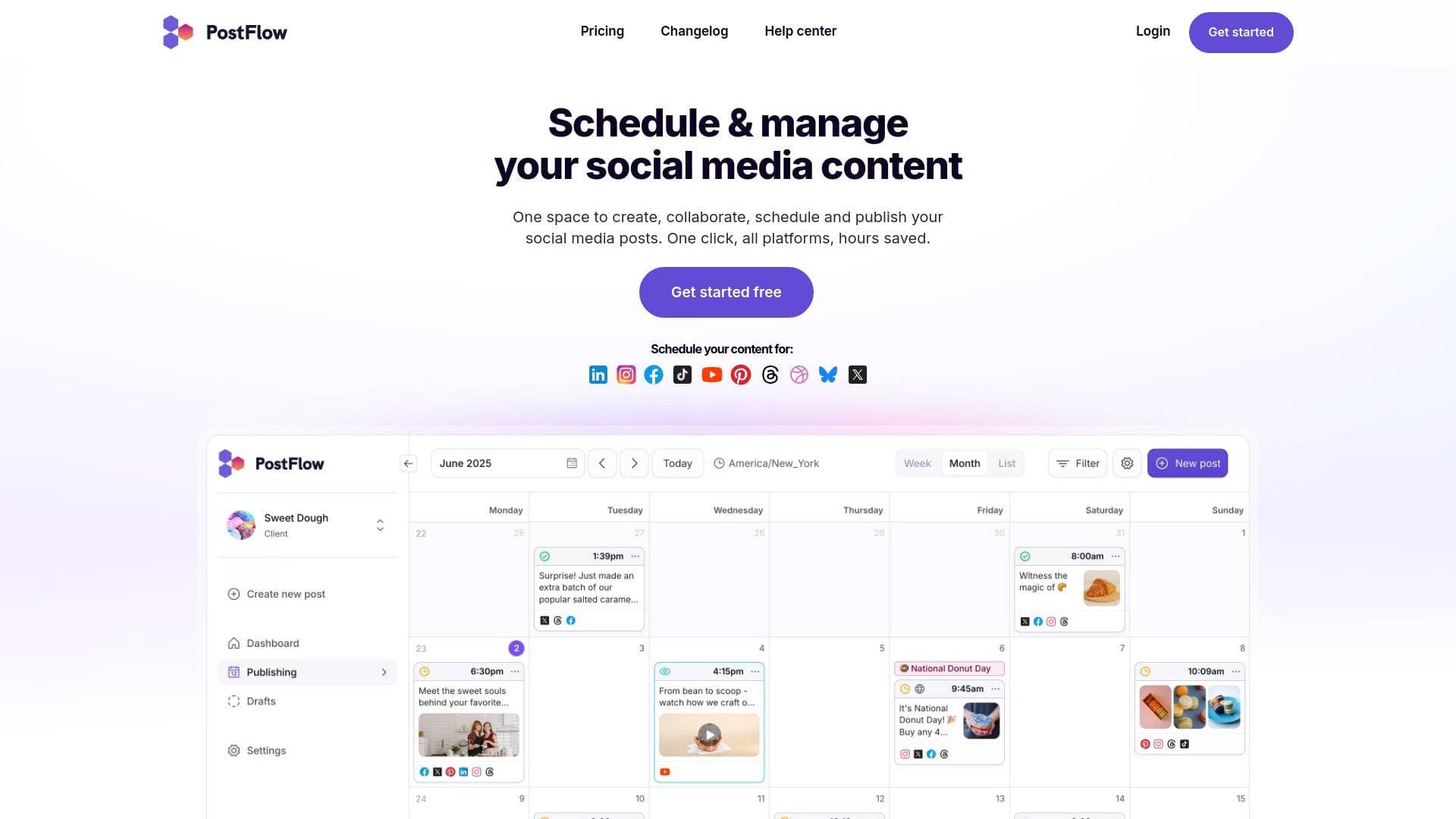
PostFlow is a social media scheduling and management platform built for content creators, brands, and teams who want to stop wasting hours copying posts from one platform to another. The core problem it solves is simple but painful: managing multiple social accounts across different networks is chaotic, repetitive, and time-consuming. PostFlow consolidates the entire content workflow into one workspace, covering everything from drafting and scheduling to team collaboration, client approvals, and performance analytics. It supports publishing to LinkedIn, Facebook, Instagram, TikTok, YouTube, Pinterest, Threads, Bluesky, Dribbble, and Google Business Profile, making it one of the more comprehensive cross-platform scheduling tools available. Creators can write a post once, then customize it for each individual network without starting from scratch. The platform also includes a built-in image and video editor, a media library, saved text templates, and detailed analytics, giving creators a complete production environment rather than just a scheduler. A 7-day free trial is available with no credit card required.
PostFlow Features That Matter for Content Creators
-
Cross-Platform Post Scheduling: Creators can write a single post and schedule it across all connected social networks simultaneously. Rather than logging into each platform individually, PostFlow lets you select all accounts in a group with one click and publish everywhere at once, turning what used to be an hour of repetitive work into minutes.
-
Platform-Specific Customization: After creating a base post, creators can open a customized version for each social network to tweak text, hashtags, and images. Every network also has its own dedicated settings section, so Instagram-specific options like collaborator tags and product tagging are separate from TikTok or LinkedIn settings.
-
Built-In Image and Video Editor: The post composer includes a full media editor with cropping, resizing, filters, annotation tools, stickers, video trimming, and a redact tool. Creators can format visuals to the correct dimensions for each platform without leaving PostFlow, and uploaded videos that don't meet Instagram's requirements are automatically converted for compatibility.
-
Content Planning Calendar: PostFlow offers an intuitive calendar view for visualizing the entire content schedule. Creators can see quiet days at a glance, drag and drop posts to reschedule them, filter by labels, and add multi-day calendar notes that can be scoped to specific groups or shared with clients.
-
Bulk Import via CSV: Creators managing high-volume content can upload a CSV file to schedule hundreds of posts across all social networks at once. The CSV import supports video thumbnails, TikTok-specific settings, and post titles, making it practical for batch-scheduling campaigns or repurposing content libraries.
-
First Comment Scheduling: PostFlow lets creators schedule the first comment on a post for Instagram, Facebook, Threads, LinkedIn, YouTube, Bluesky, and X (Twitter). Creators can even set a condition so the first comment only publishes when a post hits a certain performance threshold, making it ideal for adding links, CTAs, or newsletter plugs strategically.
-
Media Library with Google Drive Integration: A centralized media library lets creators store and organize all creative assets in one place. Files can be imported directly from Google Drive into the post composer, and clients can upload required assets directly to the library, eliminating the back-and-forth of emailing files.
-
Content Approval Workflows: PostFlow includes four approval workflow options: None, Loose, Strict (one approval required or everyone must approve), and Strict Multi-Level. Creators working with clients benefit from the multi-level option, where internal team members approve content first before clients are notified. Guests without a PostFlow account can also approve posts via a public link.
-
Analytics with Post Scoring: The analytics suite covers profile-level growth, content performance across all networks, and individual post metrics. Every post receives a score from 0 to 10, where 5 represents average performance and 10 means the post performs at least twice better than the account average, giving creators a fast way to identify top-performing content.
-
Saved Text Templates and Hashtag Groups: Creators can save frequently used hashtag sets, CTAs, newsletter plugs, and other recurring text as templates. These can be inserted into any post with one click and shared with team members or kept private.
-
Mention Suggestions and Saved Mention Groups: PostFlow supports cross-network mentions with suggestions that appear when typing
@. Creators who regularly tag the same accounts can save mention groups with handles for all networks and apply them in two clicks using@@, with fallback text for platforms that don't support mentions. -
ClickUp Integration: For creators already using ClickUp as a project management hub, PostFlow offers a deep two-way integration. Posts can be created, scheduled, and published directly from ClickUp tasks, post metrics sync into custom fields, comments sync between both platforms, and tasks are automatically marked complete once a post publishes.
Which Content Creators Should Use PostFlow?
PostFlow is built for creators who manage content across multiple platforms and are tired of the manual, repetitive process of posting everywhere separately. It scales from solo creators handling their own channels to teams and agencies managing content for multiple clients simultaneously, with unlimited seats included at no extra cost.
-
Primary creator types: YouTubers scheduling video posts and Shorts, Instagram creators managing Reels, carousels, and Stories, TikTokers scheduling short-form video, bloggers promoting content across LinkedIn and Facebook, podcasters cross-posting episode announcements, and newsletter writers adding first-comment CTAs to drive subscribers.
-
Experience level: The platform is approachable for beginners with a straightforward three-step onboarding (start trial, connect profiles, manage content), while advanced features like multi-level approval workflows, CSV bulk imports, and ClickUp integration serve experienced creators and professional teams.
-
Team size: Solo creators benefit from the scheduling, media library, and analytics features. Teams and creator collectives gain from unlimited seats, role-based permissions, group-level approval workflows, and real-time collaboration tools including live editing indicators that show when multiple users have the same post open.
-
Specific use cases:
- A YouTuber scheduling video thumbnails and custom descriptions across YouTube, Instagram, and TikTok simultaneously
- An Instagram creator tagging products from their shop catalog directly in scheduled Reels and feed posts
- A podcaster using saved text templates to quickly add episode links and CTAs to posts across all platforms
- A content team using the approval workflow to get client sign-off before any post goes live, with pixel-perfect previews for review
- A creator agency managing multiple client brands in separate groups with customized access permissions for each client
- A newsletter writer scheduling first comments with a performance condition so links only appear on posts that gain traction
- A social media manager using bulk CSV import to schedule an entire month of content in one upload
- A creator tracking which posts score highest in analytics to double down on formats that resonate with their audience
-
Content types: Feed posts, Reels, Stories, carousels (up to 10 images), video posts, GIFs, polls (X and Threads), Facebook carousel posts with up to 10 clickable cards, quote posts on Bluesky, Google Business Profile updates and events, and Facebook Page cover photo updates.
Getting Started with PostFlow
- Start your free trial: Sign up at PostFlow with no credit card required. The 7-day trial gives full access to the platform's features, and Google Sign-In is available for faster registration.
- Connect your social profiles: Link accounts from any supported network, including Instagram (now connectable without a Facebook Page), TikTok, YouTube, LinkedIn, Facebook, Pinterest, Threads, Bluesky, and Google Business Profile. Custom names can be set for each connected account to keep things organized.
- Manage and schedule your content: Use the post composer to create posts, customize them per network, add media from your library or Google Drive, set labels, assign approvers if needed, and schedule publication. From there, the calendar view gives a complete visual overview of everything queued up.
PostFlow FAQ for Content Creators
Does PostFlow support Instagram without a Facebook Page? Yes, creators can connect personal Instagram accounts directly without linking a Facebook Page. This method supports scheduling posts, Stories, and Reels. Instagram product tagging requires the Facebook login method.
Can creators schedule custom video thumbnails? Custom video thumbnails are supported for Instagram Reels, Facebook, Pinterest, LinkedIn, TikTok, and YouTube. Creators can either choose a frame from the uploaded video or upload a separate custom image as the thumbnail.
How does the post scoring system work? Every published post receives a score from 0 to 10 based on engagements and impressions relative to the account's average performance. A score of 5 represents average performance, while a 10 means the post performs at least twice as well as the account average. Scores are calculated individually per account and content type.
Are there limits on team members or client seats? PostFlow does not charge per seat. Creators can invite unlimited team members and clients to their organization at no additional cost. Access can be controlled through roles, permissions, and group-level restrictions.
Can clients approve content without a PostFlow account? Yes. Public post sharing allows creators to share a link with clients who don't have a PostFlow account. Guests can preview content, leave comments, and approve posts using the external public link, which is available for the Loose approval workflow.
What video formats does PostFlow accept?
The post composer accepts .mp4, .mov, .mpeg, .webm, and .avi video formats. Videos that don't meet Instagram's technical requirements are automatically converted for compatibility, including bitrate, resolution, and FPS adjustments.
Does PostFlow support bulk scheduling? Creators can upload a CSV file to bulk import and schedule hundreds of posts at once across all connected social networks. The CSV import supports video thumbnails, TikTok-specific settings, post titles, and post links.
The Verdict: Is PostFlow Worth It for Content Creators?
PostFlow is a strong fit for content creators who publish regularly across multiple platforms and need a centralized system that handles more than just basic scheduling. The combination of cross-platform publishing, platform-specific customization, a built-in media editor, analytics with post scoring, and flexible approval workflows makes it genuinely useful for both solo creators and collaborative teams. The unlimited seats policy is a meaningful advantage for creator teams and agencies who would otherwise pay per user on other platforms. The ClickUp integration adds real value for creators already managing projects in that ecosystem. The 7-day free trial with no credit card required makes it easy to test whether PostFlow fits a creator's specific workflow before committing.
Details
One link. Every channel, rate, and piece of work brands need to evaluate you. Built for how creators actually get hired.
Claim your profile
Live creator, content, and marketing roles from real companies, with the pay, market, and context the raw job page never gives you.
Browse jobs

 Post Bridge