

Kapwing
Kapwing is an AI-powered video creation and editing platform trusted by over 35 million creators to produce, edit, and repurpose content across every social channel.
What is Kapwing? A Content Creator's Guide
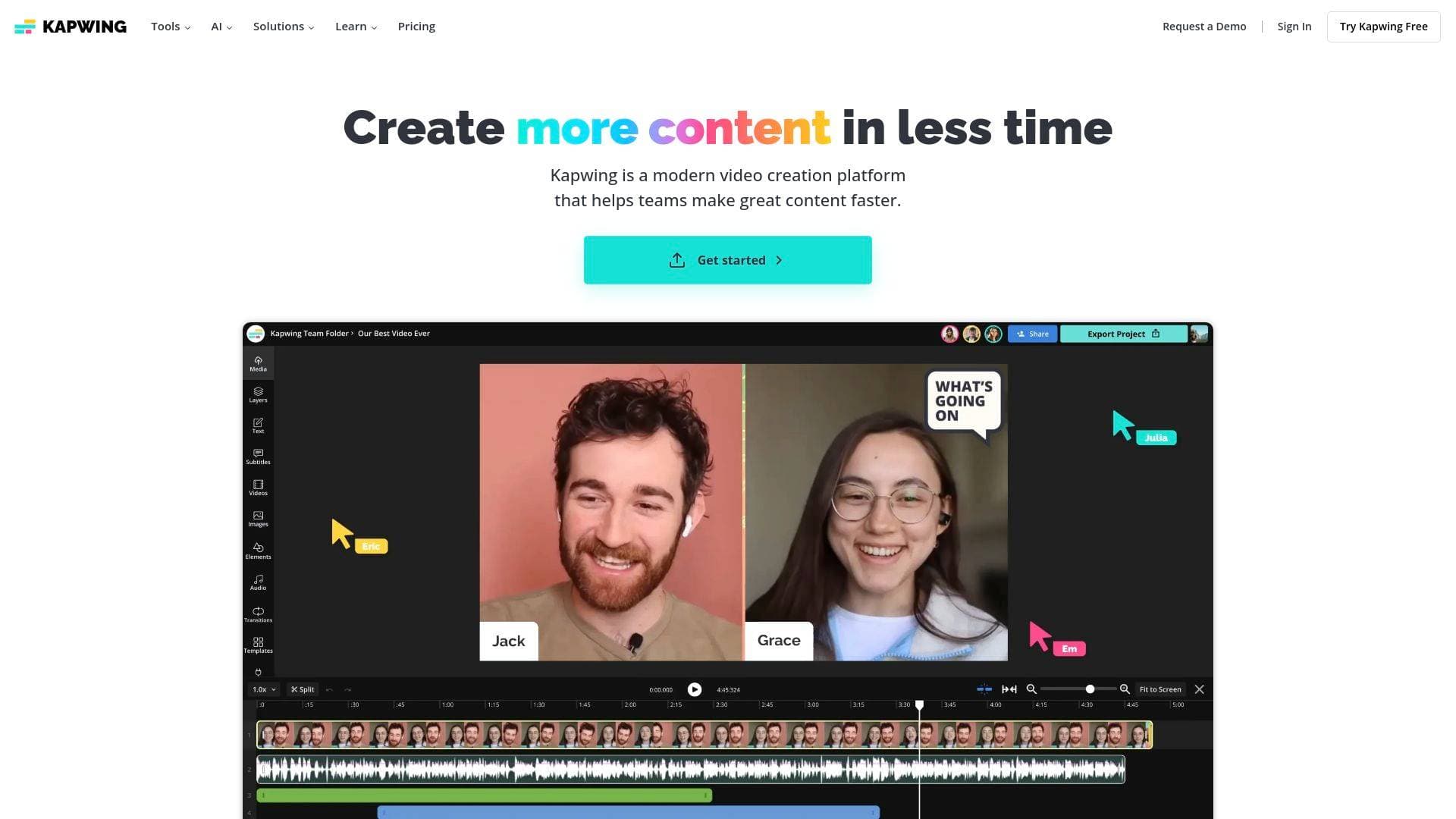
Kapwing is an AI-powered video creation and editing platform built for modern content creators who need to produce polished, publish-ready videos without spending hours in a complex editing suite. Trusted by over 35 million creators worldwide, it tackles one of the most persistent pain points in the content creation workflow: turning raw ideas and long-form footage into platform-optimized, shareable content fast. The platform operates entirely in the cloud, meaning there are no downloads or installations required — creators can jump in from any device, anywhere in the world, and pick up exactly where they left off. What makes Kapwing particularly compelling is its combination of a traditional drag-and-drop video editor with a deep suite of AI-powered tools, covering everything from text-to-video generation to automatic subtitle creation and audio cleanup. It supports a wide range of content formats and aspect ratios, including 9:16 for TikTok and YouTube Shorts, 16:9 for YouTube, and 1:1 and 4:5 for Instagram. The platform is notably built by a team that runs their own YouTube channel with 200K+ subscribers, meaning the product decisions are shaped by people who understand the creator experience firsthand. For solo creators and collaborative teams alike, Kapwing functions as a full video production platform that scales with content ambitions.
Kapwing Features That Matter for Content Creators
-
AI Video Generator: Kapwing's AI Video Generator transforms a simple text prompt into a complete video project, complete with voiceover, visuals, subtitles, music, and characters. Creators can customize the script for tone and content, making it possible to go from idea to first draft without ever recording a single frame. This is a major advantage for creators who want to produce content consistently without being on camera.
-
TikTok Clip Maker: This AI-powered tool analyzes uploaded footage or a pasted video URL, identifies the best highlights based on a text prompt, and generates fully formatted 9:16 clips within minutes. Creators can repurpose YouTube videos, Twitch streams, podcasts, interviews, and more into multiple TikTok-ready clips without touching a timeline. It supports clips ranging from 15 seconds to 3 minutes, making it versatile for different content styles.
-
Auto Speaker Focus: When converting horizontal footage to vertical formats, keeping subjects properly framed is a constant challenge. Kapwing's Auto Speaker Focus automatically centers speakers in the frame throughout the clip, eliminating cropped faces and awkward compositions. This is especially useful for interview content, gaming streams, and talking-head videos being repurposed for TikTok or Reels.
-
Drag-and-Drop Video Editor: The core video editing interface uses a multi-layer timeline that lets creators trim, combine, and overlay clips with ease. The collaborative interface allows team members to participate and leave comments directly within the project, making it practical for creator teams managing multiple channels or clients.
-
Auto Subtitle Generator: Kapwing auto-generates subtitles with hundreds of unique styles and animations, and the tool improves continuously. Creators can customize colors, fonts, and effects to match their brand. The subtitle tool supports multiple languages, making it useful for creators targeting international audiences.
-
Translation and Dubbing: Beyond subtitles, Kapwing includes translation and dubbing capabilities, allowing creators to localize their content for different regions. This opens up audience growth opportunities without requiring creators to re-record content in multiple languages.
-
Smart Cut: Smart Cut is an AI editing tool that handles one of the most tedious parts of video production — removing dead air, filler words, and awkward pauses. Creators get a cleaner, tighter video without manually scrubbing through footage frame by frame.
-
Clean Audio: Background noise is a persistent problem for creators shooting in imperfect environments. Kapwing's Clean Audio tool removes background noise automatically, helping creators maintain broadcast-quality audio without expensive studio setups or third-party software.
-
Script Generator and Text to Speech: Creators can generate scripts directly within Kapwing and convert them to voiceover using the Text to Speech tool. This supports a fully camera-free content creation workflow, from script to finished video, entirely within one platform.
-
Brand Kit: The Brand Kit lets creators and teams save logos, fonts, colors, and presets for consistent aesthetics across every piece of content. For creators managing multiple channels or working with brand partners, this ensures visual consistency without manually recreating styles on every project.
-
Repurpose Studio and Document to Video: Kapwing includes a dedicated Repurpose Studio for converting existing content into new formats, as well as a Document to Video tool that transforms written content into video. Bloggers, newsletter writers, and educators can convert their existing written work into video content without starting from scratch.
-
Royalty-Free Asset Library: Creators get access to millions of royalty-free images, videos, music, and sound effects directly within the editing studio. Audio tracks from Pixabay are included, and for footage that doesn't exist in the library, the AI Image Generator and AI Video Generator can create custom visuals from text prompts.
Which Content Creators Should Use Kapwing?
Kapwing is designed for a wide range of content creators, from complete beginners launching their first YouTube channel to experienced teams managing high-volume social media pipelines. The platform's browser-based, no-download approach makes it accessible to anyone regardless of technical background, while its AI tools and collaborative features give professional creators and agencies the speed they need to stay consistent.
-
Primary creator types: YouTubers repurposing long-form content into Shorts, TikTokers building clip libraries from livestreams, podcasters turning episodes into social clips, streamers extracting highlights from Twitch recordings, fitness influencers breaking full workouts into individual tip videos, food creators splitting recipe demos into bite-sized TikToks, and interview-based creators splitting long conversations into multiple highlight clips.
-
Experience level: Kapwing is explicitly beginner-friendly, with one user describing it as easy enough to learn without any prior editing experience using the platform's own YouTube tutorials. At the same time, the depth of AI tools and collaborative features supports experienced creators and production teams.
-
Team size: Both solo creators and collaborative teams are supported. The shared workspace feature allows team members to join projects, leave real-time comments, and access a shared Brand Kit, making it practical for creator teams, social media agencies, and content studios.
-
Specific use cases:
- Turning a 60-minute YouTube video into dozens of TikTok clips using the AI Clip Maker
- Repurposing a Twitch livestream into highlight reels without manual editing
- Generating a complete video from a text prompt for faceless YouTube channels
- Adding auto-generated, branded subtitles to boost watch time on social platforms
- Converting a podcast episode into multiple short-form clips for Instagram Reels and TikTok
- Cleaning up audio from home studio recordings without external software
- Collaborating with an editor or team member on a shared project in real time
- Localizing content for international audiences using translation and dubbing tools
-
Content types: Vertical short-form video (9:16), horizontal YouTube content (16:9), square Instagram posts (1:1), portrait Instagram posts (4:5), memes, collages, subtitled videos, and AI-generated video content.
Getting Started with Kapwing
- Create a free account: Kapwing is completely free to start. No download or installation is required — just sign up and open the studio editor in any browser.
- Upload footage or start from a prompt: Upload a video file from a device, paste a URL from YouTube, Twitch, or another platform, or use the AI Video Generator to create a video from a text prompt.
- Generate or edit clips: For TikTok content, describe the clips needed in the AI Clip Maker, specify the format (such as 9:16) and clip length, and let the AI generate ready-to-edit clips. For manual editing, use the drag-and-drop timeline to trim, layer, and combine footage.
- Add subtitles, audio, and branding: Auto-generate subtitles, apply Brand Kit assets, add royalty-free music or sound effects, and use Clean Audio to remove background noise.
- Export and publish: Once editing is complete, export the project and download a share-ready file. Free accounts include a watermark on exports; upgrading to a Pro account removes it entirely.
Kapwing FAQ for Content Creators
Is Kapwing free to use? Yes, Kapwing is completely free to start. The free plan includes access to the core editing tools and AI features, though exports on the free plan include a small watermark. Upgrading to a Pro account removes the watermark entirely.
Does Kapwing add a watermark to videos? Free account exports include a watermark on all videos, including clips generated by the TikTok Clip Maker. Pro account holders have the watermark completely removed from all exports.
Can Kapwing turn a Twitch stream into TikTok clips? Yes. Creators can upload a Twitch recording or paste a URL directly into the AI TikTok Clip Maker. The AI assistant automatically identifies and extracts the most engaging moments without requiring any manual clip selection.
What aspect ratios does Kapwing support? Kapwing supports 9:16 for TikTok, YouTube Shorts, Instagram Reels, and LinkedIn short-form video; 16:9 for YouTube; 1:1 for Instagram square posts; and 4:5 for Instagram portrait posts.
Does Kapwing support collaborative editing? Yes. Kapwing supports real-time collaborative video editing through shared workspaces. Team members can be invited to join a workspace, leave comments, and access shared Brand Kit assets. Over 100 collaborative video editing tools are available within the online editor.
Are the audio tracks in Kapwing royalty-free? Kapwing includes audio tracks from Pixabay, which are royalty-free. However, some Pixabay tracks can be flagged by YouTube's Content ID system, which is outside Kapwing's control. Pixabay provides steps to clear any such claims.
Can Kapwing create videos without any footage? Yes. The AI Video Generator creates complete video projects from a text prompt, including visuals, voiceover, subtitles, music, and characters. The Document to Video tool also converts written content into video, making it possible to produce content entirely without recording.
Does Kapwing work on mobile? Kapwing is cloud-based and accessible from any device with a browser, meaning creators can access and work on their projects from anywhere without needing a desktop application.
The Verdict: Is Kapwing Worth It for Content Creators?
Kapwing stands out as a genuinely versatile video production platform for content creators at every level. Its strongest value proposition is the combination of AI-powered clip generation, a full editing suite, and collaborative tools all in one browser-based platform — no installations, no steep learning curve, and no need to juggle multiple apps. For creators focused on short-form content, the TikTok Clip Maker alone can dramatically increase output by turning a single long video into dozens of platform-ready clips in minutes. The Auto Subtitle Generator, Clean Audio, and Smart Cut tools address the most time-consuming parts of post-production without requiring technical expertise.
The main limitation to be aware of is the watermark on free plan exports, which makes the free tier better suited for testing the platform than for publishing finished content. Creators serious about their output will need to upgrade to a Pro account to remove it. That said, the free entry point is a genuine advantage for beginners who want to explore the platform before committing.
For YouTubers, TikTokers, streamers, podcasters, and social media creators who need to produce more content faster without sacrificing quality, Kapwing delivers a well-rounded, AI-enhanced workflow that holds up across a wide range of content types and publishing platforms.
Details
One link. Every channel, rate, and piece of work brands need to evaluate you. Built for how creators actually get hired.
Claim your profile
Live creator, content, and marketing roles from real companies, with the pay, market, and context the raw job page never gives you.
Browse jobs Post Bridge
