
CameraSim
CameraSim is a free interactive camera simulator that teaches photographers how ISO, aperture, shutter speed, and exposure work through hands-on visual simulations.
What is CameraSim? A Content Creator's Guide
Photography is one of those skills every content creator eventually needs, whether shooting thumbnails for YouTube, product flats for Instagram, or behind-the-scenes stills for a newsletter. CameraSim is a free interactive camera simulation tool built specifically to make the fundamentals of photography visual and intuitive, letting creators experiment with real camera settings without ever picking up a physical camera. Originally built in 2009 to help a friend understand how a new DSLR worked, it has since grown into a globally used photography education resource featured in classrooms, workshops, and online courses. The core idea is simple but powerful: instead of reading about aperture, ISO, and shutter speed, creators can actually manipulate those settings and instantly see how each change affects a simulated photo. CameraSim has been featured by major outlets including Wired, USA Today, Engadget, Gizmodo, Lifehacker, PCWorld, and Macworld, which speaks to its credibility as a photography learning tool. For content creators who want to level up their visual storytelling without expensive courses or trial-and-error on a real shoot, this is a genuinely practical starting point.
CameraSim Features That Matter for Content Creators
-
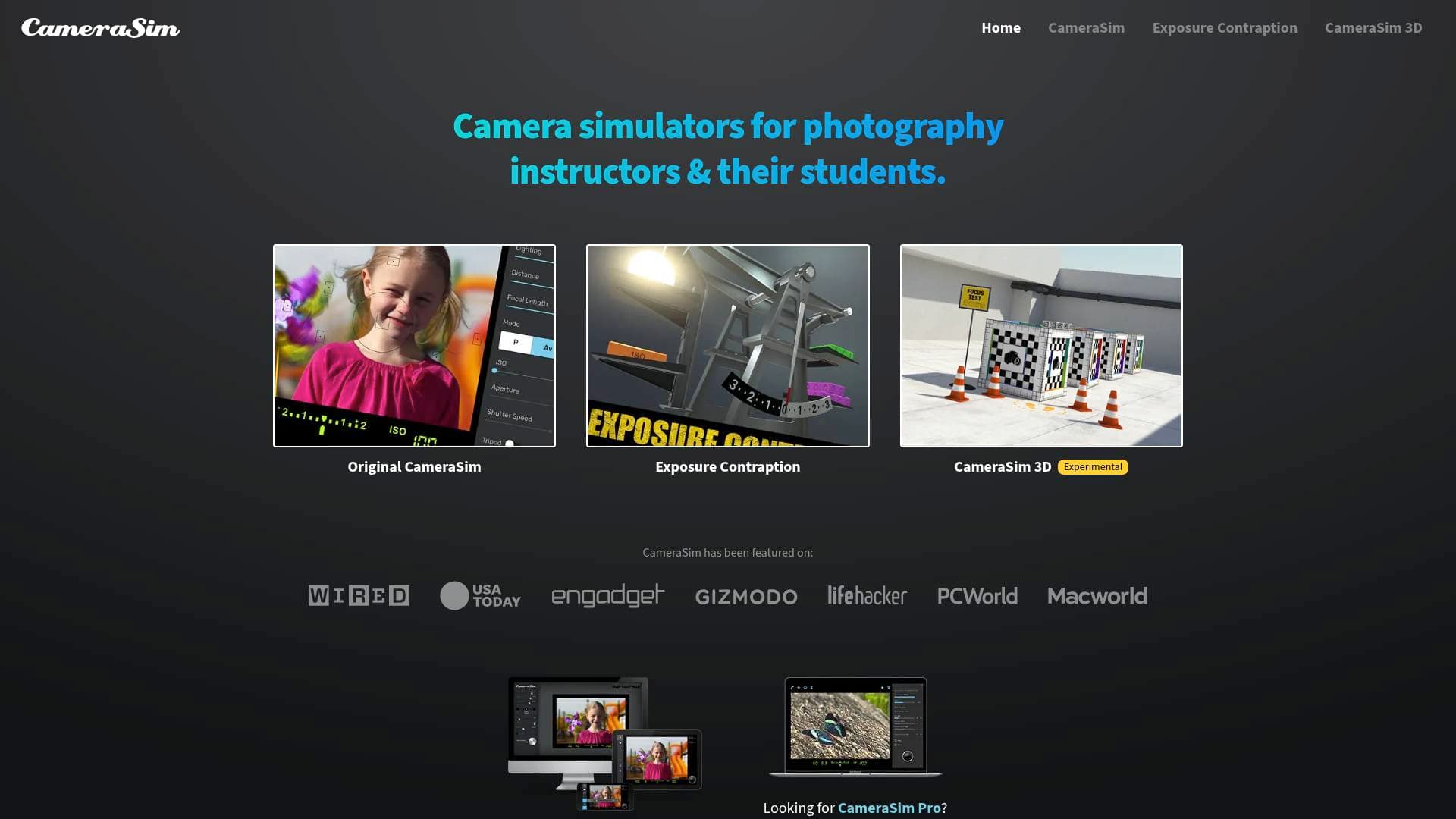
Original CameraSim Simulator: The flagship simulation tool lets creators adjust lighting, distance, focal length, ISO, aperture, and shutter speed in real time, then snap a virtual photo to see the result. It mirrors how a real DSLR behaves, meaning the skills practiced here transfer directly to shooting actual content.
-
Lighting Slider: Lighting is described as the single biggest determinant of how a camera needs to be set, and this slider lets creators experiment across a range of indoor and outdoor lighting conditions. For creators who shoot in varied environments, from dimly lit studios to bright outdoor locations, understanding how light affects settings is foundational.
-
Four Shooting Modes (Program, Aperture Priority, Shutter Priority, Manual): CameraSim simulates all four major camera modes found on DSLRs. Creators can start with Program mode where the camera handles everything automatically, then gradually work toward full Manual mode as their confidence builds, making the learning curve far less intimidating.
-
ISO Control with Visual Grain Feedback: The ISO slider demonstrates how sensitivity to light increases at higher settings but introduces visible grain into the image. Creators who shoot video thumbnails or portraits in low-light conditions will immediately understand why keeping ISO as low as possible matters for clean, professional-looking shots.
-
Aperture Simulation with Depth-of-Field Preview: Adjusting aperture in f-stops visually shows how the size of the lens opening affects both light intake and depth of field. Creators can see firsthand how a low f-stop creates that blurry background effect so popular in portrait and product photography, while high f-stops keep the entire scene sharp.
-
Shutter Speed Control with Motion Blur Demonstration: The shutter speed slider shows how fast speeds freeze action while slow speeds can introduce motion blur. This is especially useful for creators who shoot moving subjects, whether that's a cooking video, a sports moment, or a dynamic lifestyle shot.
-
Tripod Toggle: A virtual tripod option demonstrates how stabilizing the camera prevents camera shake blur at slow shutter speeds, while also clarifying that a tripod cannot stop a moving subject from blurring. It is a small but genuinely useful detail that mirrors real-world shooting decisions.
-
Exposure Contraption Simulator: Rather than relying on the traditional exposure triangle diagram, this separate simulator visualizes exposure as a physical balancing scale. Light, ISO, aperture, and shutter speed are all represented as weighted elements on the scale, making the relationship between them tangible and easier to internalize than any static diagram.
-
CameraSim 3D: A third simulation tool, CameraSim 3D, offers another dimension of interactive learning for creators who want to explore camera mechanics beyond the flat 2D interface of the original simulator.
-
Photography Articles: CameraSim includes a library of written articles covering practical topics like a three-step method for shooting like a pro, controlling exposure without going full manual, the case for shooting RAW files, and photography etiquette. These articles extend the learning beyond the simulators and give creators actionable guidance they can apply immediately.
Which Content Creators Should Use CameraSim?
CameraSim is built for anyone who wants to understand how a camera actually works before, during, or after picking one up. It is especially valuable for creators who are self-taught and have never had formal photography instruction, since it removes the jargon barrier that makes camera manuals so frustrating to read.
Primary creator types:
- YouTubers and video creators who want to shoot better thumbnails and B-roll without relying entirely on auto mode
- Bloggers and newsletter writers who photograph their own products, food, or environments for visual content
- Instagram and TikTok creators who want to understand depth of field and lighting to improve their visual aesthetic
- Podcasters who shoot promotional photos or video clips for social media promotion
- Photography educators and instructors who can use CameraSim Classroom as a teaching platform for students
Experience level: CameraSim is clearly designed with beginners in mind. The ability to start in Program mode and work toward Manual mode means creators with zero technical knowledge can start immediately without feeling overwhelmed.
Specific use cases for content creators:
- A YouTube creator learning why their indoor shots look grainy and how to fix it by adjusting ISO and lighting
- A food blogger experimenting with aperture settings to achieve blurry backgrounds on product shots
- A TikTok creator understanding why fast-moving subjects blur and how shutter speed solves the problem
- A newsletter writer who photographs their own workspace and wants cleaner, more professional images
- A podcaster shooting promotional headshots and learning how distance and focal length affect portrait quality
- A creator preparing to buy their first DSLR and wanting to understand settings before spending money
- An educator running a photography workshop who needs a visual, interactive tool to explain exposure to students
- A lifestyle creator who shoots in mixed indoor/outdoor lighting and wants to stop relying on auto mode entirely
Getting Started with CameraSim
- Choose a simulator: Start with the Original CameraSim for a comprehensive introduction to all major camera settings, or jump into the Exposure Contraption if exposure balance is the specific concept you want to understand first.
- Set your lighting and scene: Use the lighting slider to pick a starting condition (bright outdoor light or dim indoor), then adjust distance and focal length to frame your virtual subject.
- Select a shooting mode: Begin with Program mode to see how the camera handles settings automatically, then switch to Aperture Priority or Shutter Priority to take control of one variable at a time.
- Adjust ISO, aperture, and shutter speed: Experiment with each slider individually to see how changes affect the simulated image, paying attention to grain, depth of field, and motion blur.
- Snap the virtual photo: Just like a real DSLR, some effects only become visible after pressing the shutter button, reinforcing the real-world shooting experience.
CameraSim FAQ for Content Creators
Is CameraSim free to use? Yes, CameraSim offers free simulators including the Original CameraSim, the Exposure Contraption, and CameraSim 3D. There is no cost to access and use these tools for learning photography fundamentals.
What camera settings does CameraSim teach? CameraSim covers ISO, aperture (measured in f-stops), shutter speed, focal length, lighting conditions, distance to subject, and all four major shooting modes: Program, Aperture Priority, Shutter Priority, and Manual.
Is CameraSim suitable for complete beginners? Absolutely. The tool was originally built to help someone understand their first DSLR, and the design philosophy centers on making photography fundamentals visual and intuitive rather than jargon-heavy. Beginners can start in Program mode and progress at their own pace.
Does CameraSim work for photography instructors? Yes. CameraSim Classroom is a dedicated photography teaching platform for schools and instructors, extending the tool beyond individual self-study into structured educational environments.
What is the Exposure Contraption and how is it different from the Original CameraSim? The Exposure Contraption is a separate simulator that visualizes exposure as a physical balancing scale rather than a static triangle diagram. It places light itself as a variable in the equation alongside ISO, aperture, and shutter speed, making the interplay between all four elements easier to understand visually.
Does CameraSim include written learning resources? Yes. Alongside the simulators, CameraSim includes photography articles covering topics like a three-step pro shooting method, exposure compensation, shooting in RAW format, and practical photography tips.
The Verdict: Is CameraSim Worth It for Content Creators?
For any content creator who shoots their own photos or video and wants to move beyond auto mode, CameraSim is a genuinely useful and completely free resource. The interactive simulators do something that written guides and static diagrams simply cannot: they let creators feel the relationship between settings rather than just read about it. The Original CameraSim covers all the core controls a DSLR shooter needs to understand, while the Exposure Contraption offers a fresh and more intuitive take on the exposure concept that has tripped up photographers for decades.
The main limitation is that CameraSim is a learning tool, not a production tool. It will not edit photos, manage a content calendar, or help with publishing. Its value is entirely in the education it provides, and that education is genuinely solid. Creators who invest time in the simulators will walk away with a much clearer understanding of why their photos look the way they do and exactly which settings to change to get better results on their next real shoot. Given that it is free and has been trusted by photography instructors worldwide since 2009, CameraSim is an easy recommendation for any creator serious about improving their visual content quality.
Details
One link. Every channel, rate, and piece of work brands need to evaluate you. Built for how creators actually get hired.
Claim your profile
Live creator, content, and marketing roles from real companies, with the pay, market, and context the raw job page never gives you.
Browse jobs

 Post Bridge