
Instagram Hashtag Limit: The New 5-Hashtag Rule Explained
Discover Instagram's new 5-hashtag limit and the 10 million post rule that's changing content discovery. Learn strategic hashtag selection for maximum reach.
Details
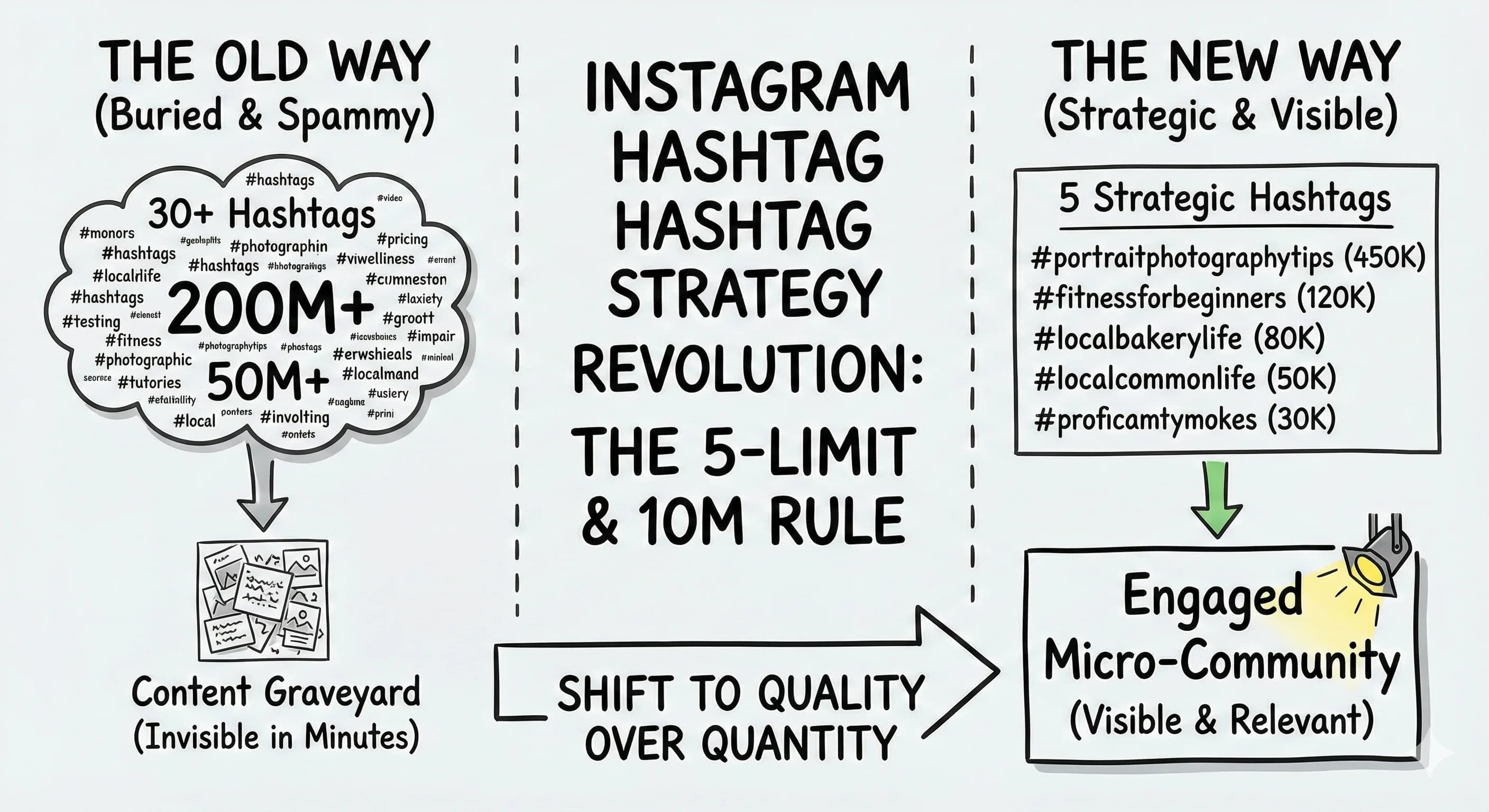
Hashtag strategy just got a major shake-up. Instagram's new hashtag limit caps you at just 5 hashtags per post, but there's a deeper strategy at play that most creators are missing. The real secret isn't the number of hashtags, it's choosing relevant hashtags using the 10 million post threshold.
What Is Instagram's New Hashtag Limit?
Instagram has officially cut the number of hashtags you can add to a post. Where you used to stuff 20-30 hashtags (or the old max of 30 tags) onto every post, Instagram now limits hashtags to 5 per post or reel. Instagram will allow no more than five hashtags on any reel or post, and the platform confirmed hashtags no longer work the way they used to. This new restriction sounds limiting, but it's actually a signal about how Instagram wants you to use them.
Why Instagram Made This Change to Hashtag Limits
 Here's what Meta confirmed: hashtags with over 10 million posts create a visibility nightmare for your content. When you post using #fitness (with 400+ million posts), your content disappears from the "Recent" feed within minutes. Research from Tailwind shows that hashtags with around 10 million posts push new content out of the top 9 spots in approximately three minutes.
Jenn Herman, a leading Instagram educator, goes even further. She warns against using any Instagram hashtag with over 1 million posts, calling them "irrelevant because they're so saturated that you'll only attract spambots." Her successful clients follow a strict volume-based selection process that mirrors the 10 million rule.
The shift to 5 hashtags actually works in your favor. Instead of stuffing 30 random tags hoping something sticks, you're forced to be strategic. The reason Instagram is making this change is simple: its content recognition is now good enough that hashtags aren't needed to explain your post. Each hashtag becomes more valuable, and the algorithm pays closer attention to your selections as a discovery signal.
The Strategic Selection Process That Actually Works
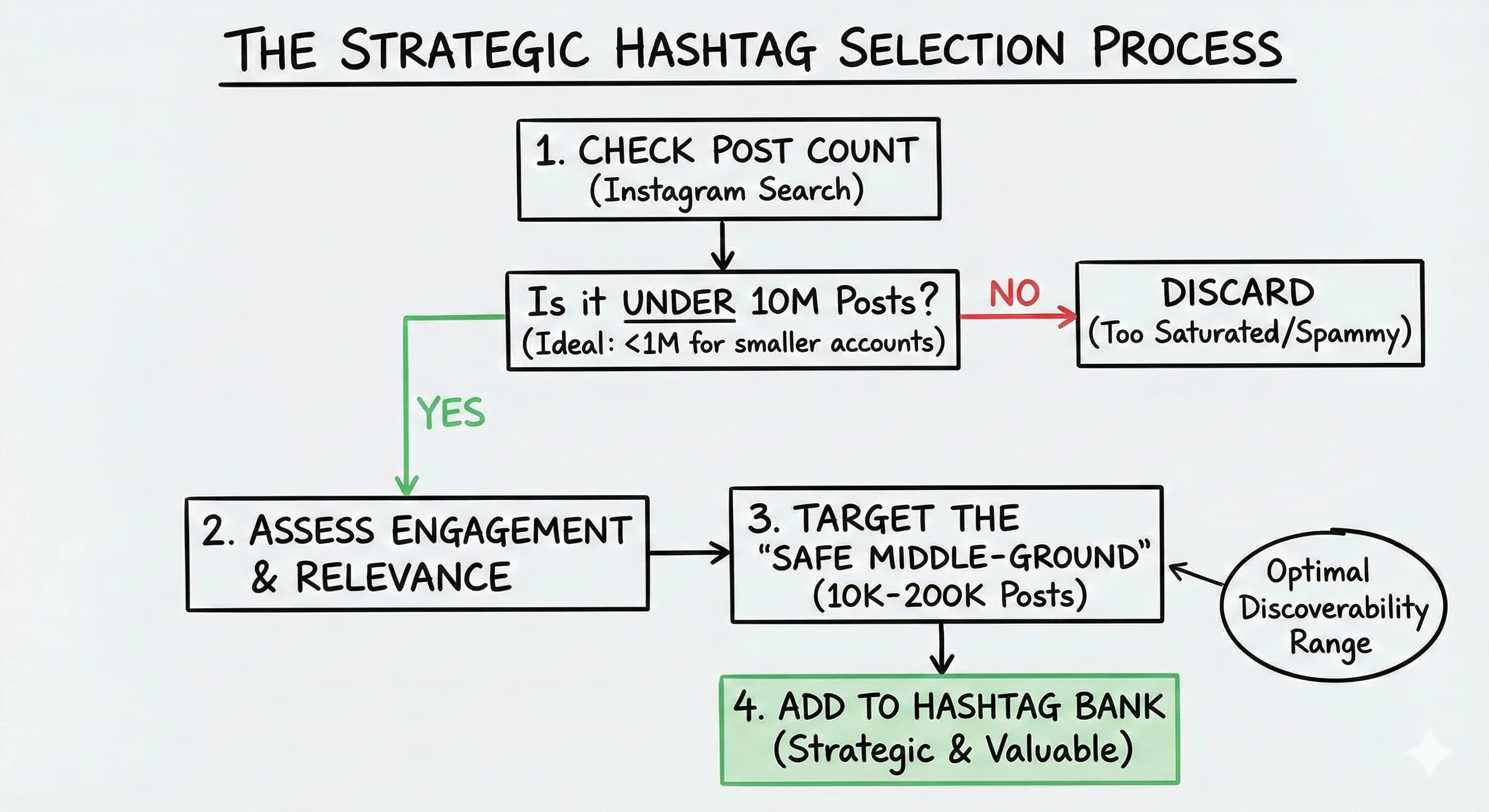 Before adding any hashtag, check its post count in Instagram's search bar. You'll see the number displayed right there. Your selection criteria should include:
- Under 10 million total posts (or even stricter, under 1 million for smaller accounts)
- Active engagement within that hashtag community
- Direct relevance to your content niche
- Mix of broad and hyper-specific terms
Later's hashtag research recommends the "safe middle-ground" approach: target hashtags with 10K-200K posts for optimal discovery. This range gives you enough search volume without the oversaturation problem, so your hashtags help distribute your content to the right people instead of burying it.
Creator @rickyzollinger recently highlighted this shift perfectly: "Instagram doesn't need you to explain your post with 30 hashtags anymore. The algorithm can already tell what your content is about." He's adapted by using strategic, low-volume hashtags that actually connect him with engaged communities. Since you can no longer add more than 5 hashtags, every one has to earn its place.
Building Your Optimized Hashtag Bank
 Create saved hashtag sets that follow your volume criteria. Instead of using #photography (200+ million posts), try #portraitphotographytips (under 500K posts). The smaller community means your content stays visible longer and reaches people genuinely interested in that specific topic.
Tailwind's own success story demonstrates this approach. They moved away from massive hashtags and focused on a balanced mix of popular and niche tags, all researched for optimal volume. Their content started reaching more engaged audiences who actually converted into followers.
For implementation, build multiple theme-based hashtag sets:
- Content-specific sets (one for tutorials, one for behind-the-scenes, one for tips)
- Audience-focused sets (targeting different segments of your niche)
- Engagement-tested sets (rotate and track which combinations perform best)
Save these in your notes app or scheduling tool like Later or Tailwind for quick copy-paste access.
How Many Hashtags Should You Use per Post or Reel?
The 5-hashtag limit applies differently across content types. For regular posts, stick to 3 hashtags up to the 5 maximum, all highly targeted. Hootsuite's testing confirmed this 3 to 5 range often outperforms maxing out the limit because it appears less spammy.
For Reels, the same volume principle applies. Focus on hashtags where your content can realistically rank in the "Top" section rather than getting buried in massive feeds. This is the same optimization mindset that works on TikTok: treat each tag as a topic signal, not a lottery ticket, and let it boost the right audience rather than chase reach.
Marathon Marketing recently tested reach with and without hashtags and found minimal difference when using oversaturated tags. But when they switched to strategic, lower-volume hashtags aligned with keywords, their engagement improved significantly. A hashtag that matches a real keyword your audience searches is worth more than a trend tag with millions of posts.
Your Implementation Strategy
Start by auditing your current hashtags against the 10 million post threshold. You'll probably find that most of your go-to hashtags are oversaturated.
Next, research replacement hashtags in your niche that fall under your chosen volume limit. Use Instagram's search function to check post counts and browse the actual content in those hashtag feeds. Are you seeing engaged communities or spam? Quality matters more than volume.
Create your saved hashtag sets and test them systematically. Track which combinations drive the most meaningful engagement, saves, shares, and genuine comments, not just likes.
Remember, hashtags now work alongside Instagram's improved content recognition. The platform reads your captions, on-screen text, and visual content to understand context. Your strategic hashtags simply help categorize your content for the right micro-communities on every post.
The creators winning with Instagram's new hashtag limit aren't fighting the system, they're using it strategically. Smaller, engaged hashtag communities convert better than massive, oversaturated ones ever could.
Read more about Audience Building & Growth for Content Creators
📚 Complete Guides
- How to Build an Audience as a Content Creator
- How to Find Your Target Audience (Start With One Person)
⚡ Tactics & Strategies
- 30 Daily Outbound Pitches for UGC Deal Generation
- 50% Retention Rate Optimization for YouTube Algorithm Success
- Age Bracket as Superpower Strategy for Older UGC Creators
- Audience Consistency Strategy to Avoid Algorithm Penalties
- Audience Psychology Over Algorithm Optimization, Focusing on Human Pain Points and Goals Instead of Platform Tactics
📄 Related Articles
- YouTube Target Audience: Why Beginners Win
- Older UGC Creators: Your Age Is Your Secret Weapon on TikTok and Beyond
- Your Oversaturated Market Is Actually an Advantage
- Content Creator Income Streams: 7 Ways to Build Financial Stability
- Instagram Automation Tools: Automate Lead Capture & DMs
- Newsletter Segmentation: Target Your Best Subscribers First
- B2B Contact Database: How Creators Reach Decision-Makers
- B2B Influencer Marketing: A No-Agency Starter Guide
Read more Instagram Resources for Content Creators
📚 Complete Guides
⚡ Tactics & Strategies
- Audience Poll on Instagram to Source Q&A Content in Advance of Recording
- Community-First Creator Sourcing to Maximize Small Influencer Budgets
- Consistent Aesthetic Elements Strategy
- Creating Viral Content Through Polarizing and Educational Hooks
- Earning Influence Through Trust Rather Than Attention Spikes
🧮 Calculators
Free: The Instagram Hashtag Audit Kit
Get the interactive tool, downloadable PDF, and Notion template - all free.
No spam. Unsubscribe anytime.

Alex Kirillov
Details
One link. Every channel, rate, and piece of work brands need to evaluate you. Built for how creators actually get hired.
Claim your profile
Live creator, content, and marketing roles from real companies, with the pay, market, and context the raw job page never gives you.
Browse jobs