
ChatGPT for Social Media: Prompts That Actually Work
Stop getting generic ChatGPT outputs. Learn the 5-part structured ChatGPT prompt framework plus 8 ready-to-use prompts for social media content creation that actually sounds like your brand.
Details
If you've ever typed a vague request into ChatGPT and felt underwhelmed by the result, the problem wasn't the AI. It was the prompt. Generic prompts produce generic outputs. But when you learn to write structured, detailed prompts, your entire content creation process transforms from frustrating to effortless. This guide covers the best ChatGPT prompts for social media, how to structure them, and how to build a repeatable system that keeps your content plan full without the creative burnout.
What Is ChatGPT and Why Does It Matter for Social Media?
ChatGPT is a large language model built by OpenAI. It generates human-like text based on the instructions you give it. For any content creator responsible for a brand's online presence, generative AI tools like ChatGPT have become a core part of the modern marketing strategy. A skilled social media manager can use it to draft captions, brainstorm ideas, repurpose existing content, and even map out a full monthly content calendar in minutes.
But ChatGPT can help you do far more than just write. It can suggest the right content angle for a campaign, recommend content types suited to each platform, and flag gaps in your content pillars. The question is not whether to use it. The question is how to use it well.
What Is a ChatGPT Prompt and Why Does Structure Matter?
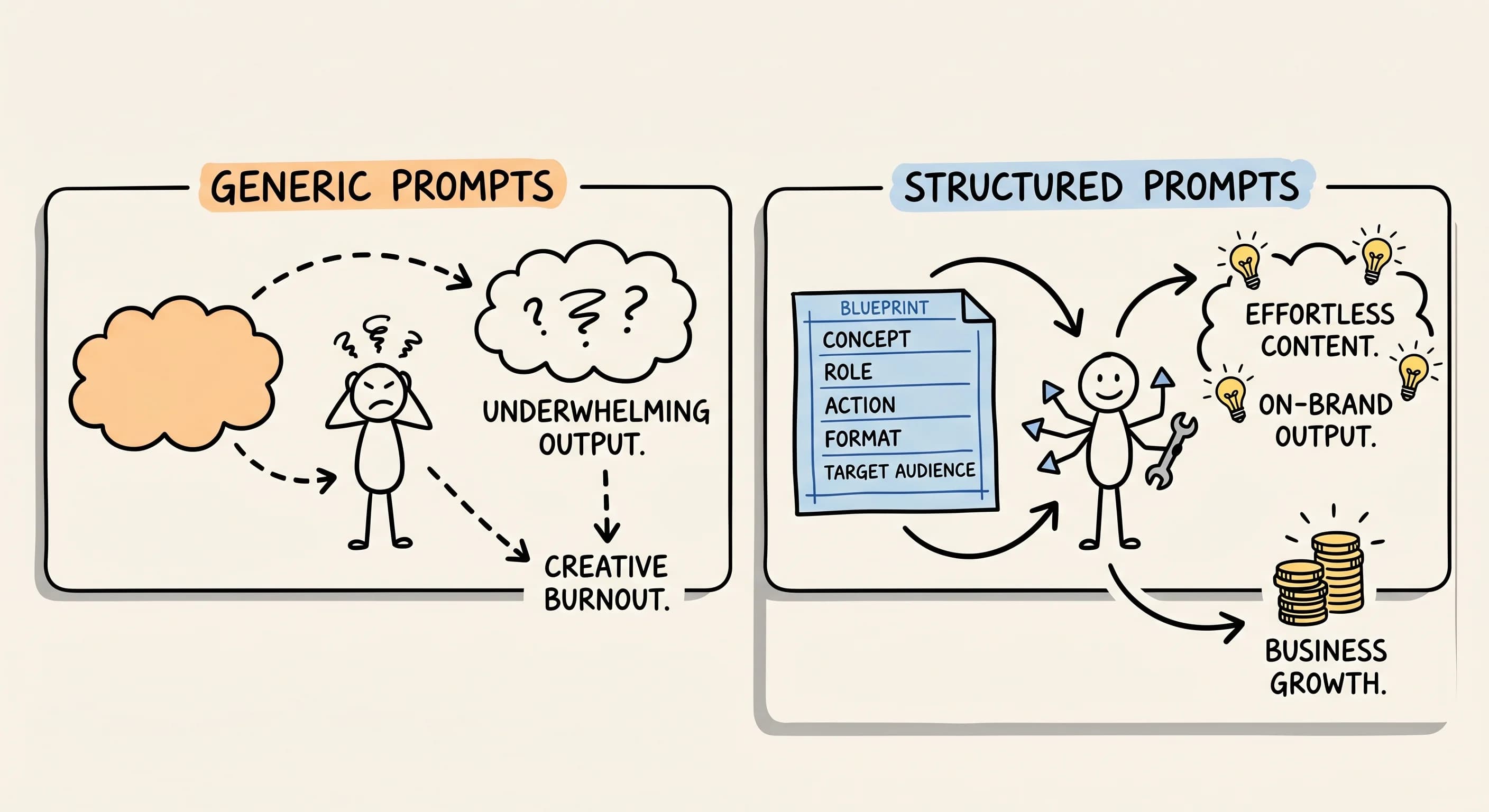 A prompt is the instruction you type into ChatGPT. Think of it as a creative brief. The structure of that brief determines the quality of what comes back. Generic prompts produce generic outputs. Specific prompts produce specific, usable drafts.
Prompt engineering experts consistently report higher first-draft quality, less editing, and more on-brand outputs when prompts include audience detail, tone guidance, and channel context. That is why learning to write structured prompts, and understanding best practices around them, is one of the highest-leverage skills in social media marketing today.
What Is the Difference Between a Prompt and a System Message?
A user message is the instruction you type in the chat. A system message is a background instruction that shapes how ChatGPT behaves throughout the entire conversation. For example, a system message might say: "You are a brand strategist who writes punchy, conversational copy for DTC brands." Every response after that will reflect that persona. If you are using the API or a tool that exposes system message settings, this is worth setting up before you start giving prompts for content work.
What Makes a Great ChatGPT Prompt for Marketing?
The top prompts that generate strong marketing results share five qualities: they name the channel, define the audience, specify the tone, anchor the message to a concrete idea, and include a clear call to action. Frameworks like CO-STAR and CRAFT exist specifically to solve the problem of under-specified prompts. CO-STAR stands for Context, Objective, Style, Tone, Audience, and Response. CRAFT uses Context, Role, Action, Format, and Target Audience. Both lead to the same result: outputs you can actually use.
When integrating ChatGPT into your marketing workflow, treat ChatGPT as a skilled collaborator rather than a magic button. The more context you give it, the better the output.
The 5-Part Framework for Writing ChatGPT Prompts
 Here are the five elements every strong prompt for social content should include.
1. Define the Exact Content Channel
Always tell ChatGPT the specific format first. Social media captions require a completely different approach than a blog post or email. Specifying the channel immediately shapes tone, length, and structure. This is true whether you want to write ChatGPT prompts for Instagram, LinkedIn threads, or short-form video scripts.
2. Identify Your Target Audience
Name your audience and their situation. "For busy entrepreneurs juggling work and family life" tells the AI far more than "for business owners." The more precisely you describe who you are writing for, the more the output will resonate rather than feel generic.
3. Specify the Tone
Tone is everything in social media management. Telling ChatGPT to "use a supportive, relatable tone" ensures the output feels human and authentic. The CRAFT framework treats tone as a non-negotiable field in every prompt because it separates brand-aligned social content from generic filler.
4. Define the Core Message
Anchor your prompt to a concrete tip or insight. "Offer one simple time management tip that can be implemented in 10 minutes or less" gives ChatGPT a clear lane. Vague topics produce vague ideas.
5. Include a Call to Action
Tell ChatGPT how you want readers to respond. Whether it is saving the post, clicking a link, or leaving a comment, a clear CTA makes your content more strategic and purposeful.
How Long Should a ChatGPT Prompt Be?
Long enough to cover all five elements above, short enough to stay focused. Most effective prompts for content creation land between 50 and 150 words. If you find yourself writing a prompt longer than that, consider breaking it into steps using prompt chaining.
What Is Prompt Chaining?
Prompt chaining means using a sequence of connected prompts instead of one giant instruction. For example, your first prompt might ask ChatGPT to generate a content strategy for a fitness brand targeting women over 40. Your second uses follow-up prompts to refine the tone. Your third asks it to turn one idea into a finished social post. Giving ChatGPT one focused task at a time produces sharper results at every stage.
8 ChatGPT Prompts You Can Use Right Now
These are specific prompts to help you get started. Each one is built on the five-part framework above. They are prompts you can use today, adapt to your brand, and save as reusable templates.
1. The Instagram Caption Prompt "Write an Instagram caption for busy entrepreneurs juggling work and family life. Use a supportive, relatable tone and offer one simple time management tip that can be implemented in 10 minutes or less. End with a question that invites comments."
2. The Content Angle Finder "I run a [niche] brand targeting [audience]. What content angle would make my next post stand out from competitors on Instagram?"
3. The 30-Day Content Calendar Builder "Act as a content strategist. Build a monthly content calendar for a [type of business] covering a 30-day content plan. Include a mix of content types: educational, promotional, user-generated content features, and behind-the-scenes posts."
4. The Trend Spotter "What are the top [industry/niche] trends on social media this week that I could create content around?"
5. The Audience Growth Prompt "What types of social media content should I share to increase followers on [platform] if I am a [niche] company?"
6. The Best Posting Time Prompt "Based on [specific audience] behavior, what are the best times to post on [platform]?"
7. The Social Proof Post "Write a short social post that incorporates a customer testimonial as social proof for a [product or service]. Use a conversational tone and keep it under 150 characters."
8. The Content Repurposing Prompt "Take this existing piece of long-form content [paste text] and rewrite it as three short social media captions for Instagram, LinkedIn, and Twitter. Keep the core message but adapt the tone for each platform."
These examples show that prompts to generate content that resonates do not need to be complicated. They need to be structured.
Can ChatGPT Create Social Media Posts That Sound Like My Brand?
Yes, with the right setup. The key is giving ChatGPT enough brand context before asking it to write. Try providing it with three to five examples of your best-performing posts and asking it to identify the common tone, vocabulary, and structure. Then use ChatGPT to write new posts using that same voice. This is one of the most underused approaches among marketers who are new to AI.
If you use ChatGPT to generate content regularly, consider saving a brand voice description as a reusable system message or as the opening paragraph of every prompt. Providing that context upfront cuts editing time significantly and improves content output quality across different social media platforms.
Which Social Media Platforms Work Best with ChatGPT Prompts?
ChatGPT works across all major social platforms, but the prompts need to be tailored. Instagram rewards emotional, visual-first captions. LinkedIn favors insight-led posts with a clear professional takeaway. Twitter and Threads reward brevity and a distinct point of view. TikTok and YouTube Shorts increasingly depend on strong video scripts with a hook in the first three seconds.
A strong social media strategy accounts for these differences. Use platform-specific prompts rather than one-size-fits-all instructions, and your outputs will be far more usable from the first draft. Specific content performs better than broad, unfocused posts on every channel.
How Often Should I Use ChatGPT for Social Media Content?
There is no rule that limits how often you use AI in your workflow. Many creators use it to generate first drafts daily and then edit for voice and accuracy. Others use it at the start of each week to map out a content calendar planning session, then write individual posts themselves. The right frequency depends on your workflow, your comfort with editing AI output, and your brand's need for originality.
What matters more than frequency is quality control. Always review outputs for accuracy. AI tools can occasionally present incorrect information confidently, which leads to the next question.
How Do I Stop ChatGPT from Making Things Up?
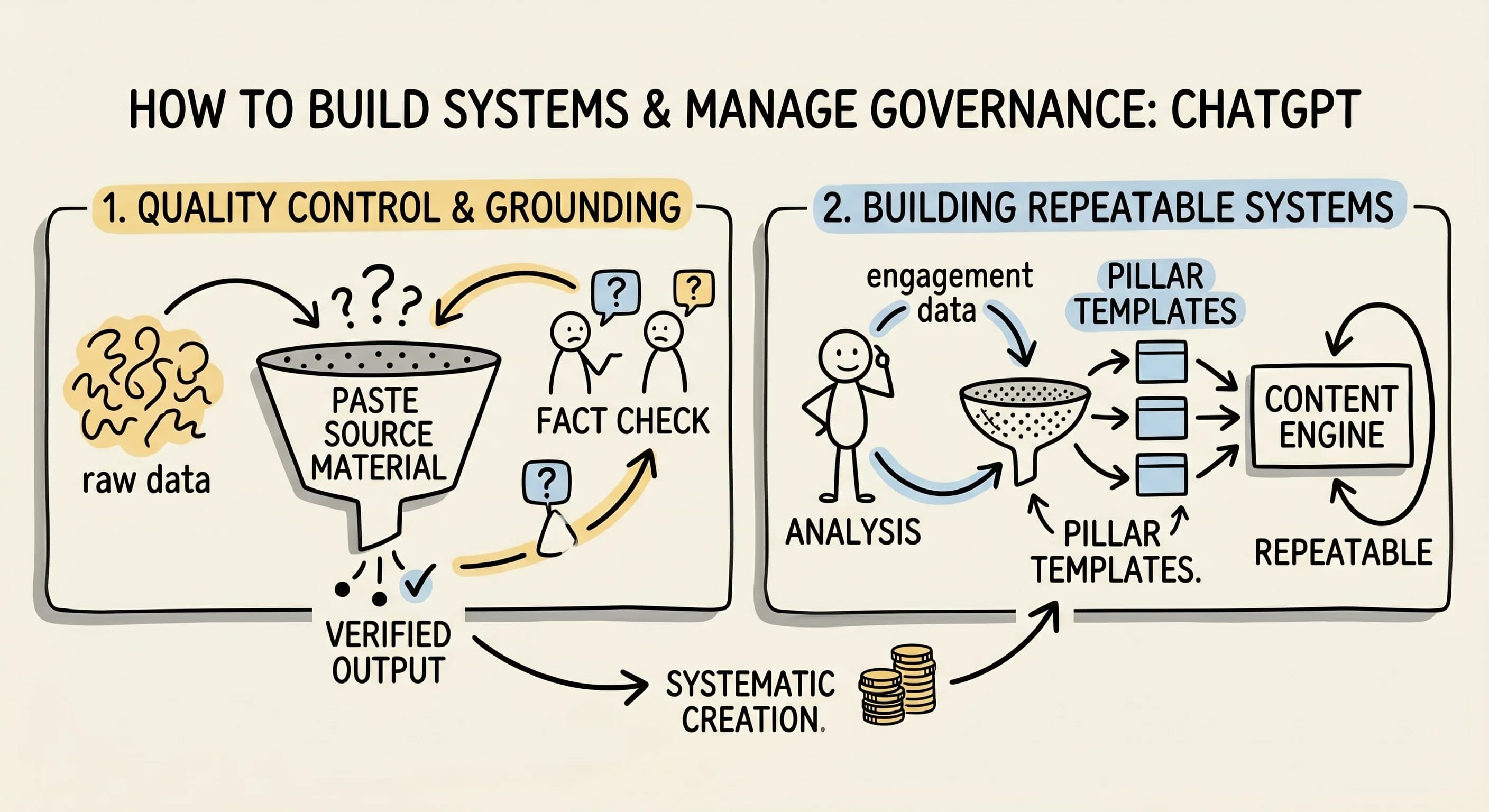
ChatGPT lacks access to real-time information and can sometimes fabricate facts confidently. The most reliable method is to keep prompts grounded in information you provide. Instead of asking ChatGPT to recall facts, paste the source material into the prompt and ask it to summarize or rewrite based only on that. You can also add a line like "Do not include statistics or claims you cannot verify" to reduce the risk of fabricated data appearing in your content marketing output.
Always fact-check any numbers, studies, or specific claims before publishing. AI tools are excellent at structure and tone. They are not a replacement for research.
ChatGPT or Claude for Your First Drafts?
Both are strong options. ChatGPT tends to produce tighter, more structured outputs when given detailed prompts. Claude is often praised for more nuanced, essay-style writing and tends to follow complex instructions with fewer errors. If you are asking what other alternatives are recommended beyond ChatGPT, Claude, Gemini, and Jasper are all worth testing depending on your specific use case. For new social media content creation workflows, ChatGPT remains the most widely used, partly because of its speed and the breadth of community-shared prompt libraries available.
Can ChatGPT Help Me Analyze My Social Media Analytics?
ChatGPT cannot pull live data from your social media accounts directly. However, you can paste your analytics data into the chat and ask it to help you interpret patterns, identify your top-performing type of content, or suggest what to do differently. This is a genuinely useful application that most people overlook.
For example: "Here is my engagement data from the last 30 days [paste data]. What patterns do you see and what changes would you recommend to my content strategy?" This kind of prompt turns raw numbers into actionable direction.
One Upgrade Worth Adding: Define a Role
 Before your main prompt, try opening with a role instruction. "You are a productivity coach who specializes in helping parent-entrepreneurs reclaim their time" changes the voice of the output significantly. ChatGPT produces content from a position of expertise rather than from a neutral, generic stance. The CRAFT framework specifically recommends this approach for getting short-form content that feels authoritative without sounding stiff.
How to Build a Strong Social Media Workflow with Prompt Templates
Ready to level up your social media strategy beyond individual posts? Build a library of reusable prompt templates organized by content pillar. This approach to content calendar planning ensures consistency across every channel. Assign each pillar a default tone, a target audience description, and a preferred call-to-action style. When you need to create content for that pillar, open the template, fill in the specific topic, and run it.
This system turns ChatGPT to help you run a true content creation engine rather than a one-off writing assistant. A social media manager who works this way can produce a full month of content in a fraction of the time, with far more consistency across posts. It also makes it easier to cover different social media platforms without losing your brand voice.
Want to go deeper? Interested in becoming a prompt engineer? The skills covered in this article are the foundation. From here, explore advanced techniques like few-shot prompting, role stacking, and output formatting instructions. Each layer adds more precision and control over what ChatGPT generates.
Ready to Transform Your Social Media Workflow?
Start with one post today. Build your structured prompt using the five elements above, run it through ChatGPT, and compare the result to what you were getting before. The difference a little specificity makes is immediate.
The prompts to help you get started are all here. Save the eight templates above, adapt them to your brand, and use them as the foundation of your monthly content system. That first structured prompt is what turns this from a concept into a skill you will use every single day.
What are your go-to prompts for content creation for social media? The best way to sharpen your approach is to keep testing, keep refining, and keep sharing what works.
Read more about Becoming a Content Creator
📚 Complete Guides
- How to Become a Content Creator: Complete Beginner's Guide
- Content Creator Platform Guide: Choose the Right Platform to Start Your Creator Journey
⚡ Tactics & Strategies
- 50% Retention Rate Optimization for YouTube Algorithm Success
- Age Bracket as Superpower Strategy for Older UGC Creators
- AI Workflow Integration for Content Reduction
- Audience Consistency Strategy to Avoid Algorithm Penalties
- Audience Poll on Instagram to Source Q&A Content in Advance of Recording
📄 Related Articles
- Newsletter Sponsorship: Design Sections Sponsors Want
- Audience Research: Let Your Audience Guide Your Content
- How to Build a Data-Driven Content Strategy (Analytics to Predictions)
- YouTube Audience Retention: How Hitting 50% Transforms Your Channel Growth
- Content Repurposing: Turn One Post Into Many (and ROI)
- How to Reach a Wider Audience: The NAPs Strategy for Niche Creators
- How to Come Up With Content Ideas (and Never Run Out)
- Newsletter Best Practices: Treat It Like a Product
Read more about Systems, Workflows & Operations for Content Creators

Alex Kirillov
Details
One link. Every channel, rate, and piece of work brands need to evaluate you. Built for how creators actually get hired.
Claim your profile
Live creator, content, and marketing roles from real companies, with the pay, market, and context the raw job page never gives you.
Browse jobs
