

Kirby
Kirby is a flat-file content management system that adapts to any project, built for developers, designers, creators, and clients who need full control over their content.
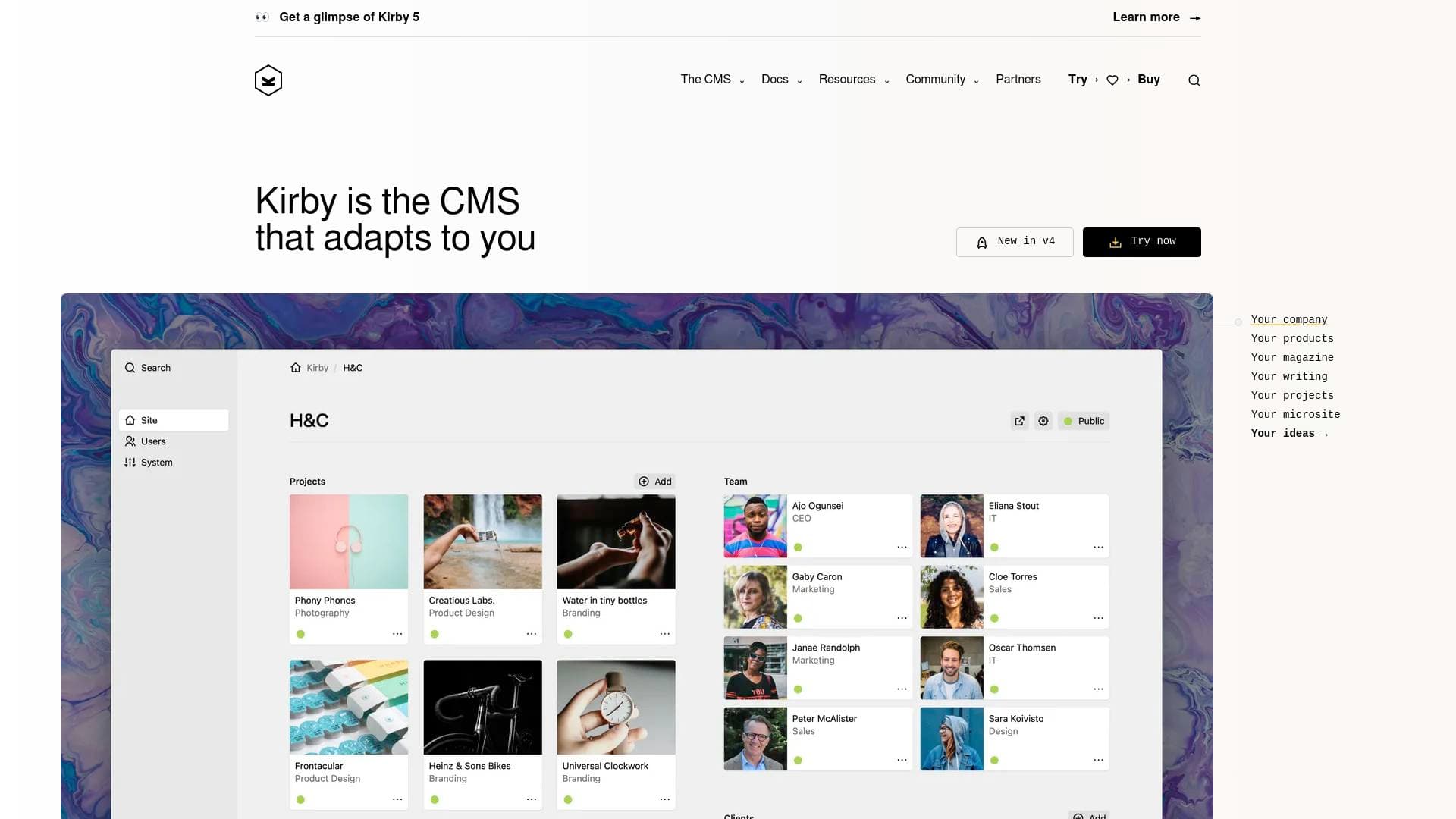
Brief Overview of Kirby for Content Creators
Kirby is a flat-file content management system designed to adapt to virtually any project, making it a compelling website and content management tool for creators who want full ownership of their digital presence. Unlike database-driven platforms, Kirby does not use a database by default, which means no database migrations when updating and a simpler, more portable setup. The CMS is built for developers, designers, creators, and clients, positioning it as a flexible foundation for portfolio sites, blogs, agency pages, and more. Its control panel, called the Panel, gives editors a clean, customizable interface for managing content without needing to touch code. Kirby 5, the latest major release, pushes the platform further with real-time collaboration features, a dark mode interface, chunked file uploads, and a powerful new preview system. For content creators who want a CMS that bends to their workflow rather than forcing them into rigid templates, Kirby offers a genuinely adaptable content creation workflow. The platform is trusted by digital agencies and independent creators worldwide, with users praising its simplicity and customization depth.
Kirby Key Features for Content Creators
-
Flat-File Architecture (No Database Required): Kirby stores content as plain files on the server rather than in a database. This makes the system highly portable, easier to back up, and simpler to update since there are no database migrations to run when moving between versions.
-
The Panel (Visual Content Editor): The Panel is Kirby's browser-based control panel where creators manage all their content. It runs at
yourdomain.com/paneland is built on modern browser features, supporting Firefox 110+, Chrome 106+, Safari 16+, Edge 106+, Opera 94+, and major mobile browsers. Clients and collaborators consistently praise its simplicity. -
Kirby 5 Collaboration and Preview Mode: Kirby 5 introduces a major leap for teams working on content together. Editors can view fully rendered previews of their edits before saving, even if those edits were made by someone else. The new Changes dialog tracks all unpublished edits across pages, files, and accounts, and preview links can be shared with teammates or external reviewers for instant feedback.
-
Side-by-Side Content Comparison: The new preview view in Kirby 5 supports side-by-side comparisons of unsaved changes versus published content, as well as full-width previews. This is particularly useful for bloggers and portfolio creators who want to review how a post or page looks before it goes live.
-
Dark Mode for the Panel: Kirby 5 adds a dark theme to the Panel, designed to reduce eye strain during long editing sessions. Creators can switch between light and dark themes or set it to match their system default, improving accessibility for users with visual impairments.
-
Entries Field for Structured Content: The new Entries field lets creators build and manage multiple structured entries within a single field, with support for minimum and maximum entry counts and required validation. This is ideal for managing things like categorized content, tags, or repeating content blocks on a portfolio or blog.
-
Batch Delete for Pages and Files: Managing large content libraries is easier with Kirby 5's batch delete feature. Creators can select multiple pages or files and delete them all at once, rather than removing items one by one, saving significant time when reorganizing a site.
-
Custom File Previews: Kirby 5 introduces configurable file previews in the Panel for any file format, including 3D objects and key documents. Built-in previews for video, audio, and PDF files come ready to use out of the box, giving creators a clear visual of their media assets without leaving the CMS.
-
Chunked Uploads for Large Files: High-resolution images, video files, and other large media assets can now be uploaded in chunks, meaning the file is split into smaller pieces and sent step by step. This makes uploading large creative assets far more reliable, especially on slower connections.
-
Plugin Ecosystem: Kirby has an official plugin repository where developers have built dozens of extensions. Creators can browse and install plugins before building custom solutions, expanding the CMS's capabilities for specific content types or workflows.
-
Starterkit and Plainkit Installation Options: Two downloadable starter packages are available. The Starterkit comes loaded with example content, blueprints, and templates, making it ideal for new users exploring the platform. The Plainkit is a minimal setup for creators already familiar with Kirby who want to build from scratch.
-
Redis Cache Driver: Kirby 5 includes a built-in Redis cache driver, allowing creators running high-traffic sites to connect to a Redis server out of the box for improved performance.
Kirby Target Users & Use Cases for Content Creators
Kirby appeals most strongly to content creators who want deep control over their website without being locked into a rigid platform structure. It sits at the intersection of technical flexibility and editorial simplicity, making it well-suited for creators who either have some technical background or work alongside a developer. Teams and solo creators alike benefit from the Panel's clean interface and the platform's file-based approach.
-
Primary creator types: Bloggers building custom-designed personal sites, portfolio creators showcasing design or photography work, digital agencies managing client content, and independent developers who also produce content.
-
Experience level: The Starterkit and extensive documentation (Guide, Reference, Cookbook) make it accessible to newcomers, while the Plainkit and plugin development tools cater to advanced users.
-
Team size: Kirby 5's collaboration features, including the Changes dialog, preview sharing, and content locking notifications, make it viable for small to mid-sized content teams working simultaneously on a site.
-
Specific use cases:
- A photographer building a portfolio site with custom file previews for images and video
- A blogger managing a large archive of posts and using batch delete to reorganize old content
- A design agency creating client sites with a simplified Panel interface that clients can manage independently
- A content team collaborating on draft articles using Kirby 5's preview sharing and side-by-side comparison tools
- A developer-creator building a headless CMS setup using Kirby's Cookbook recipes
- A solo creator uploading large video or audio assets using the chunked upload feature
- A newsletter writer maintaining a structured content archive with the Entries field for categorized posts
- A creator running a high-traffic site leveraging the Redis cache driver for faster page loads
-
Content types: Blog posts, portfolio pages, media galleries (images, video, audio, PDFs), structured data entries, and custom file formats.
How to Get Started with Kirby
-
Choose your installation kit: Download the Starterkit (includes example content, blueprints, and templates) for a guided first experience, or the Plainkit for a minimal starting point. Both are available as ZIP downloads or can be installed via Kirby CLI, Composer, or Git.
-
Set up your server environment: Kirby requires PHP 8.2 or higher (PHP 8.3 is recommended). Apache works out of the box, and Nginx, Caddy, and DDEV are supported via Cookbook recipes. For local development on macOS or Windows, Herd offers one-click installers for both kits.
-
Extract and visit your site: Extract the ZIP contents into your server's document root, then visit
yourdomain.comin your browser. Navigate toyourdomain.com/panelto launch the installer and create your first account. -
Explore the Panel: Once logged in, the Panel provides access to all your content, pages, files, and user settings. Kirby 5 users will find the Changes dialog, dark mode toggle, and preview tools available immediately.
-
Purchase and activate a license: Kirby can be used freely during development. Once the site goes live, a license must be purchased at getkirby.com/buy. Activation is done directly through the Panel by entering the license code and email address.
Frequently Asked Questions About Kirby
Does Kirby require a database? No, Kirby does not use a database by default. Content is stored as flat files on the server, which eliminates the need for database migrations when updating the CMS and makes the installation more portable.
What PHP version does Kirby require? Kirby supports PHP 8.2, 8.3, and 8.4. PHP 8.3 is the recommended version for the best balance of compatibility and performance.
Is Kirby 5 a free upgrade? Yes, Kirby 5 is a free upgrade for anyone with a valid Kirby Basic or Enterprise license. It is a major release, so some existing sites may require code changes, and a migration guide is provided to ease the transition.
What browsers does the Kirby Panel support? On desktop, the Panel supports Firefox 110+, Chrome 106+, Safari 16+, Edge 106+, and Opera 94+. On mobile, it supports Mobile Safari 16+, Android Browser 126+, and Chrome for Android 126+.
Can multiple editors collaborate on content at the same time? Yes, Kirby 5 introduces real-time collaboration features including a Changes dialog that tracks all unsaved edits across pages, files, and accounts. The Panel also displays notifications when content is locked by another editor, and preview links can be shared with teammates or external reviewers before content is published.
What installation methods are available? Kirby can be installed via direct ZIP download, the Kirby CLI, Composer, Git, or using Herd's one-click installers for macOS and Windows. Three starter packages are available: the Starterkit, Plainkit, and Demokit.
How does Kirby handle security vulnerabilities? Kirby maintains a public security policy with a full history of past incidents, CVE IDs, and severity ratings. Vulnerabilities can be reported directly to security@getkirby.com or via GitHub's security advisory form. The team actively patches supported versions and requests CVE IDs through GitHub as the responsible CNA.
Bottom Line: Should Content Creators Choose Kirby?
Kirby is a strong choice for content creators who prioritize flexibility, clean content management, and full ownership of their site without being tied to a database-driven platform. The flat-file approach makes it easy to manage, back up, and move, while the Panel gives non-technical collaborators and clients a straightforward editing experience. Kirby 5's collaboration tools, including preview sharing, the Changes dialog, and side-by-side content comparison, make it genuinely useful for small content teams working together on a site.
The platform is best suited for creators with at least some technical comfort or access to a developer, as setup involves server configuration and PHP requirements. It is not a hosted, drag-and-drop solution. However, for bloggers, portfolio creators, and digital agencies who want a CMS that truly adapts to their content structure rather than the other way around, Kirby delivers a level of customization that few comparable tools offer. The free upgrade path to Kirby 5 for existing license holders adds further long-term value to the investment.
Details
One link. Every channel, rate, and piece of work brands need to evaluate you. Built for how creators actually get hired.
Claim your profile
Live creator, content, and marketing roles from real companies, with the pay, market, and context the raw job page never gives you.
Browse jobs

 Post Bridge