
Google Trends
Google Trends is a free analytics platform that lets content creators explore search interest for any topic by time, location, and popularity to inform content strategy.
Brief Overview of Google Trends for Content Creators
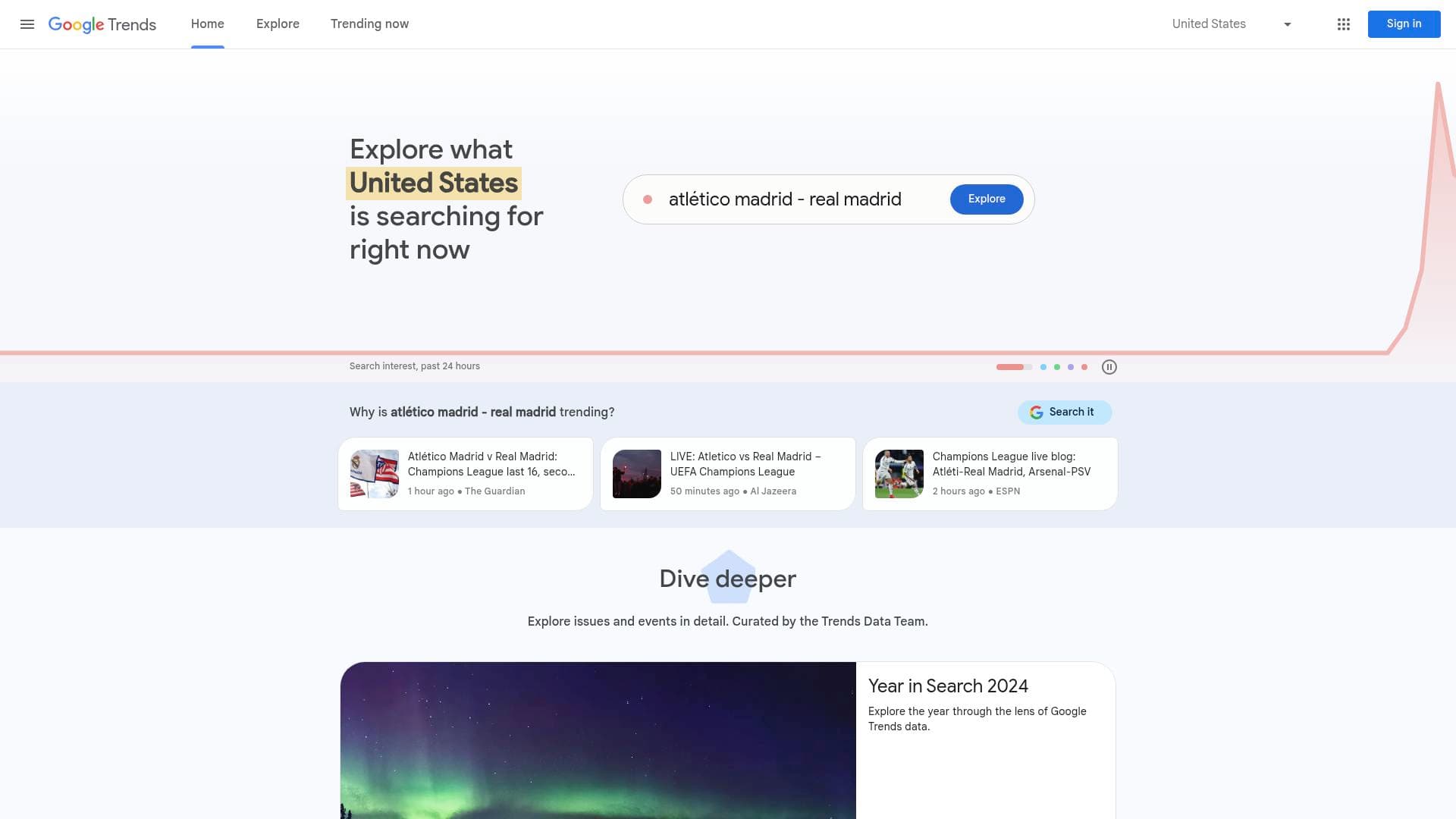
Google Trends is a free analytics platform built on Google's search data, giving content creators direct visibility into what the world is actually searching for right now. The core problem it solves is simple but critical: creators often guess at what topics will resonate with audiences, while Google Trends replaces that guesswork with real search interest data. Rather than chasing topics that have already peaked, creators can use this performance tracking tool to spot rising queries before they hit saturation. The platform lets users explore search interest filtered by time period, geographic location, and relative popularity, making it useful whether a creator targets a local audience or a global one. A dedicated "Trending Now" section surfaces what's spiking in search volume at this very moment, updated continuously across dozens of countries. There's also an Explore section for deeper dives into specific terms and topics, and a "Year in Search" feature that captures the biggest cultural moments of each year. The Trends Data Team curates special deep-dive content, collaborating with designers worldwide to visualize search data in ways that tell broader stories about human curiosity. For any creator building a content calendar around audience demand, Google Trends functions as one of the most direct audience research tools available.
Google Trends Key Features for Content Creators
-
Trending Now Dashboard: The Trending Now section shows what search queries are spiking in real time, with volume indicators ranging from 1K+ to 1M+ searches. Each trending topic displays its search volume, when it started trending, and whether it's still active or has already peaked, which helps creators decide whether a topic is worth covering right now or has already passed its window.
-
Active vs. Lasted Trend Status: Every trend is labeled either "Active" (still being searched more than usual) or "Lasted" (was trending but has returned to normal volume). This distinction is particularly valuable for creators who want to publish timely content, since jumping on a "Lasted" trend means the audience wave has already broken.
-
Search Volume Indicators: Trending topics display approximate search volumes in tiered ranges such as 1K+, 2K+, 5K+, 10K+, 20K+, 50K+, 100K+, 200K+, 500K+, and 1M+. Creators can quickly scan these numbers to prioritize which trending topics have the largest potential audience at any given moment.
-
Trend Breakdown Queries: Each trending topic expands to show multiple related search queries that make up the broader trend. A single trending topic can include dozens or even hundreds of variant searches, giving creators a fuller picture of exactly how audiences are phrasing their interest and which specific angles are driving the most searches.
-
Geographic Location Filtering: The Trending Now section supports location filtering across a massive list of countries, from the United States and Brazil to Thailand, Russia, South Korea, and many more. Creators targeting specific regional audiences can switch between countries to see what's trending locally rather than globally.
-
Time Range Filtering: Creators can filter trending data across multiple time windows including the past 4 hours, past 24 hours, past 48 hours, and past 7 days. This flexibility lets a news-focused creator check what's breaking right now, while a weekly content planner can look at the broader 7-day picture to identify sustained trends worth covering.
-
Category Filtering: The platform organizes trends into categories including Entertainment, Sports, Technology, Health, Business and Finance, Science, Politics, Beauty and Fashion, Food and Drink, Games, Travel and Transportation, and more. Creators can filter to their niche category to cut through irrelevant trending topics and focus only on what matters to their specific audience.
-
Export and Sharing Options: Trending data can be exported as a CSV file, copied to clipboard, or accessed via RSS feed. The CSV export is particularly useful for creators who want to analyze trend data in spreadsheets or share findings with a team or editor.
-
Explore Section: Beyond trending topics, the Explore section lets creators search specific terms and topics to analyze their search interest over time. A new version of the Explore page is noted as rolling out gradually, suggesting ongoing platform development.
-
Year in Search: An annual feature that captures the most-searched topics, people, and events of each year by country. Creators covering year-end roundups, retrospectives, or "best of" content can use this as a structured data source for what genuinely captured audience attention over the past 12 months.
-
Made with Trends Showcase: Google curates real-world examples of how newsrooms, charities, researchers, and data designers have used Trends data to tell stories. Projects include data visualizations about bird-watching patterns, dream interpretation searches, and economic activity tracking, giving creators inspiration for data-driven content angles.
-
Multi-Language Support: The platform is available in over 50 languages, including English, Spanish, French, Portuguese, Japanese, Korean, Arabic, Hindi, Thai, and many more. Creators producing content for non-English-speaking audiences can use the platform in their own language to research trends relevant to their communities.
Google Trends Target Users & Use Cases for Content Creators
Google Trends serves creators across virtually every niche and platform, functioning as a free audience research layer that sits underneath any content strategy. It's equally useful for solo creators publishing daily and for small content teams planning editorial calendars weeks in advance. The platform's depth scales with the creator's needs, from a quick glance at what's trending in the past 4 hours to a detailed breakdown of search query variants driving a specific topic.
Primary creator types:
- YouTubers and video creators researching which topics have enough search demand to justify production time
- Bloggers and SEO-focused writers identifying rising search terms before they become saturated
- News and commentary creators tracking breaking topics in real time to publish while interest is still active
- Podcasters spotting cultural conversations worth covering in upcoming episodes
- Social media creators on TikTok and Instagram identifying trending topics to align short-form content with what audiences are actively searching
- Newsletter writers finding data-backed story angles that connect to what readers are genuinely curious about
- Streamers and gaming creators monitoring trending game titles and gaming topics by search volume
Specific use cases:
- A sports content creator checks the Trending Now dashboard before recording to identify which match or athlete is generating the most search interest that day
- A lifestyle blogger filters trends by the Beauty and Fashion category to find rising product or topic searches before writing a review
- A news commentary YouTuber uses the Active/Lasted status to confirm a story is still generating search interest before investing time in a video
- A creator targeting Brazilian audiences switches the location filter to Brazil to see country-specific trending topics rather than US-centric data
- A content team exports trending data as a CSV to build a weekly content calendar based on sustained search interest
- A gaming creator monitors the Technology and Games categories to spot trending titles or hardware announcements worth covering
- A creator uses the Trend Breakdown feature to discover the specific search phrases audiences use, then incorporates those exact phrases into video titles and blog post headlines
- A year-end content creator references the Year in Search data to build a "biggest moments" video grounded in actual search data rather than editorial opinion
How to Get Started with Google Trends
-
Navigate to the Home or Trending Now section: The Home page shows a snapshot of current search interest, while the Trending Now section provides a full ranked list of spiking queries. New users can start with Trending Now to immediately see what's generating search volume right now.
-
Set your location and time range: Use the location filter to select the country most relevant to your audience, then choose a time window that matches your publishing cadence. Creators publishing daily content benefit from the past 24 hours view, while weekly publishers can use the 7-day range for a broader picture.
-
Filter by category: Select the content category that matches your niche to remove irrelevant trending topics and focus on what your specific audience cares about.
-
Expand trend breakdowns: Click into individual trending topics to see the full list of related search queries driving the trend. Use these specific phrases to inform titles, tags, and descriptions for your content.
-
Export data for planning: Use the CSV download or RSS feed options to pull trend data into your content planning workflow, whether that's a spreadsheet, a content calendar tool, or a shared document with collaborators.
Frequently Asked Questions About Google Trends
Is Google Trends free to use? Google Trends is completely free. There are no subscription tiers, usage limits, or paid features mentioned anywhere in the platform.
How many countries does Google Trends cover for trending data? The Trending Now section supports location filtering across a very large list of countries spanning every major region, including the United States, Brazil, Thailand, Russia, India, Japan, South Korea, the United Kingdom, Germany, France, Australia, and many more across Africa, the Middle East, Latin America, and Southeast Asia.
What time ranges are available for trending data? Creators can filter trending topics by when they started trending, including the past 4 hours, past 24 hours, past 48 hours, and past 7 days.
What categories can creators filter trends by? Available categories include All Categories, Autos and Vehicles, Beauty and Fashion, Business and Finance, Climate, Entertainment, Food and Drink, Games, Health, Hobbies and Leisure, Jobs and Education, Law and Government, Other, Pets and Animals, Politics, Science, Shopping, Sports, Technology, and Travel and Transportation.
Can creators export trending data? Yes. Trending data can be exported as a CSV file, copied to clipboard, or accessed via an RSS feed, making it easy to incorporate into external content planning workflows.
What is the difference between Active and Lasted trends? Active trends are search queries that are still being searched more than usual at the time of viewing. Lasted trends were searched more than usual at some point during the selected time window but have since returned to their typical search volume. Creators can also filter to show only active trends.
Does Google Trends offer learning resources for new users? Yes. The platform includes a dedicated "Get Started with Trends" section featuring multiple video tutorials covering an introduction to Google Trends data, a full walkthrough, advanced tips, and a guide to the Trending Now feature. Written training resources are also available covering basics, data understanding, and advanced usage.
Bottom Line: Should Content Creators Choose Google Trends?
Google Trends is a genuinely essential tool for any content creator whose work depends on staying relevant to what audiences are actively curious about. The combination of real-time trending data, geographic filtering, category segmentation, and detailed query breakdowns gives creators a multi-dimensional view of search interest that directly informs smarter content decisions. It's particularly well-suited for news and commentary creators, sports content producers, bloggers focused on SEO, and any creator targeting audiences in specific countries or regions.
The platform's biggest strength is its breadth: search interest data spanning dozens of countries, dozens of categories, and time windows from the past 4 hours to full years, all available without cost or registration barriers. The export functionality adds practical workflow value for creators who plan content in advance rather than purely reacting to the moment.
The main limitation is that Google Trends shows relative search interest and volume tiers rather than precise search numbers, which means it's better used as a directional signal than an exact measurement tool. Still, for creators looking to align their content with genuine audience demand, Google Trends remains one of the most accessible and data-rich audience research tools available anywhere.
Details
One link. Every channel, rate, and piece of work brands need to evaluate you. Built for how creators actually get hired.
Claim your profile
Live creator, content, and marketing roles from real companies, with the pay, market, and context the raw job page never gives you.
Browse jobs

 Post Bridge