
Google Alerts Marketing: How to Land High-Profile Guests with Strategic Timing
Learn how to use Google alerts for marketing to land high-profile guests. Set up strategic monitoring to catch promotional cycles and time your outreach perfectly.
Details
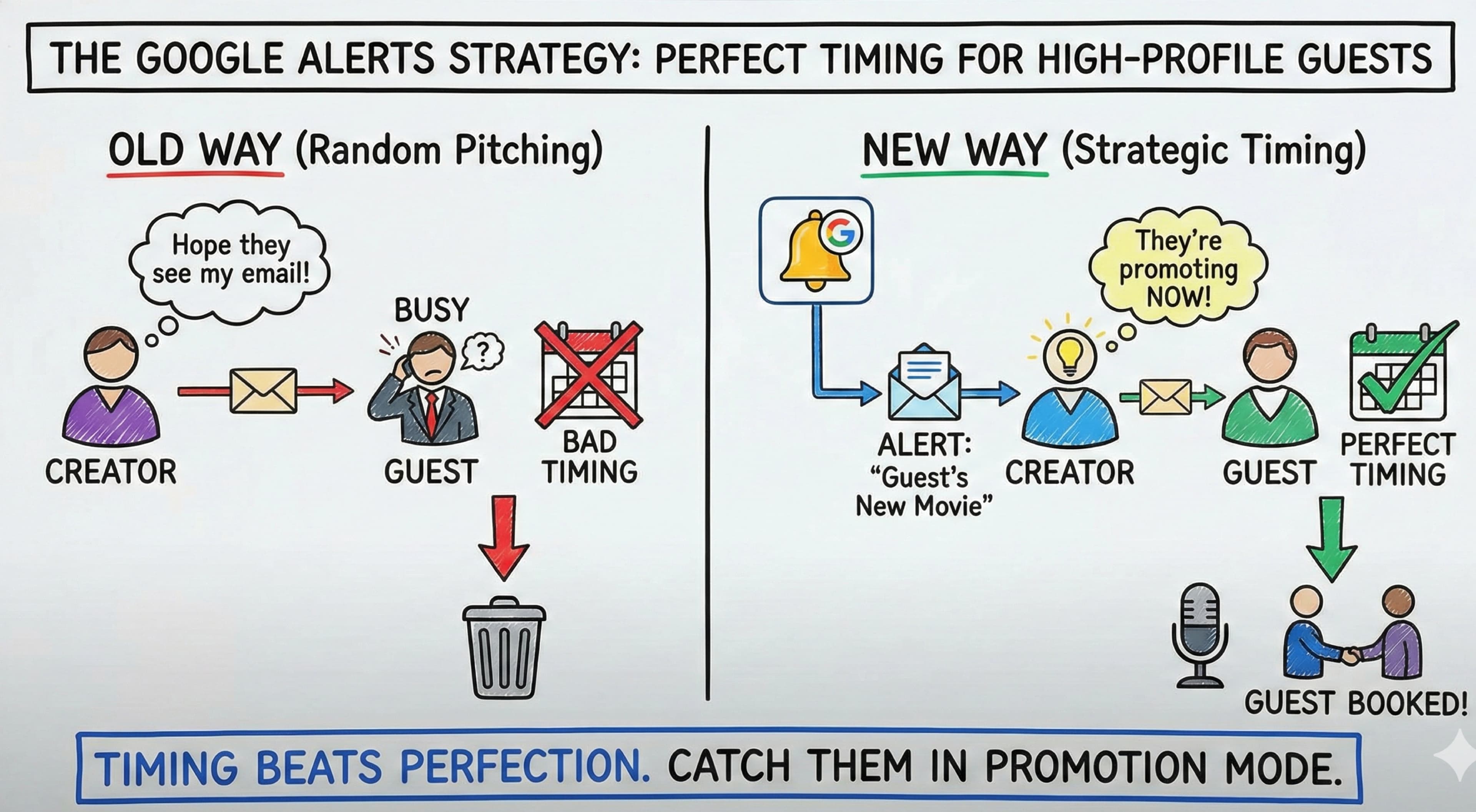
Content creators everywhere keep wondering why their dream guests never respond to pitches. You're crafting perfect emails, timing them perfectly (or so you think), but you're missing the most crucial element: knowing when they actually want to talk.
The secret isn't in your pitch, it's in your timing. And Google Alerts is the free tool that'll transform how you approach guest outreach forever. What if I told you there was a free way for your business to keep track of competitors, identify the right time to reach customers, and keep an eye on industry trends, all without spending a cent?
What Are Google Alerts? How Google Alerts Can Benefit Your Marketing Strategy
Google Alerts is a free notification service provided by Google that lets you monitor the web for new content related to keywords you choose. More precisely, Google Alerts is a free online tool that lets you enter specific keywords or phrases, and Google finds matching web content across the web, then sends you email notifications in a digest. When you create an alert for a target guest's name, company name, or upcoming project, you get an email whenever fresh content matching your criteria is indexed by Google.
Here's what most creators miss: timing beats perfection every single time. You could send the world's best pitch, but if someone's not in promotion mode, it's going straight to the digital trash can.
Marketing experts consistently emphasize that alerts work best for time-sensitive opportunities where speed matters. Hook Agency specifically recommends using "as-it-happens" alerts when you need to respond quickly to emerging opportunities, exactly what you're doing when you catch someone at the start of their promotional cycle.
Ever wanted to monitor all the web content within your business' niche to keep track of SEO opportunities? Google Alerts can benefit your content strategy and it costs nothing. Google Alerts is a free tool that any creator or marketer can start using today.
How Do Google Alerts Work for Strategic Guest Outreach?
To use Google Alerts to monitor potential collaborators effectively, you'll want to create alerts for every person you're targeting. Use quotation marks around their exact name to get precise results, then add variations like their company name, upcoming project titles, and relevant industry keywords. You'll also want to include common misspellings of their name so you catch every mention across different publications.
The real magic happens when you monitor promotional cycles before they become saturated. Reputation management experts note that the ability to help you respond quickly to alerts can materially affect booking success, and the same principle applies to guest outreach.
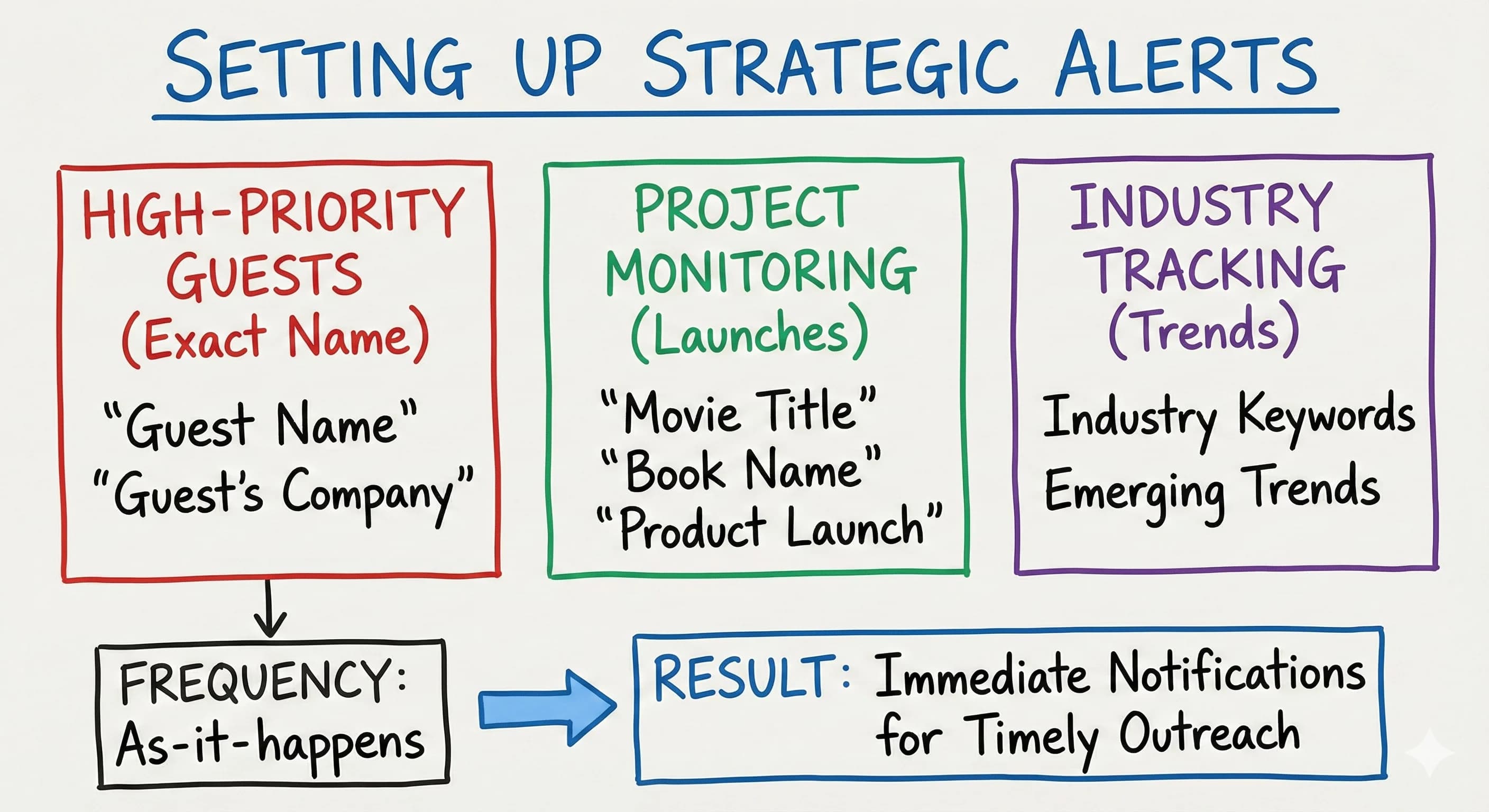
Google Alerts may send notifications daily, weekly, or as-it-happens, depending on your preference. For guest booking, choose immediate notifications to stay one step ahead of everyone else who's about to flood their inbox. You'll need a Google account to set everything up, and the whole process takes less than five minutes.
Here's your setup strategy:
- High-priority guests: "as-it-happens" alerts with their exact name in quotes
- Project monitoring: alerts for movie titles, book names, or new product launches
- Industry tracking: broader keywords for emerging topics in your niche
How to Set Up Google Alerts and Create an Alert in Minutes
Ready to get started? Here's how to create a Google alert from scratch. Go to alerts.google.com, sign in, and type the search term you want to track into the search bar. You'll immediately see a preview of the results Google finds before you even save anything.
To set up a Google alert:
- Go to Google Alerts and sign in.
- Type the specific keywords you want to monitor in the search box.
- Click "Show options" to customize the frequency of alerts, sources, language, and region.
- Choose the alerts you want to receive (as-it-happens, daily, or weekly).
- Enter the email address where you want to receive email notifications.
- Click "Create Alert" and you're done.
You can set Google Alerts for as many topics as you need. Want to track multiple guests, competitors, and industry trends at the same time? Create multiple alerts and organize them by priority. The number of alerts you create is flexible: Google doesn't impose a strict hard cap, so you could set up a Google alert for each high-priority guest on your list without worrying. To refine your alerts later, just go back to Google Alerts, click the pencil icon next to any alert, and adjust the settings. To edit or delete, the same dashboard gives you full control.
Can you use Google Alerts with a non-Google email address? You can direct the alerts you receive to a non-Google inbox, but you'll still need a Google account to set up and manage everything.
Advanced Google Alerts Techniques That Actually Work
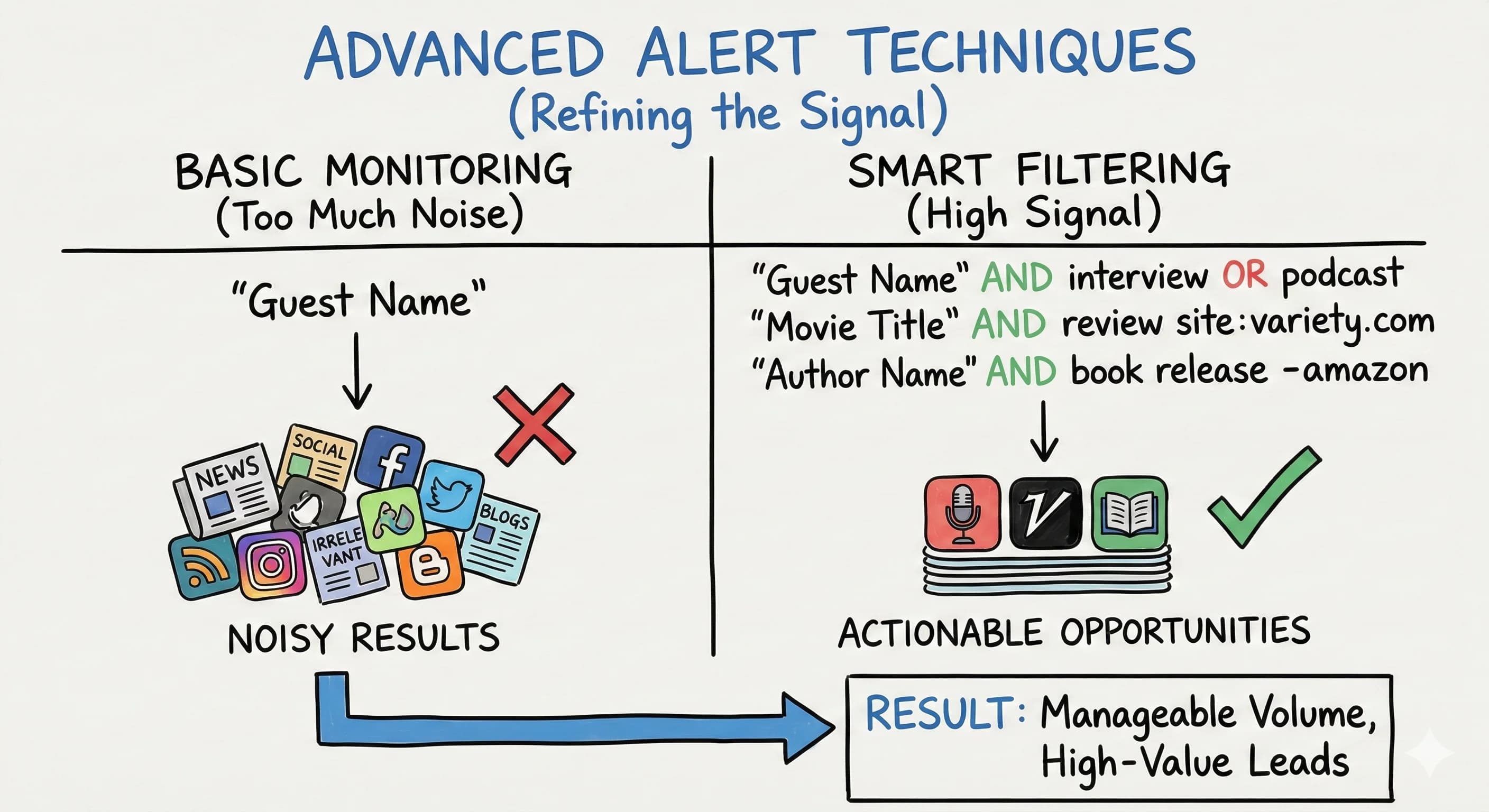
Know how to set up a basic alert? Good. Now let's make alerts work harder. Smart creators use Boolean operators and site filters to reduce noise and increase signal. Marketing guides recommend segmenting alerts for your keywords by priority level and review frequency to keep them actionable.
Try these refined search queries:
- "Guest Name" AND interview OR podcast
- "Movie Title" AND trailer OR review site:variety.com
- "Author Name" AND book release -amazon (excludes shopping results)
You can also set alerts for your competitors' names specifically: alerts for your competitors' names and project launches let you watch key outlets like trade publications or industry blogs. This approach keeps the number of alerts manageable while catching high-value opportunities. Use this information to prioritize your outreach and focus on the moments that matter most.
Real-World Success with Strategic Timing
Campground brands have documented success using fine-tuned alerts to monitor mentions and respond quickly to drive more bookings. Knowing every time your business is mentioned online means you can act before the conversation moves on, and the same promptness that wins reviews wins bookings.
Content creator Hope Clark has used alerts to stay on top of successful authors and make career-advancing contacts by staying informed about their latest projects and opportunities. She specifically mentions how alerts help her find opportunities she wouldn't ordinarily discover.
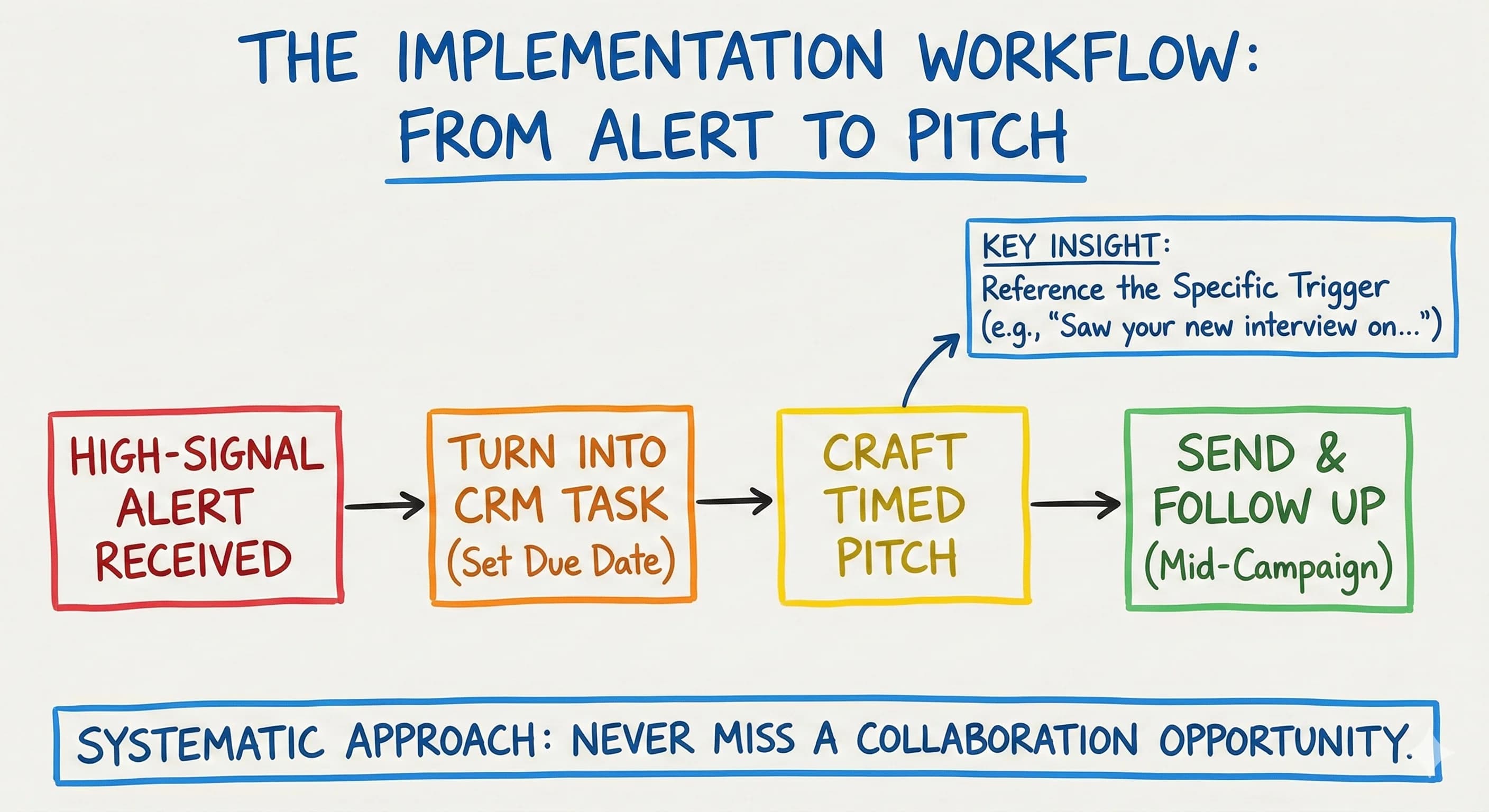
The key insight from these success stories? Reference the specific alert trigger in your outreach. Just like businesses respond to reviews by mentioning the specific experience, your guest pitches should reference the exact announcement, interview, or project that triggered your alert.
Google Alerts for Marketing Campaigns, SEO, and Competitive Intelligence
Google Alerts for marketing go well beyond tracking individual names. Use this tool from Google for comprehensive business marketing by tracking competitors, monitoring mentions of your company, and watching for emerging topics that inform your content calendar. Google Alerts makes it easy to stay current on your whole market, not just your own brand.
Keeping an eye on mentions of your brand and mentions of your brand's competitors is one of the fastest ways to spot gaps you can fill. Alerts is not only free but genuinely useful for identifying trending conversations and positioning yourself as the relevant voice who's already talking about what matters. In the broader world of digital marketing, this kind of real-time awareness is what separates reactive marketers from proactive ones.
Set alerts to monitor your brand and help grow your business by tracking:
- Your own brand name (reputation monitoring and mentions of your company)
- Competitors' podcast appearances and launches
- Industry conference announcements
- Trending topics in your space
Google Alerts can also flag whenever new content matching your competitors' promotions appears, giving you a chance to respond with your own offer before the moment passes. If you're also running Google Ads, pairing alerts with your ad strategy means you'll never miss a competitive shift that could affect your marketing efforts and help you grow your business faster.
When Google Alerts May Fall Short, and What to Do About It
What are the limitations? The service sometimes misses content from social media platforms and newer websites. It isn't built specifically for social media monitoring, so using Google alerts to stay current on Twitter or Instagram conversations may not catch everything. How often should you check your Google Alerts? You can customize the frequency of alerts you want to receive at any time, but real-time alerts work best for time-sensitive opportunities.
Is there an alternative to Google Alerts? Tools like Talkwalker Alerts and Mention offer more comprehensive monitoring. That said, alerts is a free online service that remains incredibly effective for basic keyword tracking and guest opportunity identification. Google Alerts is a free tool that covers the basics without any subscription cost, making it a smart starting point for any business marketing plan.
Experts suggest pairing a tool like Google Alerts with more robust monitoring tools for comprehensive coverage. You might use alerts at any time for immediate notifications while running weekly searches on specialized media monitoring platforms. Use Google Alerts to stay informed on the channels where it excels, then layer in other tools where it falls short.
Implementation for Multi-Platform Google Alerts Marketing Success
Create separate alerts for different platforms and content types. Monitor industry publications, press release sites, and entertainment news for guest opportunities. Track your own brand name to help you stay informed about mentions and engagement opportunities you might be missing.
Set alerts using specific keywords and phrases related to your content focus areas. A good Google search habit pairs naturally with your alert setup: if a search term works well in Google Search, it'll work well as an alert. Turn each high-signal alert into a CRM task with due dates aligned to the promotional window, and create calendar reminders to follow up mid-campaign before market saturation hits.
Start using Google Alerts today and you'll quickly see how this simple, free tool can help you respond quickly to real opportunities. Set up Google Alerts today and you're already ahead of creators who are still pitching cold.
This systematic approach ensures you never miss collaboration opportunities while building relationships with high-profile guests at exactly the right moment, when they actually want to talk.
Google Alerts transforms random, hopeful outreach into strategic, well-timed communications that significantly improve your success rate in landing influential guests and valuable collaborations. The difference isn't in what you say, it's in when you say it.
Read more about Audience Building & Growth for Content Creators
📚 Complete Guides
- How to Build an Audience as a Content Creator
- How to Find Your Target Audience (Start With One Person)
⚡ Tactics & Strategies
- 30 Daily Outbound Pitches for UGC Deal Generation
- 50% Retention Rate Optimization for YouTube Algorithm Success
- Age Bracket as Superpower Strategy for Older UGC Creators
- Audience Consistency Strategy to Avoid Algorithm Penalties
- Audience Psychology Over Algorithm Optimization, Focusing on Human Pain Points and Goals Instead of Platform Tactics
📄 Related Articles
- Deep Research Prompts: A Framework and 5 Templates for Content Creators
- How to Train ChatGPT on Your Brand Voice
- Influencer Ads: Turn Organic Content Into Winning Ads
- Facebook Group Research: How to Use Social Media Comment Sections to Uncover Content Gold
- Instagram Competitor Analysis: The Secret to Organic Follower Growth
- Followers vs Engagement: Which Matters More For Your Business?
- Instagram Reels Strategy: The Feed Toggle Trick to Grow Faster
- Instagram Hashtag Limit: The New 5-Hashtag Rule Explained
Read more about Systems, Workflows & Operations for Content Creators
Free: The Google Alerts Guest Booking System
Get the interactive tool, downloadable PDF, and Notion template - all free.
No spam. Unsubscribe anytime.

Alex Kirillov
Details
One link. Every channel, rate, and piece of work brands need to evaluate you. Built for how creators actually get hired.
Claim your profile
Live creator, content, and marketing roles from real companies, with the pay, market, and context the raw job page never gives you.
Browse jobs
