

Mixpost
Mixpost is an open-source, self-hosted social media management platform that lets creators schedule and publish posts across 11 platforms with no monthly fees and complete data ownership.
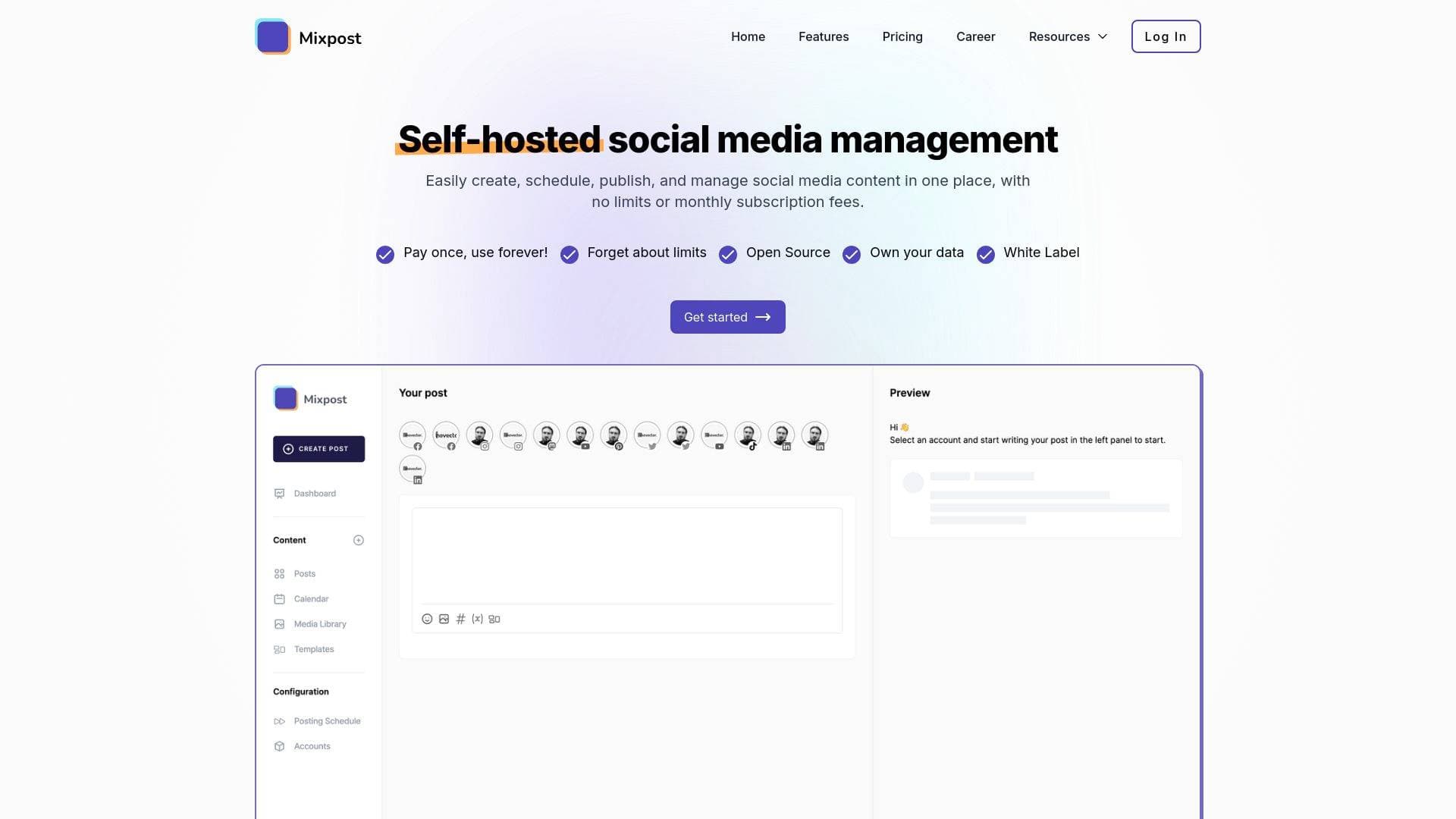
Brief Overview of Mixpost for Content Creators
Managing social media across a dozen platforms while paying monthly subscription fees that grow with every team member added is one of the most frustrating realities for content creators today. Mixpost tackles this problem head-on as an open-source, self-hosted social media management platform that puts creators in complete control of their content, data, and costs. Rather than routing posts and analytics through a third-party server, Mixpost runs entirely on your own infrastructure, meaning your audience data and publishing history stay private and permanently accessible. The platform supports 11 social networks including YouTube, TikTok, Instagram, X, LinkedIn, Pinterest, Threads, Bluesky, Facebook, Mastodon, and Google Business Profile, making it a genuinely comprehensive content scheduling tool for multi-platform creators. A free Lite edition covers the basics for solo creators, while the Pro package unlocks AI-assisted writing, advanced analytics, queue automation, and team collaboration for a one-time payment of $269. What makes this social media management solution stand out is its combination of no per-seat fees, no artificial account limits, and full source code access, giving technically inclined creators the ability to extend and customize the platform to fit their exact workflow.
Mixpost Key Features for Content Creators
-
AI-Powered Content Creation: Mixpost includes a built-in AI assistant that generates captions from descriptions or uploaded images, rewrites existing content into different tones (professional, casual, funny, or persuasive), and suggests hashtags, emojis, and call-to-actions optimized for each specific platform. This is a genuine time-saver for creators who publish across multiple networks daily and need platform-specific copy without writing everything from scratch.
-
Multi-Platform Publishing to 11 Networks: A single unified dashboard connects to Facebook, Instagram, Threads, X, LinkedIn, YouTube, TikTok, Pinterest, Mastodon, Bluesky, and Google Business Profile. Creators can connect unlimited accounts per platform, which is particularly valuable for those managing multiple channels or brand accounts without hitting artificial caps.
-
Visual Content Calendar with Queue Automation: Both monthly and weekly calendar views let creators see their entire posting schedule at a glance, with drag-and-drop rescheduling to fill gaps and maintain consistency. The queue automation feature lets creators set specific time slots and then simply add content, with Mixpost automatically publishing at the next available slot without any manual intervention.
-
Post Versions for Platform-Specific Optimization: Rather than publishing identical copy everywhere, creators can build platform-specific versions of each post, adjusting text length, hashtags, and media to match each network's requirements and best practices. This is especially useful for creators who need short punchy captions on TikTok but longer, keyword-rich descriptions on YouTube.
-
Video Content Support (Reels, Shorts, TikTok): Mixpost supports publishing to Facebook Reels, Instagram Reels, YouTube Shorts, and TikTok, including videos larger than 64MB on TikTok. Custom video thumbnails, alt text for images, and platform-specific options like YouTube's "Made for Kids" setting and TikTok's AI-generated content flag are all built in.
-
Hashtag Manager and Dynamic Variables: Creators can build and save hashtag groups organized by topic or campaign, then insert entire sets into posts with a single click. Dynamic variables like
{date}and{time}allow one template to generate infinite personalized variations, which is ideal for recurring content formats like weekly roundups or daily tips. -
Media Library: All images, videos, and GIFs live in a centralized media library where creators can upload, organize, browse, and reuse assets across posts. Recent updates added chunked uploads for large media files, support for HEIC/HEIF image formats, remote media downloads by URL, and image/video previews directly within the library.
-
Team Collaboration and Approval Workflow: Content creators working with editors, managers, or clients can set up multi-level approval chains where drafts move through review before publishing. The post activity timeline logs every action, including who created, scheduled, approved, and published each post, with timestamps and revision history for full transparency.
-
Threads and First Comments: Mixpost supports creating multi-post threads on X, Mastodon, and Bluesky with automatic threading. Creators can also add a first comment to any post to include links, hashtags, or additional context while keeping the main post clean, a popular strategy for boosting reach without cluttering captions.
-
RESTful API, Webhooks, and Integrations: A comprehensive API lets creators automate post creation, media uploads, and account management programmatically. Webhooks deliver real-time notifications when posts are scheduled or published, and the platform integrates with tools like n8n for no-code workflow automation, enabling creators to auto-publish blog posts, RSS feeds, or product updates directly to social channels.
Mixpost Target Users & Use Cases for Content Creators
Mixpost is built for creators who want real ownership over their social media workflow rather than renting access to someone else's platform month after month. It rewards those with a bit of technical confidence, since self-hosting requires choosing a deployment method, but Docker installation is described as a quick one-command process that works with any VPS provider.
-
Primary creator types: YouTubers managing both long-form videos and YouTube Shorts, TikTokers scheduling content in advance, Instagram creators publishing Reels and Stories, bloggers cross-posting to LinkedIn and Mastodon, podcasters promoting episodes across multiple networks, and newsletter writers maintaining a consistent social presence alongside their email content.
-
Experience level: Intermediate to advanced creators who are comfortable with self-hosting or willing to learn. The interface itself is designed to be intuitive, but the initial setup requires deploying to a server via Docker, Laravel package, or manual installation.
-
Team size: Scales from solo creators using the free Lite edition all the way to creator teams with editors, managers, and client reviewers. There are no per-seat fees, so adding collaborators costs nothing extra.
-
Specific use cases for content creators:
- A YouTube creator scheduling Shorts to TikTok, Instagram Reels, and Facebook Reels simultaneously from one post composer
- A podcaster using queue automation to maintain a consistent daily posting rhythm across X, LinkedIn, and Bluesky without manual scheduling
- A blogger using dynamic variables and post templates to auto-format weekly content roundups with the correct date and platform-specific hashtags
- A creator team using the approval workflow so editors draft content and the lead creator approves before anything goes live
- A multi-brand creator using separate workspaces to keep each channel's content, analytics, and team permissions completely isolated
- A technically inclined creator using the API and n8n integration to automatically push new blog posts or RSS feed items to all connected social accounts
- A privacy-conscious creator who wants follower analytics and engagement data stored on their own server rather than shared with third-party SaaS platforms
- A creator building a side business by using the Enterprise tier to offer social media management as a service to other creators or small brands
How to Get Started with Mixpost
- Choose your edition: Start with the free Lite edition for basic scheduling on Facebook Pages, X, and Mastodon, or purchase the Pro license ($269 one-time) for full platform support including TikTok, Instagram, YouTube, and AI features.
- Deploy to your server: Select a deployment method, Docker (recommended for a quick one-command setup), Laravel package, or manual installation via Composer, on any VPS provider of your choice.
- Activate your license: During installation, enter your license key when prompted and the software verifies and activates automatically. The free Lite edition is available directly on GitHub without a license key.
- Connect your social accounts: Link profiles across any of the 11 supported platforms. Unlimited accounts can be connected per platform on Pro and Enterprise tiers.
- Start scheduling: Use the visual calendar or queue automation to plan your content, build post versions for each platform, and let Mixpost handle publishing while you focus on creating.
Frequently Asked Questions About Mixpost
Is Mixpost really free? The Lite edition is completely free and open-source, available on GitHub with lifetime access to updates and community support. It covers basic scheduling on Facebook Pages, X, and Mastodon. The Pro edition is a one-time payment of $269 and unlocks all 11 platforms, AI features, advanced analytics, and team collaboration tools.
Are there limits on how many social accounts or posts I can manage? There are no artificial limits on social accounts, posts, or team members within Mixpost itself. Creators can connect unlimited accounts per platform. The only limits that may apply come from the social networks themselves, such as rate limits imposed by Facebook, LinkedIn, or TikTok, which can be increased by requesting higher limits directly from those platforms.
Do I need to renew my license to keep using Mixpost? No. Every purchase includes a perpetual fallback license, meaning creators can keep using the version they purchased forever even without renewing. The one-time payment includes one year of free updates. After that year, the software continues to work, but new updates require a license renewal.
What platforms does Mixpost support for video content? Mixpost supports video publishing to TikTok (including videos larger than 64MB), Instagram Reels and Stories, Facebook Reels and Stories, YouTube videos and Shorts, and Pinterest videos. Custom video thumbnails are supported, and platform-specific options like TikTok's AI-generated content flag and YouTube's "Made for Kids" setting are built into the post composer.
Is my data secure on a self-hosted Mixpost installation? Sensitive data including passwords and third-party service credentials are encrypted using Bcrypt hashing. The platform also supports two-factor authentication for user accounts. Because everything runs on the creator's own server, no third party has access to social media data or analytics.
Can I upgrade from the Pro to the Enterprise plan? Yes. Upgrading from Pro to Enterprise is available by paying only the price difference, but this option is only available within the first three months of purchase. After that period, the Enterprise license must be purchased separately.
Does Mixpost support non-English languages? Mixpost offers full interface translation in multiple languages including Arabic, German, Spanish (Spain and Mexico), French, Italian, Romanian, Czech, Russian, Catalan, Dutch, Basque, and Slovenian, with more being added based on community feedback. Each team member can independently set their preferred language.
Bottom Line: Should Content Creators Choose Mixpost?
Mixpost is a strong choice for content creators who are tired of paying recurring monthly fees that scale with team size or account volume. The one-time pricing model, combined with no per-seat charges and no account limits, makes it genuinely more cost-effective over time compared to subscription-based alternatives, especially for creators managing multiple channels or working with a small team.
The platform is best suited for creators who publish across several networks simultaneously, particularly those who need video support for TikTok, Instagram Reels, and YouTube Shorts in the same tool. The AI caption generator, queue automation, post versioning, and hashtag manager address real daily pain points in a content creation workflow without requiring separate tools for each task.
The main consideration is the self-hosting requirement. Creators who are not comfortable managing a server will face a steeper initial setup compared to fully managed cloud tools. However, Docker deployment is positioned as a quick process, and installation services are available through the support team for those who need assistance.
For privacy-conscious creators, technically inclined solo creators, and small creator teams looking to eliminate recurring SaaS costs, Mixpost delivers a compelling combination of features, flexibility, and long-term value. The free Lite edition also makes it easy to test the core experience before committing to a purchase.
Details
One link. Every channel, rate, and piece of work brands need to evaluate you. Built for how creators actually get hired.
Claim your profile
Live creator, content, and marketing roles from real companies, with the pay, market, and context the raw job page never gives you.
Browse jobs

 Post Bridge